Pricing Labs Episode 4-Creative Tools
How Creative Tools Design Their AI Pricing
The psychology behind making users comfortable with variable AI costs
The psychology behind making users comfortable with variable AI costs
You click 'generate image.' The AI works. You get your result. But somewhere in the background, a complex calculation just decided whether you hit a paywall, got a credit deduction, or sailed through 'free.' That seamless experience? It's carefully architected.
Generative AI in creative tools involves image, video, and text outputs that vary significantly in compute complexity and cost. These products don't serve a developer audience familiar with token meters and latency dashboards—they cater to designers, marketers, and creative teams who expect fast, predictable, and packaged pricing.
Why images and videos swing the unit‑economics pendulum: According to OpenAI's June 2025 pricing, output tokens for GPT‑4o text outputs cost $20 per million while GPT‑image‑1 costs $40 per million (2x the cost of text). While the cost difference may not seem dramatic at first glance, we're often talking about just one image per request. And in creative workflows, image generation is inherently iterative: users try variations, tweak prompts, and regenerate frequently. That cost stacks up fast.
Video is even more extreme. Generating or editing a few seconds of video using models like Sora or Runway can cost 10–50× more than a single image, depending on resolution and duration, making predictability nearly impossible without abstraction.

So, how do these platforms deliver that simplicity while still protecting their unit economics?
Most creative tools solve their pricing challenge with a seemingly simple move: credits.
But under the hood, credits do a lot of heavy lifting:
What's elegant is how credits allow for throttling without overwhelming users. One background removal = 1 credit. A full generative fill = 4 credits. The user sees simple trade-offs. The system enforces economic logic.
Add seat-based plans on top, and you've got layered pricing that adapts to different roles and intensity of usage, without turning pricing into a decision tree.
Beyond per-seat and credit packs, these tools lean heavily on tier differentiation that aligns with perceived value:
These serve as proxies for expected usage and willingness to pay, without exposing users to raw technical details. It also gives businesses clear upgrade levers.
Figma doesn't just charge per seat; it prices by access level. Designers get full capabilities, while developers and marketers pay less. This reflects role-based utility and willingness to pay and becomes a win-win for both parties.
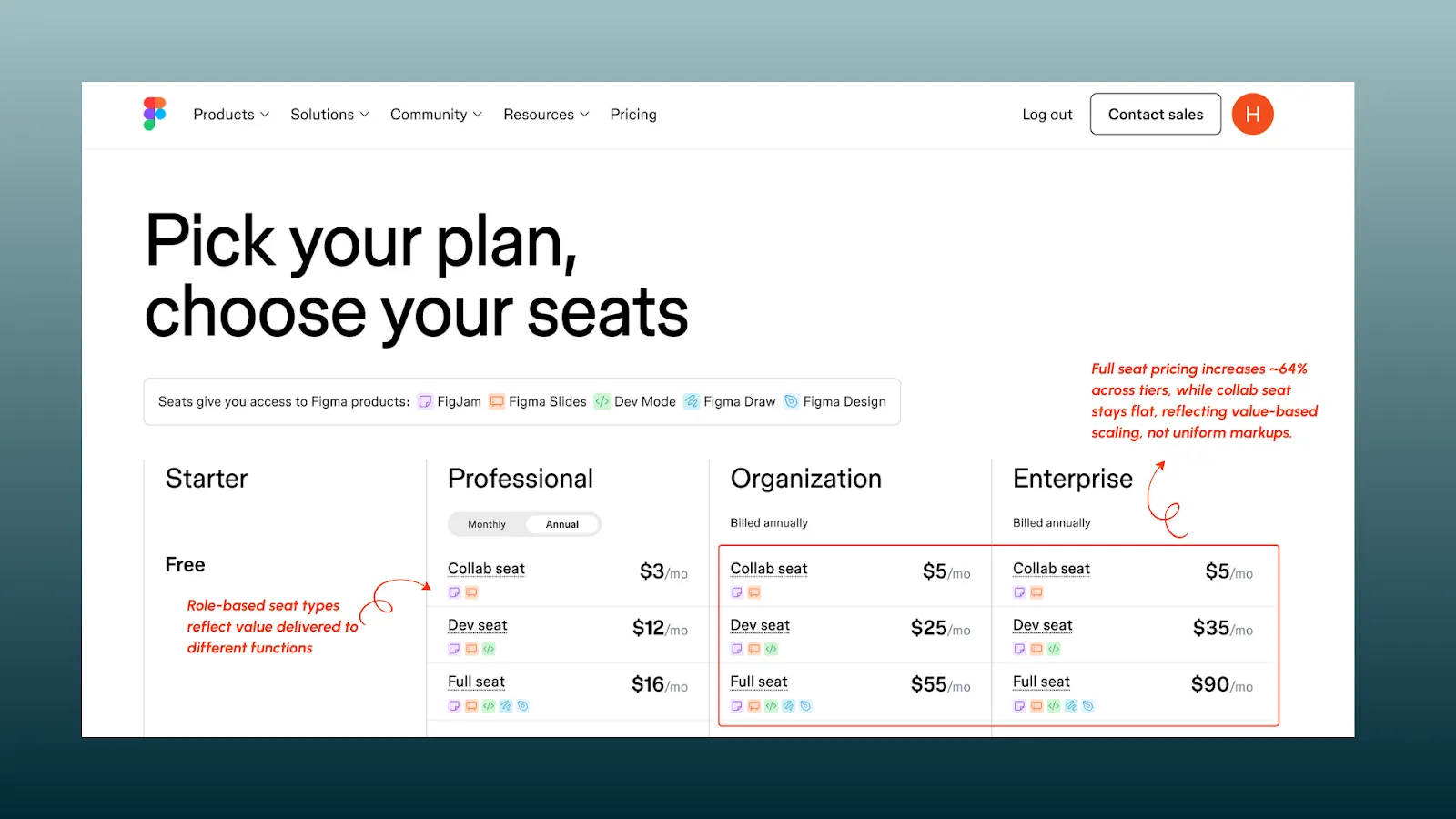
Even the price increases per seat across plans factor in the incremental value unlock for that role, signalling fairness.
Freepik folds AI tools into its broader creative suite subscription. Instead of metering every feature, it uses soft controls like daily download caps, watermark thresholds, and limited tool access.
This works well for their asset-hunting audience, where speed and quantity matter more than fine-tuned control. The AI feels "free," but usage is still contained.
Picwish stands out for its hybrid approach: it offers one-time lifetime credits for casual users, while subscription plans provide 4–5x more credits at a lower cost per unit, with rollover.
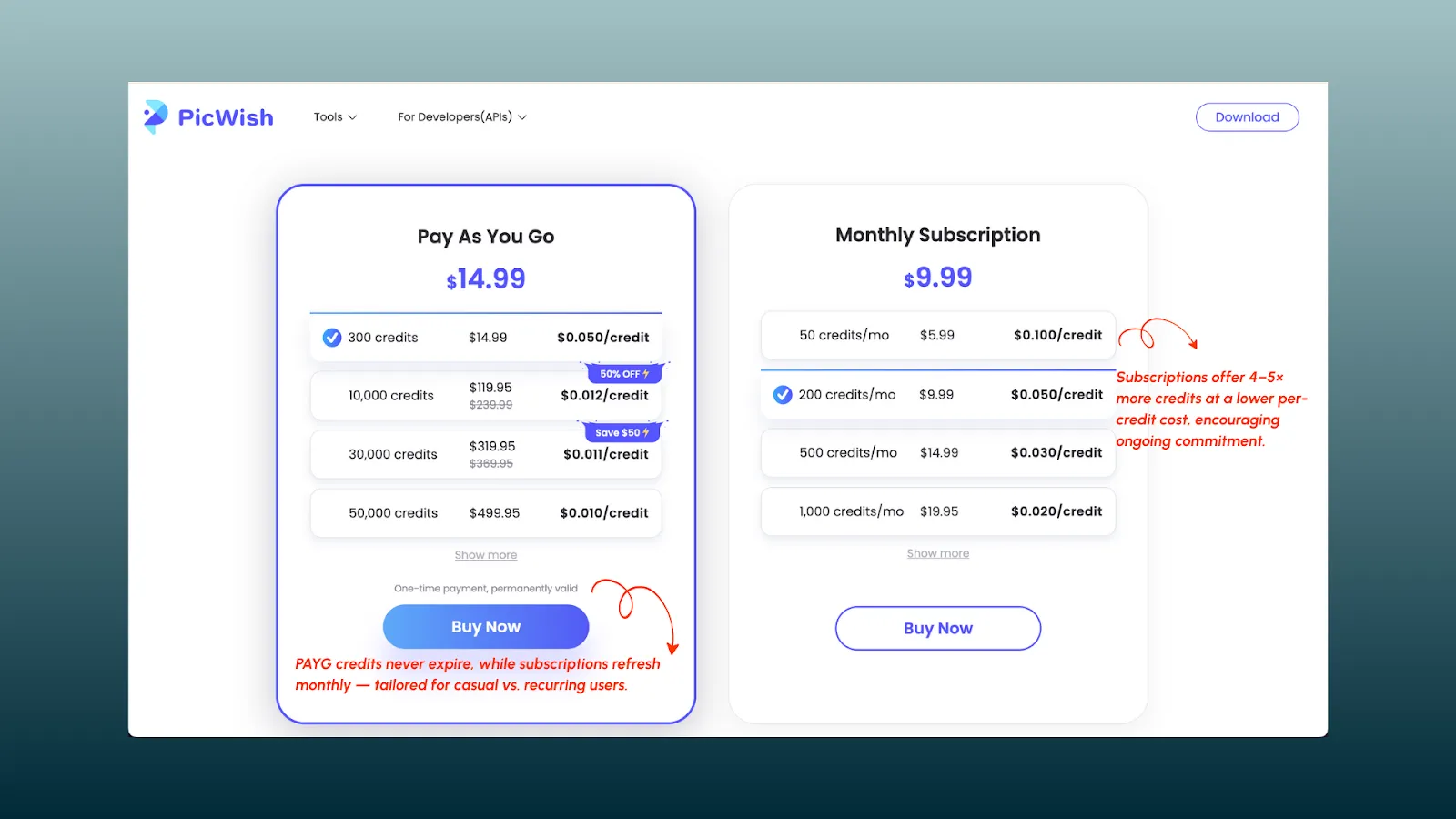
This not only broadens reach (hobbyists vs. pros) but also nudges users toward recurring plans with better long-term value. It is a subtle but effective use of credit mechanics for segmentation.
Photoroom powers image editing in Doordash, Amazon, and other platforms via a simple API. Pricing is linear and easy to pass downstream (e.g., $X/image), with clear tiers.
For API customers who need to reprice or embed costs, simplicity beats granularity.
If your product experience mirrors what tools like Figma, Canva, Gamma, or Photoroom built — self-serve adoption, hybrid AI features, team expansion, and enterprise appeal — your pricing model likely looks just as layered:
Designing the pricing model is only half the game. The other half? Making it work at scale. That's where your billing infrastructure plays a critical role.
Because the truth is: between your pricing strategy and your user's payment lies an entire stack of logic: one that handles seat changes, plan migrations, metering, credits, taxes, retries, quotes, invoices, CRM syncs, and more.
Get it wrong, and your best monetization ideas stay on a Figma board.
Get it right, and pricing becomes a growth lever, not a UX tax.
| What to Get Right | What You Need to Enable It |
|---|---|
| Pricing Flexibility |
|
| Transparency |
|
| Control |
|
| Personalization |
|
| Global Operations & Scalability |
|
| Data, CRM & GTM Integration |
|
The untold story of how Zapier's CEO deliberately walked away from proven revenue tactics to pursue the one metric that wasn't on any dashboard: customer trust.
Read Now