Handling Chargebacks and Late Payment Failures in Chargebee
Problem Statement
This article helps you understand handling chargebacks and late payment failures in chargebee.
Solution
This article explains why certain chargebacks, especially for Direct Debit payments processed through gateways like Mollie and Adyen, may not be automatically marked as chargebacks in Chargebee.
By default, the payment is reversed and the invoice is updated to Not Paid. The subscription remains active, and no chargeback notification or dunning workflow is triggered. You can change this handling by enabling Enable Dunning for Late Payment Failures in Payment Preferences.
We'll also clarify how to distinguish true chargebacks from late payment failures, and guide you on configuring Chargebee to better manage these events through dunning and notifications.
Understanding Late Payment Failures
Not all gateway-reported chargebacks are genuine chargebacks. Some are actually late payment failures, which occur when a previously successful Direct Debit payment later fails due to:
- Insufficient funds
- A closed or deactivated customer bank account
- Other unforeseen banking issues
This issue is primarily seen with Mollie SEPA and Adyen ACH/SEPA payment methods.
How Late Payment Failures Occur
When Chargebee requests a Direct Debit payment, the customer's bank may provide provisional approval within 5–7 days. However, the actual funds settlement happens later. If the transaction ultimately fails during this period, the initial "successful" status is reversed, and the payment is marked as failed.
How Gateways and Chargebee Handle These Failures
Different gateways handle late failures differently:
- Mollie SEPA and Adyen ACH/SEPA treat late failures as chargebacks, sending appropriate notifications to Chargebee.
- Chargebee reads the reason code in these notifications to determine whether it qualifies as a legitimate chargeback.
- Legitimate chargebacks are processed through Chargebee's chargeback system.
For Non-Legitimate Chargebacks or Late Payment Failures
When the failure does not qualify as a genuine chargeback, Chargebee's handling depends on Enable Dunning for Late Payment Failures in Payment Preferences.
When the setting is off (default):
- The original successful transaction is detached from the invoice.
- As a result, the invoice status is updated to Not Paid.
- A reversal transaction is automatically created to reflect the failed payment.
- A comment is added to both the invoice and associated transactions for traceability.
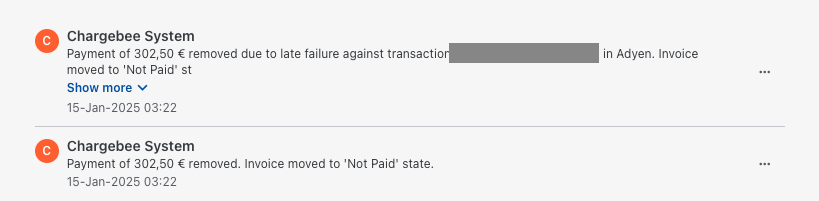
Example of System Comment:
Payment of $XX removed due to late failure against transaction parent_success_transaction_ID in gateway_name. Invoice moved to 'Not Paid' state.
When the setting is on:
- Chargebee marks the original successful payment as Late Failure. Chargebee does not create a separate reversal transaction.
- Related invoices move out of Paid as follows:
- Posted if the invoice due date is still in the future.
- Payment Due if the due date has already passed and dunning is configured with remaining retry period.
- Not Paid if dunning is not enabled, or the dunning period has already ended.
- If dunning can still run, Chargebee retries collection using your remaining dunning schedule.
Payment gateways supported for late payment failure
The following payment gateways support late payment failure handling in Chargebee:
- GoCardless
- Authorize.net
- Chargebee Payments
- Adyen
- Checkout.com
- Mollie
- Twikey
Payment methods supported for late payment failure
Late payment failure handling is supported for the following Direct Debit payment methods:
- ACH
- SEPA
Limitations
Late payment failure handling is not supported in the following cases:
- The payment gateway is not supported for late payment failure.
- The payment method is not supported for late payment failure.
- The payment transaction is already failed.
- The payment transaction is linked to a refund transaction.
Preventing and Managing Late Payment Failures
To stay proactive and ensure timely handling of these failures:
-
Enable Dunning for Direct Debit Payments:
To retry collection and send dunning emails for late payment failures, activate dunning for Direct Debit payments, then enable late-failure dunning in Payment Preferences:
a. Navigate to Settings > Configure Chargebee > Dunning for online/offline payments > Dunning for Direct Debit payments, and click Activate Dunning.
b. Customize your retry strategy as needed.
c. Enable Enable Dunning for Late Payment Failures from Payments > Payment Gateways > Manage Settings in Payment Preferences. You no longer need to contact Chargebee Support to turn this on.
-
Enable Notifications for Late Payment Failures:
Set up alerts to notify your team when a late failure occurs. Follow these steps:
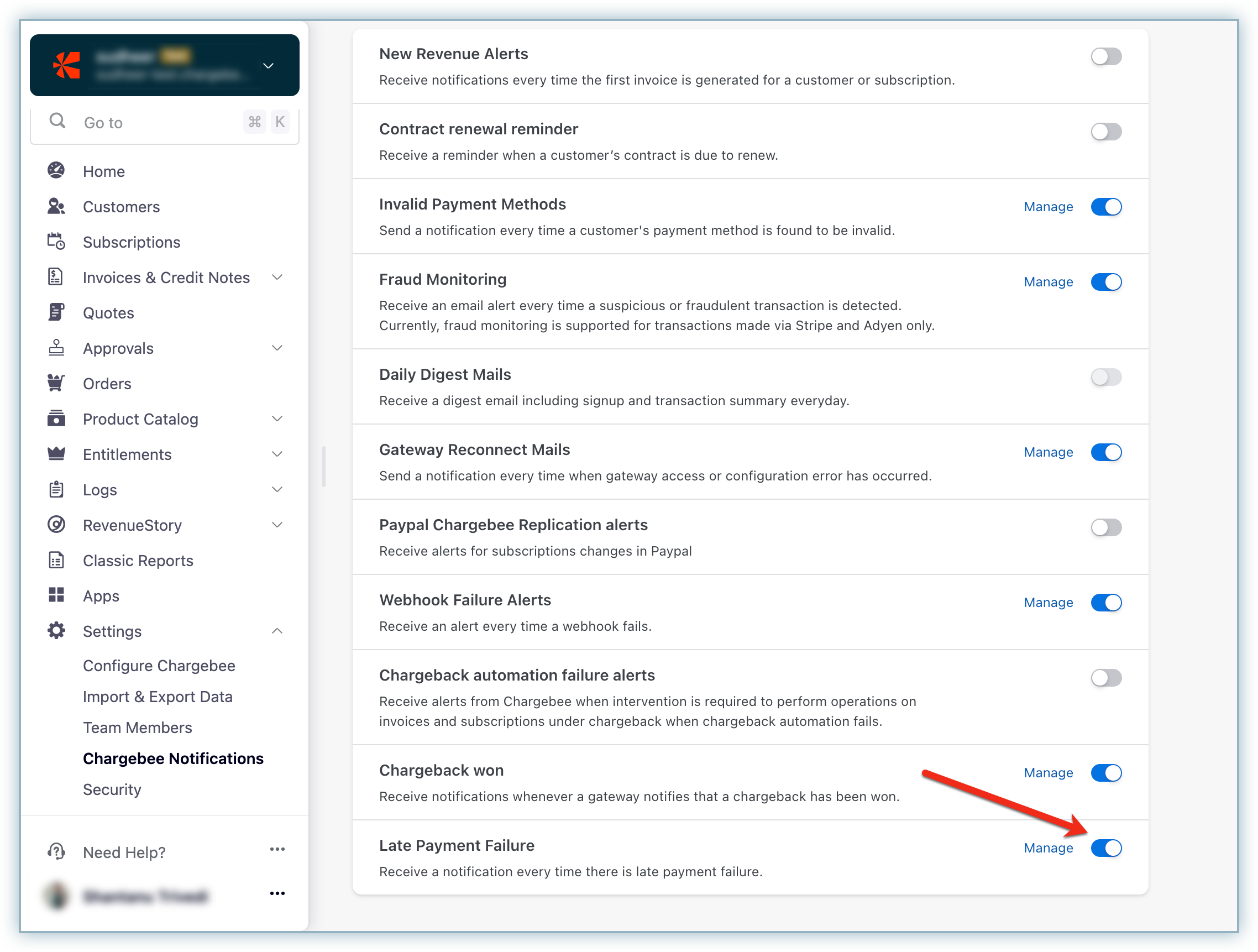
a. In the Chargebee Billing app, navigate to Settings > Chargebee Notifications. b. Enable Late Payment Failure and configure email or webhook notifications for internal teams.
Was this article helpful?