New in Chargebee: Explore Reveal and understand your payment performance end-to-end.Try Now
Docschargebee docs
HomeBillingPaymentsRevRecGrowthReveal
Support

Product Updates


  • Release Notes

Payment Methods


  • Payment Methods Overview
  • Cards
  • Direct Debit
  • Bank Based Payments
  • Wallets
  • Vouchers
  • Articles and FAQ

Payment Gateways and Configuration


  • Payment Gateways Overview
  • Chargebee Test Gateway
  • Stripe
  • PayPal Payment Services
  • Chargebee Pay
  • Adyen
  • Authorize.net
  • Bambora (formerly Beanstream)
  • Bank of America
  • BluePay
  • BlueSnap
  • Braintree
  • Checkout.com
  • CyberSource
  • dLocal
  • EBANX
  • Ecentric
  • Elavon
  • E-xact Direct Integration
  • eWay Rapid
  • Global Payments
  • GoCardless
  • J.P. Morgan Mobility Payment Solutions
  • Metrics Global
  • Mollie
  • Moneris
  • Network Merchants Incorporated (NMI)
  • Nuvei
  • Orbital (Chase Paymentech)
  • Pay.com
  • Paymill
  • Paystack
  • Pin Payments
  • QuickBooks Payments
  • Razorpay
  • Sage Pay
  • Solidgate
  • Tempus
  • Twikey
  • Windcave
  • Worldline Online Payments(formerly Ingenico)
  • Worldpay
  • Articles and FAQ

Level 2/3 Data Support


  • Level 2/3 Data Support

Advanced Routing


  • Advanced Routing

Dunning


  • Dunning
  • Articles and FAQ

Offline Checkout


  • Offline Checkout
  • Articles and FAQ

Transaction Sync & Invoice Mapping


  • Transaction Sync and Invoice Mapping

Fraud Management


  • Fraud Management

Error Handling


  • Errors with Root Cause and Troubleshooting

Payment Lifecycle Logs


  • Payment Intents
  • Transactions
  • Gateway Activity Logs
  • Gateway Webhook Logs
  • Articles and FAQ

Others


  • Reach (Merchant of Record)
  • Payment Verification
  • Bulk Deletion of Payment Methods
  • Custom Payment Methods
  • Payment Initiator Parameter
  • PSD2 and Strong Customer Authentication
  • RBI e-Mandate
  • RBI Tokenization Regulations
  • Chargeback Management
  • Transaction Descriptors
  • Payment Preferences
  • Visa Trial Rules
  • Mastercard Trial Rules
  • Co-badged Card Compliance
  • Articles and FAQ
  1. Payments
  2. Payment Gateways and Configuration
  3. Articles and FAQ
  4. Offline Payments
  1. Payments
  2. Payment Gateways and Configuration
  3. Articles and FAQ
  4. Offline Payments

How can I handle check/cash/wire transfer payments with Chargebee?

Problem Statement

You want to know how can I handle check/cash/wire transfer payments with chargebee.

Solution

This article also answers:

  • Can I use Chargebee if I don't collect credit card payments?
  • Chargebee doesn't support any gateways in my country. How can I manage my payments with Chargebee?
  • Manually marking invoices as PAID for offline payments is time-consuming. Can I automate this?

Payments collected outside Chargebee (cash/check/wire transfer,etc.) are termed as offline payments. These can be easily tracked with Chargebee.

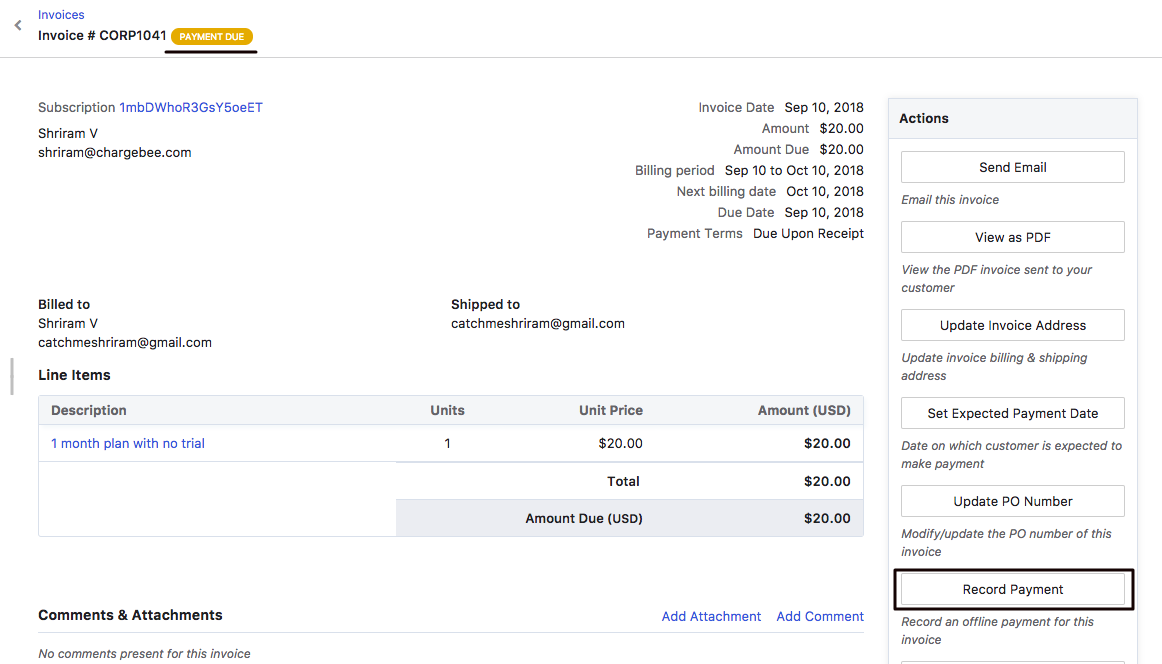
For customers paying offline Auto Collection has to be turned OFF. On every renewal, invoices will be auto-generated in Payment Due state. On receiving the payment, just hit the Record Payment option on the invoice details page and the invoice status will move to PAID. More on this here.
image

When you don't have a gateway supported by Chargebee, just let Chargebee take care of the invoicing and handle the payments on your end as discussed above.

Furthermore, you can consider using our APIs to automate the offline payment management workflow. Because manually marking the invoice as PAID can be cumbersome on a large scale. More information here**.

Related Articles

How do I enable offline payment methods?
Direct Debit Payments in the United States
Payment Failed but not updated in Chargebee
How Offline Payments work ( Xero, Netsuite, Quickbooks)
How do I delete the refund recorded offline?

Show more

Was this article helpful?