Integrate Chargebee Retention
The technical requirements for installing Chargebee Retention with Chargebee Billing, or any of our supported billing providers are fairly straightforward. The following guide can work with any e-commerce platform or front-end framework so long as you have access to updating the source code on the page where the user clicks cancel.
1. Add API Key
Add an API key from your subscription billing provider in the Chargebee Retention settings
Note
The API key allows Chargebee Retention access to look up your user and modify the subscription for cancels, discounts, plan changes, and billing extensions or pauses.
In the Chargebee application go to Settings > Configure Chargebee > API Keys and click Add API Key.
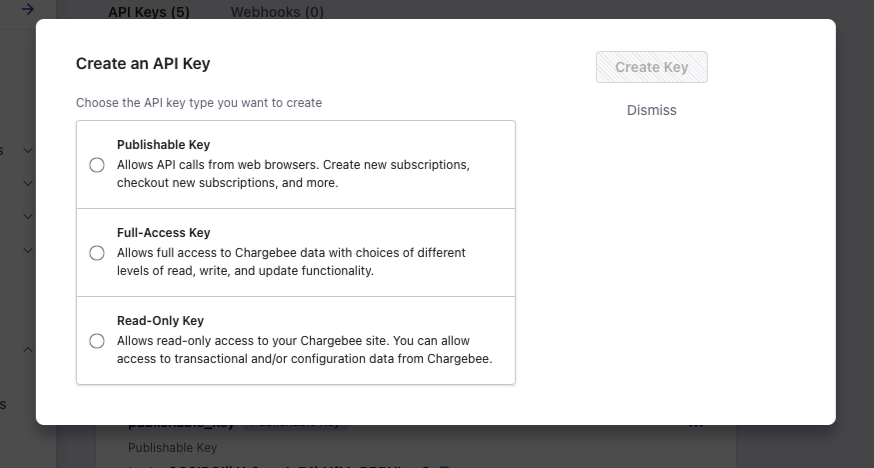
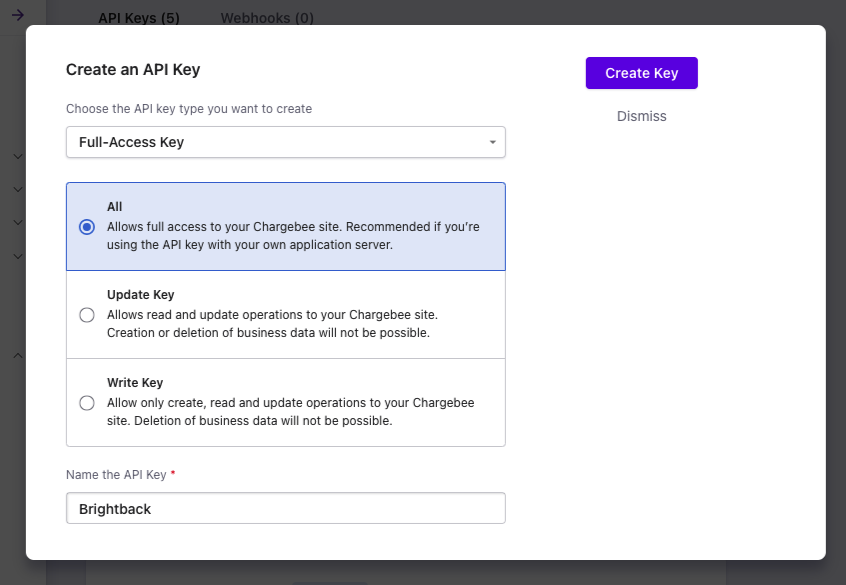
Use a full access key if you would like Chargebee Retention to make subscription updates. Then assign the key an access level and click Create Key.
Copy the new key and open the Chargebee Retention application. Head over to Settings > Integrations > Chargebee and add the key with your site name and API key.
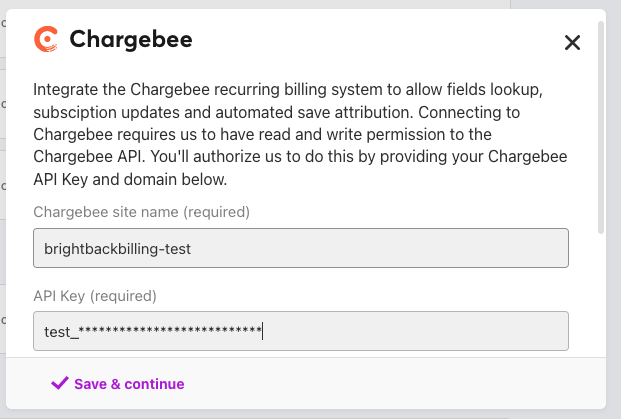
Chargebee is connected! Now you'll need to edit the page where your cancel button lives in your application.
2. Integrate Chargebee Retention via Chargebee.js
Follow this guide to integrate Chargebee Retention via Chargebee.js on your website or app.
Appendix
Integrate Retention.js (Deprecated)
⚠️ Deprecated
This section describes the earlier method of integrating Retention.js, which is now deprecated. Use Chargebee.js instead to integrate Chargebee Retention via Chargebee.js.
Apply the id="bb-cancel" selector to the button or link element that the user clicks to initiate a cancel session.
Note
This tells the Chargebee Retention snippet which button should direct the user to their personalized cancel experience. Our javascript will target this button and fall back to the URL in the href attribute if there are any issues in the hand-off to Chargebee Retention.
<button id="bb-cancel" href="">Cancel Subscription</button>
Step 3.
Drop our snippet in the <body> of the page somewhere below the button and populate the request payload with the user's subscription id like so:
Note
This step identifies your user in Chargebee Retention, syncs the subscription information in Chargebee and directs them to their personalized cancel experience should they choose to click cancel.
<script
  type="text/javascript"
  src="https://app.retention.chargebee.com/js/current/?compiled=true"></script>
<script type="text/javascript">
  if (window.Brightback) {
    window.Brightback.handleData({
      app_id: RETENTION_APP_ID
      subscription_id: SUBSCRIPTION_ID
    });
  }
</script>
The above implementation steps are all you need to get started and can be accomplished in less than one day or even a few minutes for each task. We also support many customization options and install variations such as installing in a single page app, pulling in custom data, white-labeling your pages with a vanity domain, and much more. Questions? Please reach out if you have any questions! retention-support@chargebee.com
Was this article helpful?