What is CORS?
Problem Statement
You need to understand the importance and role of CORS (Cross-Origin Resource Sharing) configuration in web interfaces.
Cross-Origin Resource Sharing (CORS) is a mechanism that uses additional HTTP headers to tell browsers to allow a web application running at one origin to access selected resources from a different origin.
Solution
Why does the browser block communication?
Browsers block cross-origin requests when the request comes from an origin different from that of the client. CORS headers tell the client that it can use the response it received.
Response headers
These are the headers the server sends back in its response:
- Access-Control-Allow-Origin — Specifies which origin is allowed to access the resource. You can allow only a specific origin (for example,
https://geekflare.com) or allow any origin (Access-Control-Allow-Origin: *). - Access-Control-Expose-Headers — Lists the headers the browser can access.
- Access-Control-Max-Age — Indicates how long the response of a preflight request can be cached.
- Access-Control-Allow-Credentials — Indicates that the browser can use the response when the initial request was made with credentials.
- Access-Control-Allow-Methods — Indicates which HTTP methods are allowed when accessing a resource.
- Access-Control-Allow-Headers — Indicates which HTTP headers can be used in a request.
Example response:
HTTP/1.1 204 No Content
Access-Control-Allow-Origin: *
Access-Control-Allow-Methods: GET,HEAD,PUT,PATCH,POST,DELETE
Vary: Access-Control-Request-Headers
Access-Control-Allow-Headers: Content-Type, Accept
Content-Length: 0
Date: Sat, 16 Nov 2019 11:41:08 GMT+1
Connection: keep-alive
Request headers
These are the headers the client's request should contain to use CORS:
- Origin — Indicates the origin of the client's request. When working with a frontend and backend, this is the host of your frontend application.
- Access-Control-Request-Method — Used in a preflight request to indicate the HTTP method that will be used.
- Access-Control-Request-Headers — Used in a preflight request to indicate the HTTP headers that will be used.
Example request:
curl -i -X OPTIONS localhost:3001/api \
  -H 'Access-Control-Request-Method: GET' \
  -H 'Access-Control-Request-Headers: Content-Type, Accept' \
  -H 'Origin: http://localhost:3000'
Preflight requests
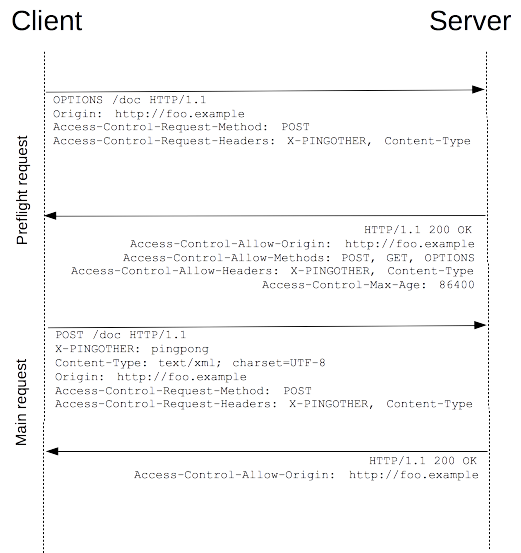
What is a preflight request?
Preflight requests occur when the client must send a request before the main request. The preflight request probes whether the server supports the main request. When the server confirms, the main request is sent. Requests that are not preflight requests are called simple requests.
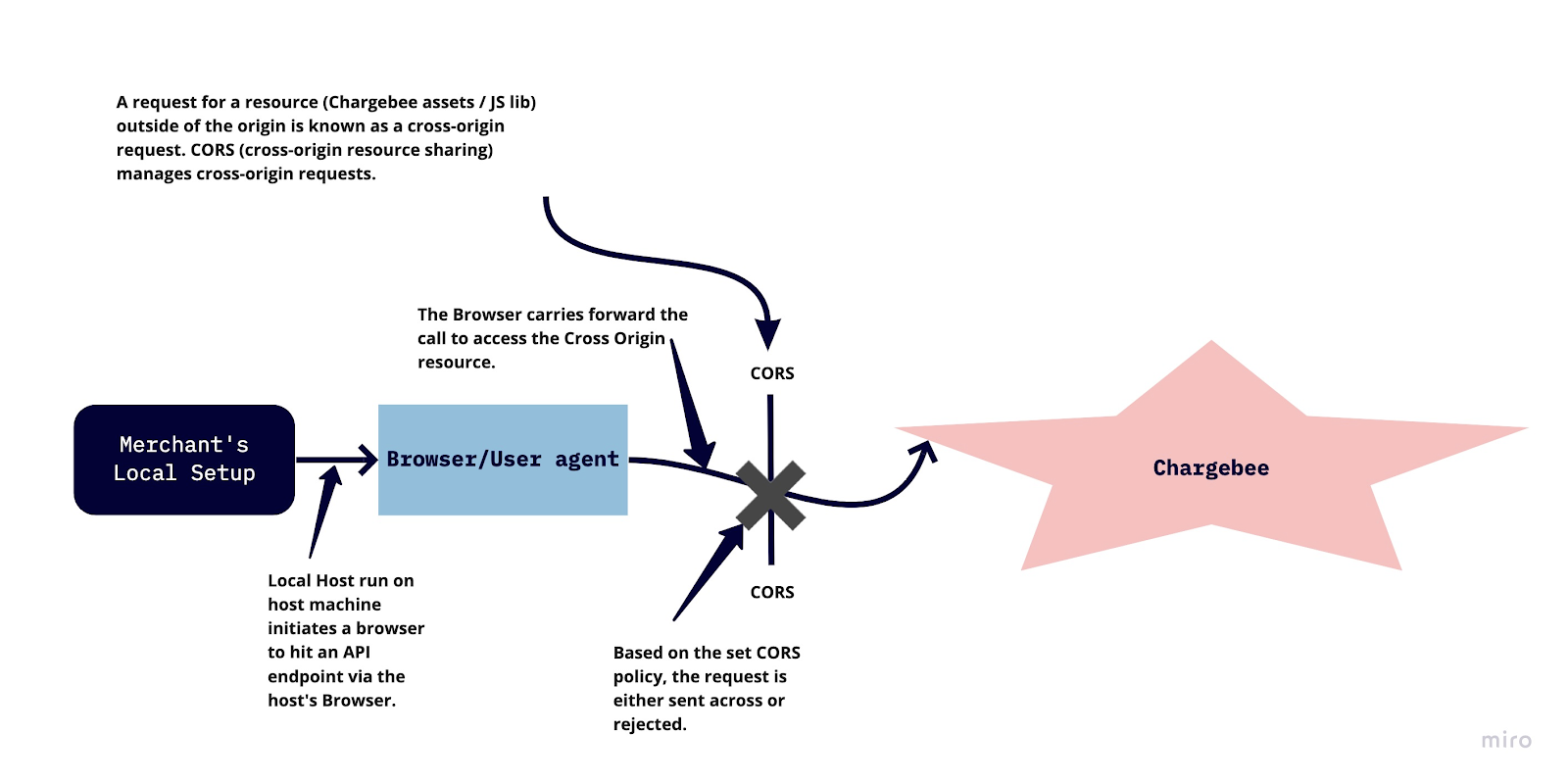
CORS relaxes the same-origin policy so your browser can access the resources you need. Understanding CORS, why it matters, and how to configure it helps you troubleshoot issues when building web applications.
Was this article helpful?