New in Chargebee: Explore Reveal and understand your payment performance end-to-end.Try Now
Docschargebee docs
HomeBillingPaymentsRevRecGrowthReveal
Support

Product Updates


  • Release Notes

Payment Methods


  • Payment Methods Overview
  • Cards
  • Direct Debit
  • Bank Based Payments
  • Wallets
  • Vouchers
  • Articles and FAQ

Payment Gateways and Configuration


  • Payment Gateways Overview
  • Chargebee Test Gateway
  • Stripe
  • PayPal Payment Services
  • Chargebee Pay
  • Adyen
  • Authorize.net
  • Bambora (formerly Beanstream)
  • Bank of America
  • BluePay
  • BlueSnap
  • Braintree
  • Checkout.com
  • CyberSource
  • dLocal
  • EBANX
  • Ecentric
  • Elavon
  • E-xact Direct Integration
  • eWay Rapid
  • Global Payments
  • GoCardless
  • J.P. Morgan Mobility Payment Solutions
  • Metrics Global
  • Mollie
  • Moneris
  • Network Merchants Incorporated (NMI)
  • Nuvei
  • Orbital (Chase Paymentech)
  • Pay.com
  • Paymill
  • Paystack
  • Pin Payments
  • QuickBooks Payments
  • Razorpay
  • Sage Pay
  • Solidgate
  • Tempus
  • Twikey
  • Windcave
  • Worldline Online Payments(formerly Ingenico)
  • Worldpay
  • Articles and FAQ

Level 2/3 Data Support


  • Level 2/3 Data Support

Advanced Routing


  • Advanced Routing

Dunning


  • Dunning
  • Articles and FAQ

Offline Checkout


  • Offline Checkout
  • Articles and FAQ

Transaction Sync & Invoice Mapping


  • Transaction Sync and Invoice Mapping

Fraud Management


  • Fraud Management

Error Handling


  • Errors with Root Cause and Troubleshooting

Payment Lifecycle Logs


  • Payment Intents
  • Transactions
  • Gateway Activity Logs
  • Gateway Webhook Logs
  • Articles and FAQ

Others


  • Reach (Merchant of Record)
  • Payment Verification
  • Bulk Deletion of Payment Methods
  • Custom Payment Methods
  • Payment Initiator Parameter
  • PSD2 and Strong Customer Authentication
  • RBI e-Mandate
  • RBI Tokenization Regulations
  • Chargeback Management
  • Transaction Descriptors
  • Payment Preferences
  • Visa Trial Rules
  • Mastercard Trial Rules
  • Co-badged Card Compliance
  • Articles and FAQ
  1. Payments
  2. Payment Gateways and Configuration
  3. Articles and FAQ
  4. Cards
  1. Payments
  2. Payment Gateways and Configuration
  3. Articles and FAQ
  4. Cards

Card Verification: Enabled Configuration

Problem Statement

This article helps you understand 'card verification: enabled configuration'.

Solution

Scope

What does Card Verification- Enabled setting under Payment Gateways do?

Summary

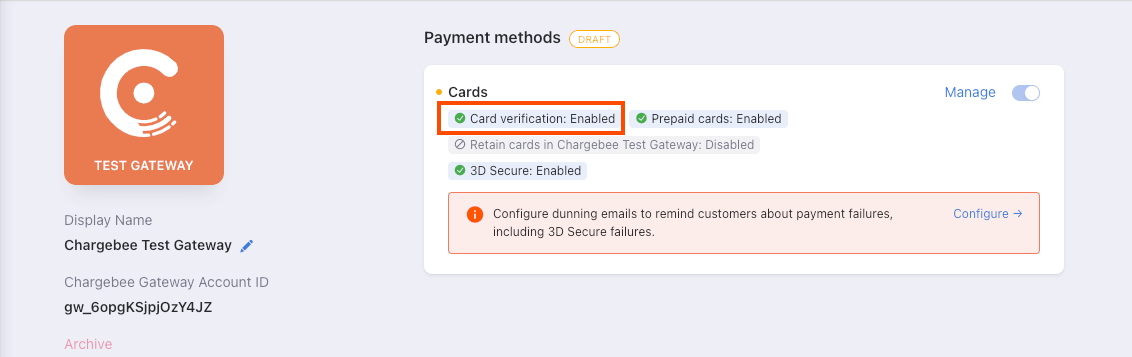
The function of the card verification: Enabled setting in Chargebee.
image

Solution

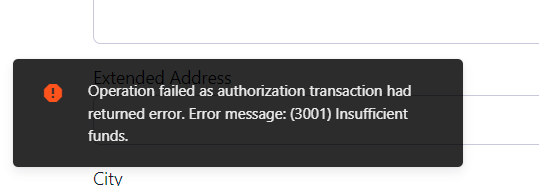
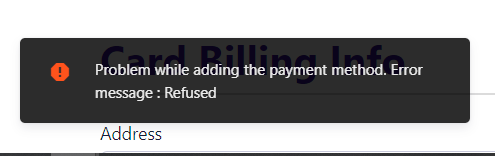
This setting authorizes payment methods when they are added to Chargebee. For example, a card with insufficient funds is added with this setting enabled, they would not be added and the system will throw the below errors-
image
image

However, if this is Disabled, the card will be added without any errors and the payments will fail later on.

Card verification is the process of validating a card to ensure that the card number provided is tied to a valid bank account, can be charged, and can be vaulted. This issue occurs while testing out a test card on a live checkout. The validation on the Live site happens via the payment gateway, hence the error will be an invalid card. However, in the case when your customer enters an actual card number with insufficient funds, it will show-up an actual error message as per the card validation and payment gateway.

Related Articles

Can I use multiple currencies with my Chargebee account?
Where is the credit card stored for recurring transactions? Is it safe?
Does Chargebee automatically update an expired card?
How can customers add or update their payment information in Chargebee?
My customers are not able to sign up using their American Express, Discover, JCB or Diners Club cards even though these card types are enabled in Chargebee. How can I fix this?
I want to edit specific card details for a customer such as the date of expiry. Is this possible?
How to charge a card before the next retry after a failed payment?
How can my customers set a primary/backup payment method using their self serve portal?
How to copy/move just the card details from one customer record to another?
'Fix for error- when Credit cards are being added in the "Add payment method" link/ MISSING_CARD_HOLDER_INFO: Either the first name or last name should be present.'
Billing address updated in chargebee is not reflecting on open invoices or in the gateway. Why?
Verify any 16 digit number in Chargebee fields (Luhn Algorithm)
How can I get information when a card is submitted as a payment method?
Payment methods - IBAN not being accepted

Show more

Was this article helpful?