Razorpay RBI e-Mandate Impacts
The Reserve Bank of India (RBI) announced guidelines to streamline the process and security measures for card payments. According to the guidelines, payments will require Additional Factor of Authentication (AFA), especially for "card-not-present" transactions above a fixed amount. These regulations impact the existing mandates set up for managing recurring payments. Learn more
How will this impact my Razorpay integration with Chargebee?
The following impacts may apply to your Razorpay integration:
- E-mandate creation is applicable only to cards issued in India and INR currency. Issuing banks and Razorpay do not support the creation of e-mandates for non-INR currency. As a workaround for non-INR transactions, you can use Pay Now to process payments manually as one-time payments by asking the customer to complete the AFA.
- Banks will trigger dynamic authentication to complete additional factor authentication (AFA) when setting up the mandate and for transactions that exceed INR 15,000. However, not all banks support dynamic authentication.
- Note: Please reach out to Razorpay for the list of supported banks.
- Note: If the amount exceeds INR 15,000, the e-mandate will require AFA during the pre-debit notification.
- For sub-recurring payments, pre-debit notifications must be sent 24 hours before every renewal payment. However, you may experience delays of up to 3 days for payment confirmation.
- All existing customers will need to set up their mandates again after October 1, 2021, to ensure recurring payments can be processed without AFA.
- Note: Failure to set up updated mandates with customers will require customers to complete AFA for recurring transactions after October 1, 2021.
Click here to access Razorpay's help document.
Note
By default, the maximum amount for a UPI mandate is set to Rs. 5,000 and for a Netbanking mandate to Rs. 1,000,000. You can also set a custom mandate limit for UPI and Netbanking (below the default maximum limit) for your account. Contact Chargebee Support to set the desired limit. Currently, this option is only available for UPI and Netbanking, and not for Cards.
What steps should I take to prepare for this change?
You must complete the following to prepare for this change:
-
Contact Chargebee support to enable the e-mandate workflow for your Razorpay and Chargebee account. The Chargebee team will contact Razorpay and get it enabled at both ends within a week and inform you. Make sure to plan your setup accordingly.
-
You must ensure that 3DS authentication is enabled in Chargebee for your configured Razorpay account.
-
Configure your Webhooks within Razorpay as all recurring payments are expected to take X+3 days to get a confirmation. This delay can be attributed to RBI guidelines for Issuing banks to send Pre-debit notifications to customers at least 24 hours before the payment can be made.
For example, if the payment is scheduled for the 1st of every month, the payment will be processed only on the 4th of every month.
Click here to read more about configuring webhooks.
Note: Ensure you select receive all events on your Razorpay webhook settings.
-
Ensure you have Dunning enabled for your Chargebee site and configure dunning email notifications with Pay Now feature to help your customers complete payments.
-
Configure your dunning period for an increased number of days to allow a longer grace period for your customers to set up or reauthenticate a mandate or provide alternate payment methods and avoid subscription cancellations.
-
Communicate the changes with your customers and ensure they are appraised of the need to come back online to set up a new mandate to continue their recurring payment without AFA post-October 1, 2021.
-
Customers must be encouraged to use the Self Serve Portal to proactively set up new e-mandates for their recurring payments.
-
You can utilize the Custom Email functionality to send notifications to your customers to update the AFA process for new e-mandates.
-
Additionally, you can utilize the Pay Now feature within the dunning emails will assist customers setup new e-mandates.
-
-
The following changes may apply based on the Razorpay integration with Chargebee:
-
If you are using Chargebee's Hosted Pages, required updates will be made at the backend to minimize any impact on you as a merchant.
-
If you are using a Custom Checkout with Chargebee.js, most updates are made at the backend to minimize any impact but there is a minor update you need to do to your integration. Please read the recommended steps here.
-
If you are using a Custom Checkout with Razorpay.js, this will require changes to the integration and you must contact Razorpay's support to determine new parameters and API endpoints. You can also connect with our support team if you require additional assistance.
As a transitory solution, we recommend that you switch to using Chargebee's Hosted Pages until you are able to make all necessary changes to your Custom Checkout with Razorpay.js integration.
-
Razorpay e-mandates Setup
The e-mandate will encompass a broader scope to avoid the need for customers to complete the Additional Factor Authentication(AFA) for any minor changes in amount and frequency. The maximum amount and frequency of the mandate are set up as INR 15,000 and Sporadic (as and when presented) respectively.
- All subscriptions or changes to subscriptions and one-time payments will have to go through the AFA process.
- The e-mandate setup process can be initiated by a customer upon checkout or via the Self-Serve portal.
- The e-mandate setup process cannot be completed by the merchants on behalf of the customers.
Payment Workflow with e-mandates
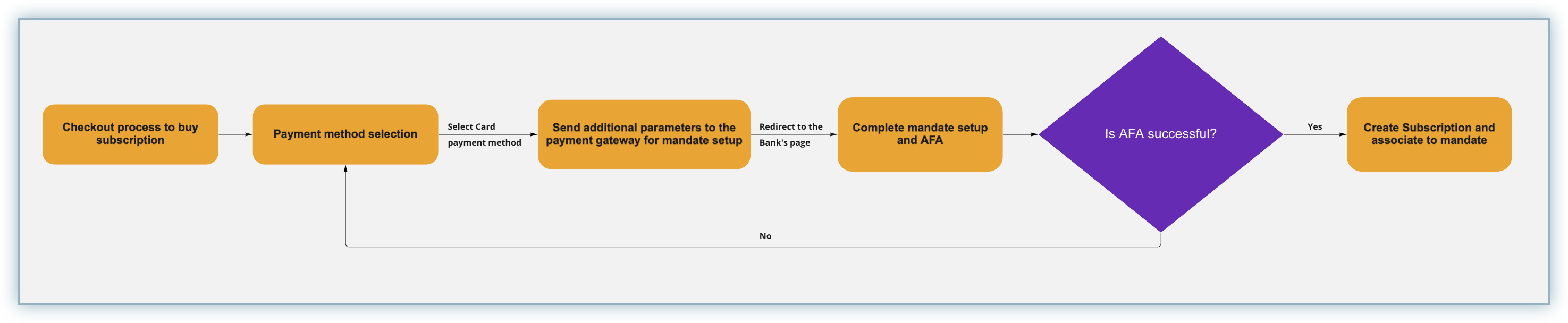
The following workflow applies to the setup of an e-mandate as part of the checkout flow.
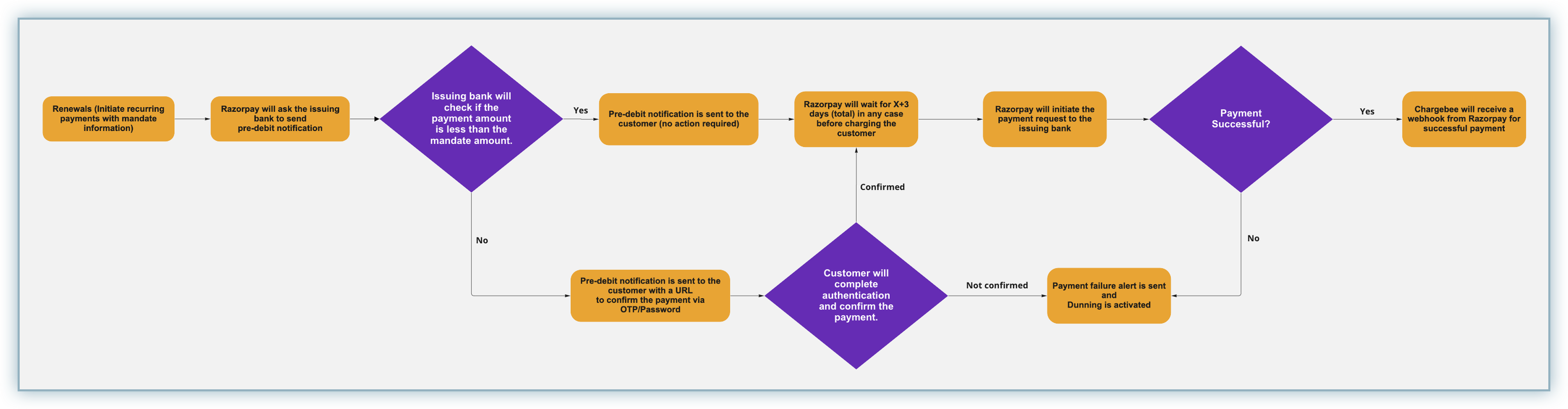
The following workflow applies to the recurring payments associated with an e-mandate.
Setup e-mandates
The e-mandate update process can be initiated by a customer using Chargebee's checkout and Pay Now link.
Checkout
The customer is directed to complete the normal checkout process. As part of this checkout, they would be notified about the need to set up e-mandates and their relevance to successful recurring payments. This checkout process will conclude with the customer being redirected to the AFA (3D Secure) process prescribed by their issuing bank.
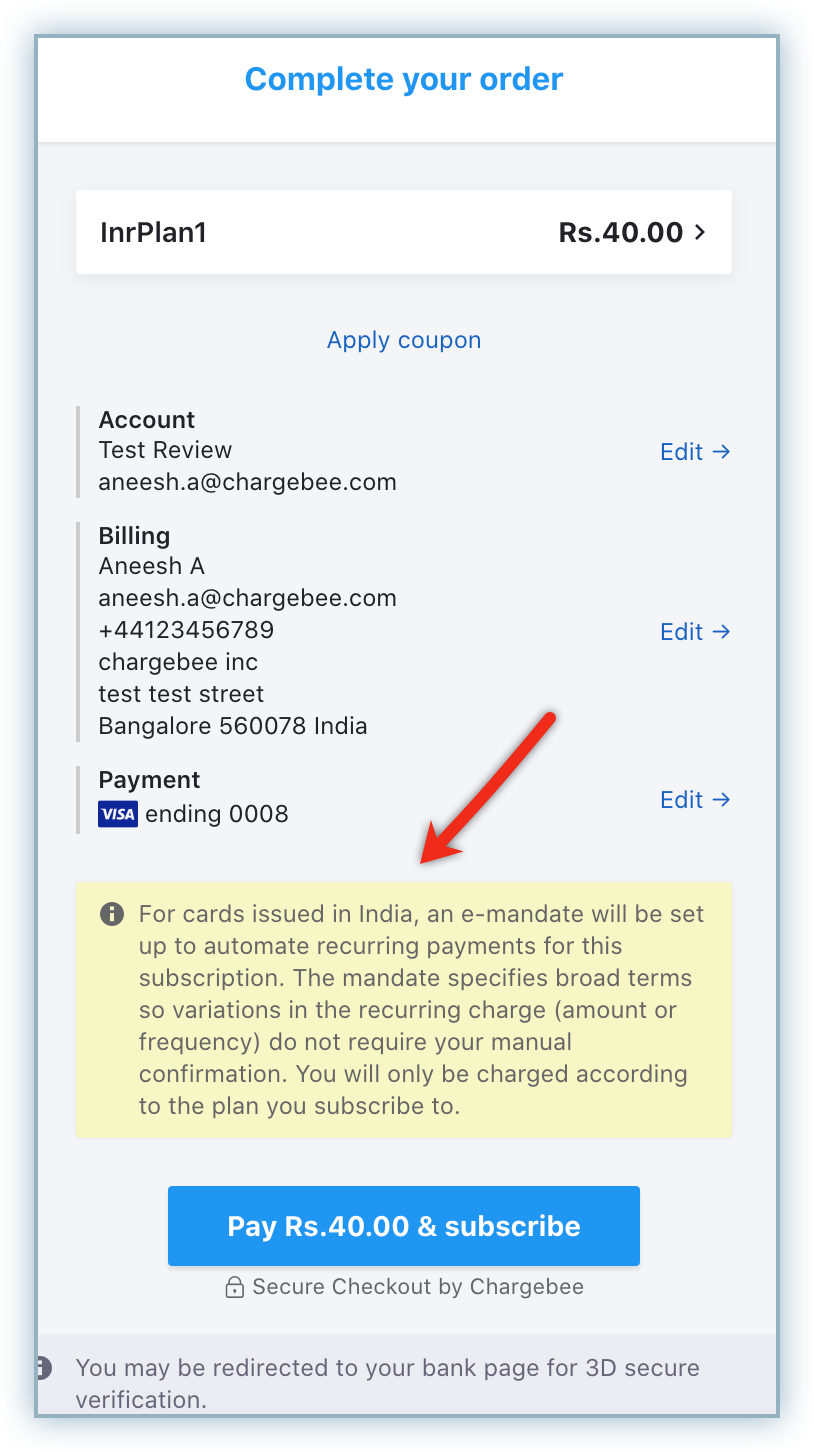
After successful completion of the authentication process, the e-mandate is set up and all subsequent recurring payments are scheduled subscription cycles based on the e-mandate.
Dunning Emails with Pay Now Link
When a recurring payment fails, customers will receive dunning emails based on your configuration notifying them of the payment failure and including the link for the Pay Now interface.
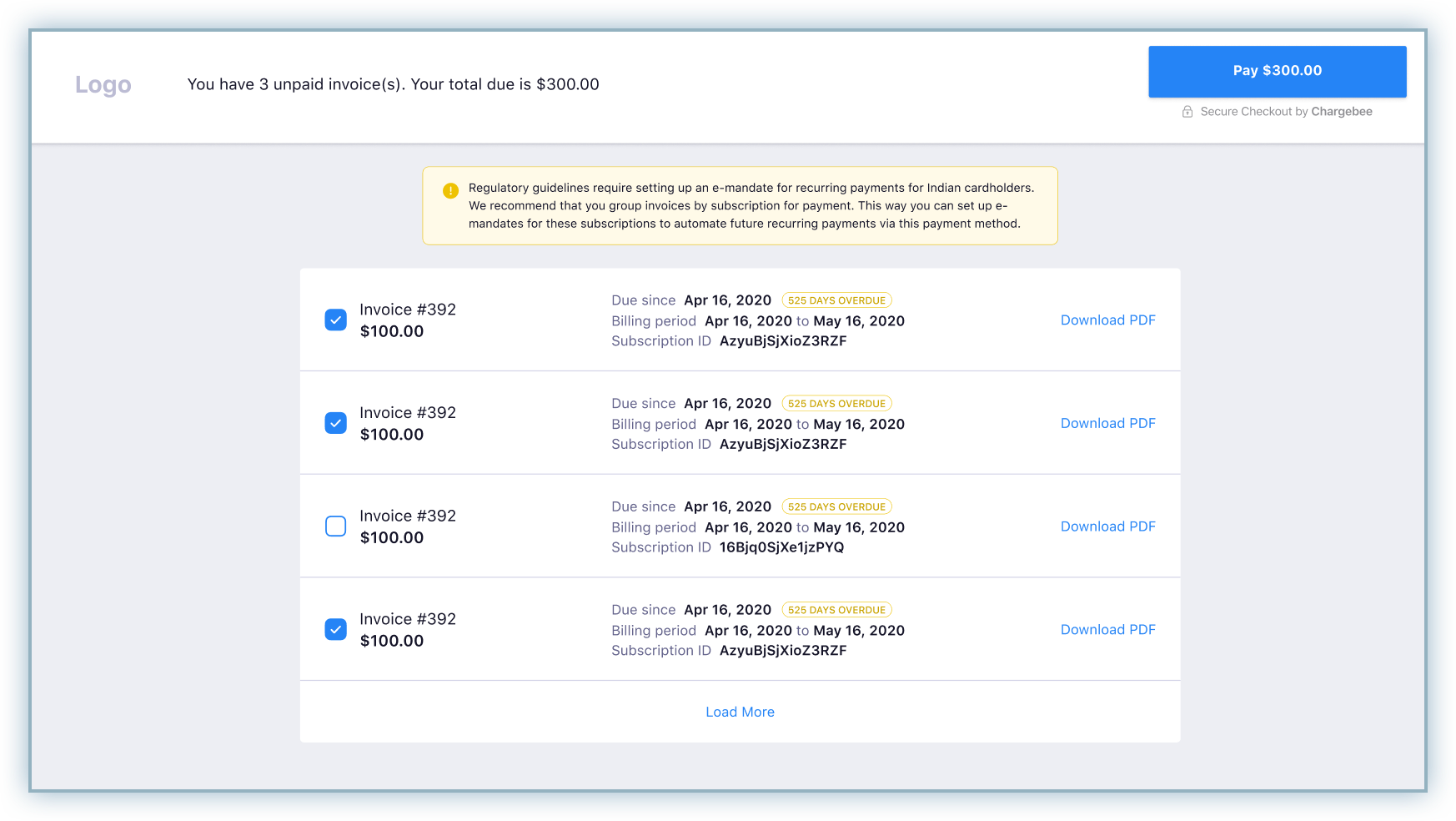
The Pay Now interface lists unpaid invoices. Customers must select the invoices with identical Subscription IDs to set up a mandate for that subscription and complete the payment for those unpaid invoices during the AFA process completion.
When a recurring payment fails, customers will receive dunning emails based on your configuration notifying them of the payment failure and including the link for the Pay Now interface.
The Pay Now interface lists unpaid invoices. Customers must select the invoices with identical Subscription IDs to set up a mandate for that subscription and complete the payment for those unpaid invoices during the AFA process completion.
Was this article helpful?