Availability
Chargebee Pay is currently in early access and available only for Chargebee Billing customers during the EAP period.
Account Updater
Overview
Account Updater automatically updates saved card-on-file details when a customer’s card information changes. With Chargebee Pay, these updates occur in real time during payment attempts and are immediately reflected on the Chargebee platform.
What is account updater?
Account Updater is a card network service that provides updated credentials, such as a new expiry date or a reissued card token, when a card payment is attempted. Chargebee Pay applies these updates automatically to the saved card.
Scope of account updater
This feature helps keep payment details up to date when cards are reissued or replaced.
- Only card payments are supported; ACH, SEPA, and BACS are out of scope.
- Real-time updates are available for Visa, Mastercard, and Cartes Bancaires cards.
- Updates are applied when a transaction is attempted if the card scheme or issuer provides new details.
- Availability varies by issuer and brand, and updates are not guaranteed in all cases.
Card information updated during checks
Chargebee Pay checks for updates to the following fields in the saved card record:
- Last 4 digits / BIN (if the PAN was reissued)
- Expiry month and year
- Card brand metadata (when provided)
- If the issuer reports the account as closed, the saved card is disabled to prevent future use.
Full card numbers (PAN) are never stored or displayed. Only masked data is visible.
Account Updater lifecycle
| Step | Description | When it happens |
|---|---|---|
| Charge attempted | You charge a saved card (e.g., subscription renewal). | Immediately |
| Real-time check | If the charge fails, updates are requested from the card network or issuer. | Real time |
| Payment continues | The current payment proceeds using refreshed details from the card network or issuer. | Same attempt |
| Update applied | Chargebee Pay updates the saved card (last4/bin/expiry) or disables it if the account is closed. | Instant (if applicable) |
| Data available in dashboard & reports | Updated masked details are visible in the UI. | Right away |
Enablement and update statuses
Account Updater is enabled by default for Chargebee Pay.
Processor status handling
The table below outlines the different account update statuses provided by our processor and how the Chargebee Pay system handles them internally.
| Processor Status | How does Chargebee Pay react | Impact |
|---|---|---|
| CardChanged | Masked last-4 digits and BIN may change — new details are updated in place of the old ones. | No impact to the current transaction. |
| CardExpiryChanged | Only the expiry date has been updated. | No impact to the current transaction. |
| CloseAccount | The card has been closed by the issuer. | The card cannot be used after this. The current transaction would fail. |
| ContactCardAccountHolder (Visa only) | Updated details not available from the issuer. | The current transaction would fail. You need to ask the cardholder to update new card details. |
| Unknown (Mastercard only) | Issuer returned an unknown status — likely Mastercard could not find the card temporarily. | The current transaction proceeds as it is. The card information is unaltered. |
Viewing updates in the Portal
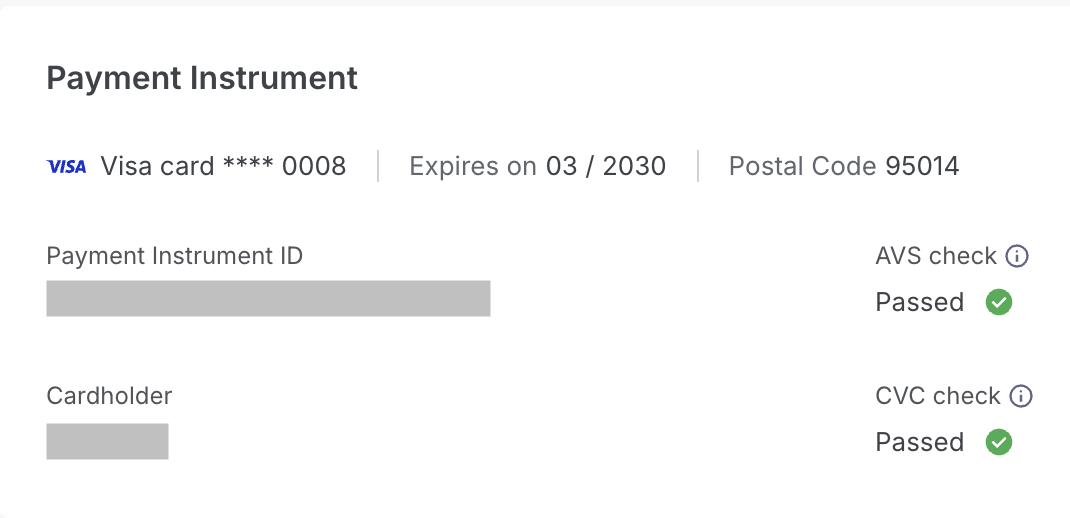
After an account update, you can verify the refreshed card details in the Chargebee UI.
- Navigate to Transactions > Details > Payment Instrument
- You can see the Brand, card (last4), and Expiry MM / YYYY after the account update
FAQs
- Will renewals automatically use the new card? Yes, when the network returns CardChanged or CardExpiryChanged during the attempt.
- Can I download a list of updated cards? As of now, there is no provision to download the updated cards.
- Is there a nightly or batch updater? No. Chargebee Pay uses real‑time updates during eligible payments.
Was this article helpful?