Chargebee Pay is available to pre-qualified Chargebee Billing customers.
Frequently Asked Questions – Chargebee Pay
Here you can find answers to some of the most common questions about Chargebee Pay.
You can reach out to Chargebee support if you are unable to find the information you are looking for.
Onboarding
1. What are the registered countries supported by Chargebee Pay?
Chargebee Pay is available for businesses registered in the United States (including all 50 states and Washington, D.C.), the United Kingdom, Austria, Belgium, Finland, France, Germany, Italy, Ireland, the Netherlands, and Spain.
| Country | Tax ID | Company Registration Number | VAT Number |
|---|---|---|---|
| United States of America (USA) | Employer Identification Number (EIN) | ||
| United Kingdom | Tax number (UTR) | Company Registration Number | VAT number |
| Austria | Tax ID (Steuernummer) | Firmenbuchnummer | Umsatzsteuer-Identifikationsnummer |
| Belgium | Tax number (Business number) | Registration number (enterprise number) | VAT number (Numéro de TVA / BTW identificatienummer) |
| Finland | Tax ID (Henkilötunnus) | Registration number (Y-tunnus) | VAT number (Arvonlisäveronumero / Mervärdesskattenummer) |
| France | Numéro SPI | Registration number (SIRET) | VAT number (Numéro de TVA intracommunautaire) |
| Germany |
| Handelsregisternummer | Umsatzsteuer-Identifikationsnummer (USt-IdNr.) |
| Italy | Partita IVA | VAT number (Partita IVA) (Note: In Italy, the Partita IVA often serves as both the company registration identifier and the VAT number.) | |
| Ireland | Registration number / company number | VAT number | |
| Netherlands | Tax number (RSIN) |
| BTW number |
| Spain | NIF - Número de Identificación Fiscal | Número de Identificación a efectos de IVA (Impuesto sobre el Valor Añadido) |
2. What are the country-wise business/company identification numbers required for onboarding to Chargebee Pay?
To successfully onboard your business to Chargebee Pay, you must provide specific company identification numbers. These requirements may vary by country. Refer to the table above for the required details for each supported country. Ensure you have these details readily available to facilitate a smooth onboarding process.
3. Who is a Control Person?
A control person is someone who: (1) owns or controls 10% or more of the voting stock of a corporation; (2) holds a position as an officer or director of a corporation; or (3) is in a position to influence the decision-making process of a corporation.
4. Who are Beneficial Owners?
A beneficial owner is an individual or entity that owns equity of 25% or more in a business. As part of the onboarding process, you must list all beneficial owners who own more than 25% of the equity in the business.
5. What is a Merchant Category Code (MCC)?
Payment brands use merchant category codes to classify merchants and businesses by the type of goods or services provided in order to track and restrict transactions. These are four-digit numbers used by credit card issuers that describe a merchant's primary business activities. If you are unsure of your MCC, we recommend finding your business's MCC from Visa or Mastercard.
6. How long does it take for my application to be reviewed?
The review timeline may vary for each application, but we typically provide an outcome within 24 to 48 hours. We recommend regularly checking your Chargebee site for the status of your application.
7. How will I be notified of changes to the status of my application?
We send email notifications to update you on any changes to your application's status. Additionally, you can check the Chargebee site homepage, where a banner displays the most recent status of your application.
8. Does Chargebee or its partners contact by phone or email seeking additional information?
No, Chargebee or its partners will not contact you to request documentation or additional information by phone or email. Please share any such communication with Chargebee support to verify its authenticity before engaging.
9. What verification process is followed to review my application?
Complete Know-Your-Customer (KYC), Anti-Money Laundering (AML), and MATCH™ checks are mandatory as part of the onboarding process. Additionally, your application is subject to sanction screenings mandated by the Office of Foreign Assets Control (OFAC) or other regulatory bodies.
10. Why was my application rejected?
Our partner thoroughly reviews each application to ensure it aligns with the guidelines and requirements set by processors, sponsor banks, card networks, issuing banks, and other regulatory authorities. In the event of a rejection, we will share any relevant information provided by our partner.
11. Can I configure my Smart Routing to include multiple payment processors?
Smart Routing determines which payment gateway to use when processing a payment in a particular currency. You can configure Smart Routing to route transactions in different currencies to different gateways.
12. Once approved, how can I track the status of the transactions?
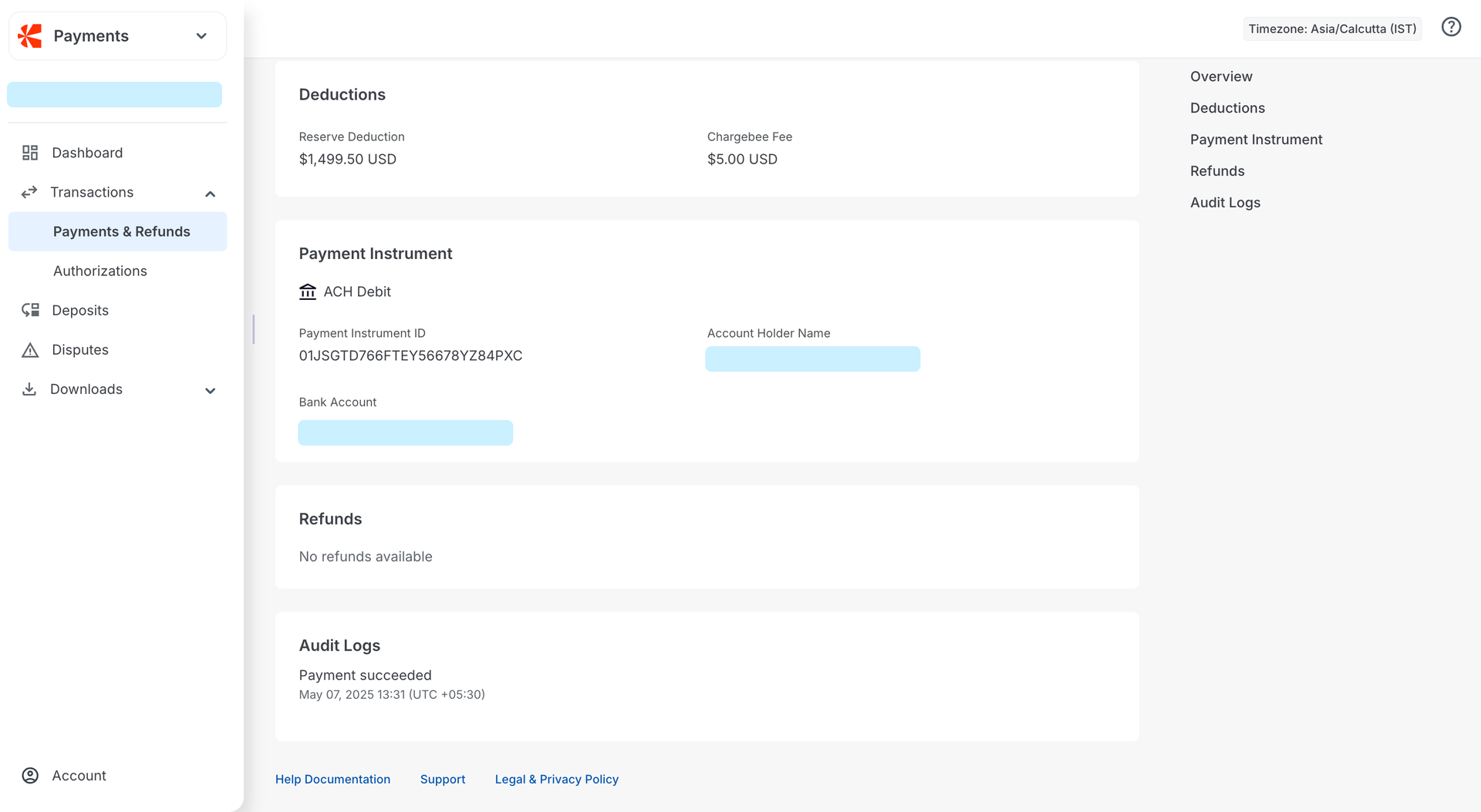
After your Chargebee Pay application is approved and Smart Routing is configured to route payments through Chargebee Pay, you can monitor all transactions via the Transaction List. Log in to Chargebee Billing > Chargebee Pay portal > Transactions > Payments & Refunds. Click the transaction for which you want to track the status, then drill down to Audit Logs.
Payments and Currency
1. Can I choose to transact in multiple currencies using Chargebee Pay?
Yes. Chargebee Pay now supports payments in 102 currencies, including the US Dollar (USD).
2. Which payment methods are currently supported by Chargebee Pay?
Chargebee Pay supports payments via debit cards, credit cards, prepaid cards, and direct debit. For direct debit, we support ACH, SEPA, and BACS. Cards are enabled by default once a merchant is onboarded. To enable direct debit, contact your account manager or reach out to Chargebee support. Alternative payment methods like Apple Pay, Google Pay, and iDEAL will be added soon.
3. Is there a per-transaction amount limit for direct debit payment methods?
Yes. Chargebee Pay applies the following amount limits per transaction for direct debit methods:
- ACH: USD 150,000
- SEPA: EUR 30,000
- BACS: GBP 5,000
4. How can I view a list of all the payments processed over a period of time via Chargebee Pay?
Log in to the Chargebee Billing site and navigate to Chargebee Billing > Chargebee Pay portal > Transactions > Payments & Refunds. You will see the list of transactions processed via Chargebee Pay for the current month. You can use the date range filter to view processed transactions for any time period.
5. What steps should I take if a payment fails but the amount is still deducted from the customer's account?
Log in to Chargebee Billing > Chargebee Pay portal > Transactions > Payments & Refunds. Click the transaction for which you want to track the status. Drill down to Audit Logs to view the latest status of your transaction. You can also reach out to support if you need additional assistance.
6. Are my details safe with the payment processor?
Our payments partner, Adyen, is certified as a Level 1 Payment Card Industry Data Security Standards (PCI DSS) compliant service provider. This is the most stringent level of security certification available in the payments ecosystem.
Token Migration
How long does it take to migrate tokens from other gateways to Chargebee Pay? The token migration process usually takes 2–3 weeks, depending on the support provided by your current payment processor.
Disputes
1. How do I view and defend a dispute associated with a payment?
You can view all customer-initiated chargebacks using the Disputes module in the Chargebee Pay portal. Use this portal to upload the necessary documents as evidence to challenge a dispute, if applicable.
2. Can direct debit chargebacks be challenged?
No, direct debit chargebacks cannot be challenged by merchants.
3. What is the process for submitting evidence when defending a dispute?
Chargebee Pay accepts only one document as evidence for defending a dispute. Ensure all supporting evidence is merged into a single file before uploading it in the Chargebee Pay portal.
Direct Debit Transactions
1. How can I enable direct debit processing for my account?
To enable direct debit processing, you will need to specifically request this feature. Please reach out to Chargebee support to initiate the enablement process.
2. What is the difference between a late payment failure and a chargeback for a direct debit transaction?
A late payment failure occurs when the underlying systems cannot successfully process a direct debit transaction, often due to issues like insufficient funds or an invalid account (e.g., BACS, SEPA, ACH). This happens when the underlying system is unable to debit funds from a specified account. A chargeback is typically initiated by the customer (the shopper) disputing a debit. This can happen for various reasons, such as the customer believing the debit was unauthorized, the amount or date was incorrect, or the mandate was canceled.
3. How can I track late payment failures and chargebacks for direct debit transactions?
To track late payment failures:
- Log in to Chargebee Billing > Chargebee Pay portal > Transactions > Payments & Refunds.
- Set the Type filter to Payment Return.
- This displays a list of transactions that have resulted in a late payment failure for the selected time period.
To track customer-initiated chargebacks:
- Log in to the Chargebee Pay portal, go to Disputes, and select the All tab.
- This displays a list of all customer-initiated chargebacks for the selected time period.
4. What are the fees associated with late payment failures and chargebacks for direct debits?
A fee of USD 7.50 (or equivalent in other currencies) is charged per transaction for late payment failures, and a fee of USD 15 is charged per transaction for customer-initiated chargebacks.
5. What are some reason codes that indicate a late payment failure for direct debits?
A late payment failure happens when a direct debit can’t be completed for operational or account-related reasons and not because the customer disputed the payment. These failures are usually reported a few days after the payment attempt.
Here are some common examples across different direct debit schemes:
- ACH (US): Insufficient Funds (R01), Account Closed (R02), No Account / Unable to Locate Account (R03), Invalid Account Number Structure (R04), Beneficiary or Account Holder Deceased (R15), Account Frozen (R16)
- BACS (UK): Insufficient Funds (0), Beneficiary or Account Holder Deceased (2), Account Transferred (3), No Account (5), No Instruction (6), Incorrect Account Details (L), Bank Will Not Accept Direct Debits on Account (G), Instruction Has Expired (H)
- SEPA (EU): Insufficient Funds (RC01), Account Closed (AC04), Invalid Account Number (AC01), Mandate Information Incorrect (MD02), Blocked Account (AC06)
These codes indicate that the payment couldn’t be processed due to issues like incorrect account details, insufficient funds, or expired mandates and not because the payer raised a dispute.
6. What happens if my merchant account has a negative balance due to chargebacks?
Chargebacks can lead to a negative balance in your account. To adjust this negative balance, funds must be available in your chargeback reserve.
7. Why is a chargeback reserve needed for direct debit transactions?
Funds from direct debit transactions are typically settled into your account within T+2 days (transaction day plus two days). However, direct debit networks do not provide real-time authorization, and there can be a delay of 5–7 days for the underlying systems to fully process these transactions and confirm success or failure. If a direct debit ultimately fails (due to cancellation, dispute, or insufficient funds), it is booked as a chargeback. The chargeback reserve ensures that funds are available to cover these potential unpaid debits and the resulting negative balance in your account. If chargeback reserves are not topped up, payouts will not be processed until the negative balance is adjusted. A chargeback can indicate that:
- The debit instruction was changed or canceled.
- The shopper disputes the due date, amount, or frequency of the direct debit.
- The shopper has not paid the direct debit.
- There were insufficient funds in the shopper's bank account.
8. How much should I top up in my chargeback reserve?
We recommend topping up your chargeback reserve with an amount equivalent to 20–40% of your monthly Total Processing Volume (TPV). This helps ensure that your payout processing is not impacted by negative balances arising from chargebacks or late payment failures.
9. What happens if my chargeback reserve is not topped up sufficiently, and I have a negative balance?
If your chargeback reserve does not have adequate funds to cover a negative balance resulting from chargebacks or late payment failures, your payouts will not be processed until the negative balance is adjusted.
Refunds
Why are my refunds failing with the error “There are not enough funds available to process the refund”?
Refunds require a positive balance in your Chargebee Pay account to be processed. By default, Chargebee Pay automatically transfers the full settled amount from your account to your bank account as soon as funds are received. This may leave no balance in your account for issuing refunds. To avoid refund failures, set up a refund reserve by adding funds to your Chargebee Pay account. This reserve ensures you have sufficient funds available to process refunds as needed. You can find more details about refund reserves here.
Was this article helpful?