Docschargebeedocs

HomeBillingPaymentsRevRecGrowthReveal
Support

Product Updates


  • Release Notes

Getting Started with RevRec


  • About Chargebee RevRec
  • Quick Start Guide
  • Site Configuration
  • Conversion
  • RevRec Essential
  • Articles and FAQ

Revenue Recognition


  • Configuring Product Catalog
  • Standalone Selling Price
  • Configuring Revenue Rules
  • Recognizing Discounts
  • Revenue Arrangement
  • Prior Period Adjustment
  • Pending Collectibility
  • Chargebee Billing Features
  • Articles and FAQ

Expense Recognition


  • Recognizing Expenses
  • Articles and FAQ

Multi Currency


  • Multi-Currency
  • Articles and FAQ

Multi Entity


  • Multi-Entity

Data Processing & Validation


  • Overview
  • Automated Data Synchronization
  • Importing Data in Bulk
  • Input via User Interface
  • Control Checks
  • Automated Import and Export
  • Understanding Errors
  • Articles and FAQ

Adjustments


  • Manual Adjustments

Reports & Analytics


  • Overview of RevRec Reporting
  • RevRec Standard Reports
  • Articles and FAQ

General Ledger & Accounting Close


  • Journal Account Mapping
  • Understanding Journal Entries
  • Creating Journal Entries
  • Journal Posting & Closing Accounting Period
  • Articles and FAQ

Integrations


  • HubSpot
  • Salesforce
  • QuickBooks Online
  • Xero
  • Sage Intacct
  • NetSuite
  • Stripe
  • Mobile Stores
  • Articles and FAQ

RevRec Premium


  • Overview
  • Quick Start Guide
  • Site Configuration
  • Getting Around RevRec Premium
  • General Ledger & Accounting Close
  • Reports & Analytics
  • Integrations
  1. Revrec
  2. Reports & Analytics
  3. Articles and FAQ
  4. Reports & Analytics
  1. Revrec
  2. Reports & Analytics
  3. Articles and FAQ
  4. Reports & Analytics

How are MRR and ARR calculated in RevRec?

Scope

What is the formula used to calculate MRR and ARR in RevRec?

Types of examples of MRR and ARR calculation in RevRec?

Solution

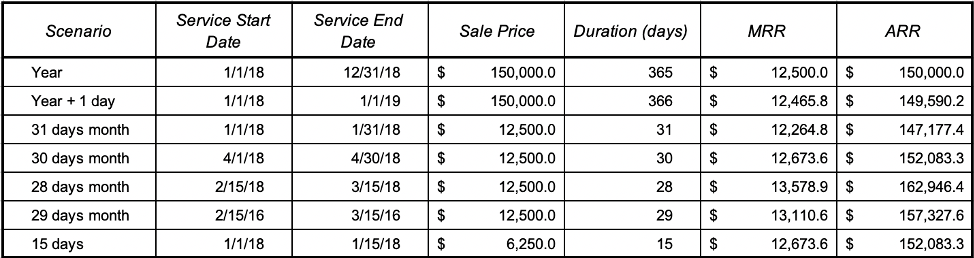
RevRec calculates MRR using the following formula.

MRR = ([Sale Price] / [Duration (days)]) * (365 / 12)
ARR = ([Sale Price] / [Duration (days)]) * 365

First, find the [Duration (days)] using [Service Start Date] and [Service End Date].

Calculate the [Daily Selling Price] for the subscription/recurring Item by dividing [Sale Price] by [Duration (days)]

MRR = Daily Selling Price x 365 /12

ARR = Daily Selling Price x 365

See below for some sample calculations that explain different scenarios.
image

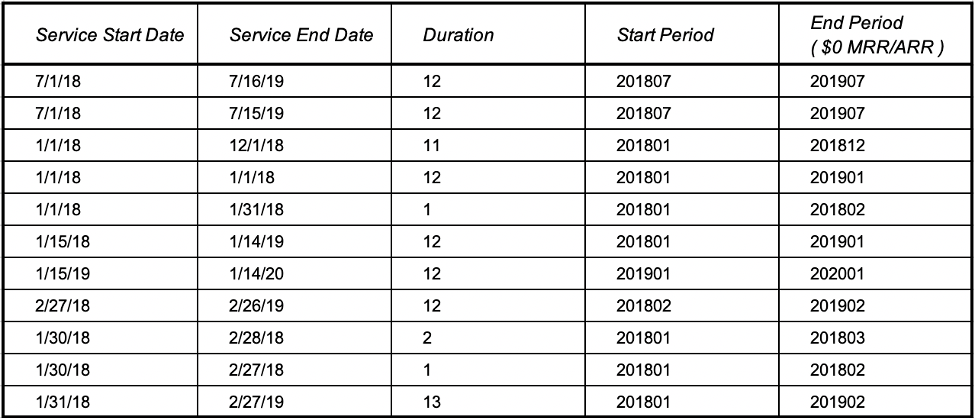
MRR/ARR Active Periods

MRR/ARR active period is established using [Service Start Date] & [Service End Date]. Although it is a pretty straightforward calculation there are some edge cases that need a closer look. Below we have tried to show several examples (including simple and edge cases) so that our users know exactly how active periods are established.
image

Related Articles

Where do I access reports in RevRec?
How to find the Unearned Revenue Rollforward Report in RevRec?
Where can I find Revenue Journal Report in RevRec?
How to Customize a Report in RevRec?
How to save and share a report in RevRec?
How to export a report in RevRec?
How to add Custom fields to a RevRec report?
What are the categories available on RevRec Standard Reports?

Show more

Was this article helpful?