New in Chargebee: Explore Reveal and understand your payment performance end-to-end.Try Now

Docschargebeedocs

HomeBillingPaymentsRevRecGrowthReveal
Support

Product Updates


  • Release Notes

Getting Started with RevRec


  • About Chargebee RevRec
  • Quick Start Guide
  • Site Configuration
  • Conversion
  • RevRec Essential
  • Articles and FAQ

Revenue Recognition


  • Configuring Product Catalog
  • Standalone Selling Price
  • Configuring Revenue Rules
  • Recognizing Discounts
  • Revenue Arrangement
  • Prior Period Adjustment
  • Pending Collectibility
  • Chargebee Billing Features
  • Articles and FAQ

Expense Recognition


  • Recognizing Expenses
  • Articles and FAQ

Multi Currency


  • Multi-Currency
  • Articles and FAQ

Multi Entity


  • Multi-Entity

Data Processing & Validation


  • Overview
  • Automated Data Synchronization
  • Importing Data in Bulk
  • Input via User Interface
  • Control Checks
  • Automated Import and Export
  • Understanding Errors
  • Articles and FAQ

Adjustments


  • Manual Adjustments

Reports & Analytics


  • Overview of RevRec Reporting
  • RevRec Standard Reports
  • Articles and FAQ

General Ledger & Accounting Close


  • Journal Account Mapping
  • Understanding Journal Entries
  • Creating Journal Entries
  • Journal Posting & Closing Accounting Period
  • Articles and FAQ

Integrations


  • HubSpot
  • Salesforce
  • QuickBooks Online
  • Xero
  • Sage Intacct
  • NetSuite
  • Stripe
  • Mobile Stores
  • Articles and FAQ

RevRec Premium


  • Overview
  • Quick Start Guide
  • Site Configuration
  • Getting Around RevRec Premium
  • General Ledger & Accounting Close
  • Reports & Analytics
  • Integrations
  1. Revrec
  2. Revenue Recognition
  3. Articles and FAQ
  4. Revenue Recognition
  1. Revrec
  2. Revenue Recognition
  3. Articles and FAQ
  4. Revenue Recognition

How to understand your revenue plans and their accounting in RevRec?

Scope

How to check the data and graph for each sales order item revenue plan in RevRec?

Is there any way to check the revenue differences on subscription change in RevRec?

Do we have the option to check revenue for each item in RevRec?

Summary

You can analyze and check revenue plans and their accounting by navigating from Customer > Sales Order > Arrangements > Revenue Plan.

Solution

Once a sales order is recorded into RevRec it will automatically use the SSP library to create an associated revenue plan. Orders that have revenue plans are shown as Active in the search results on sales
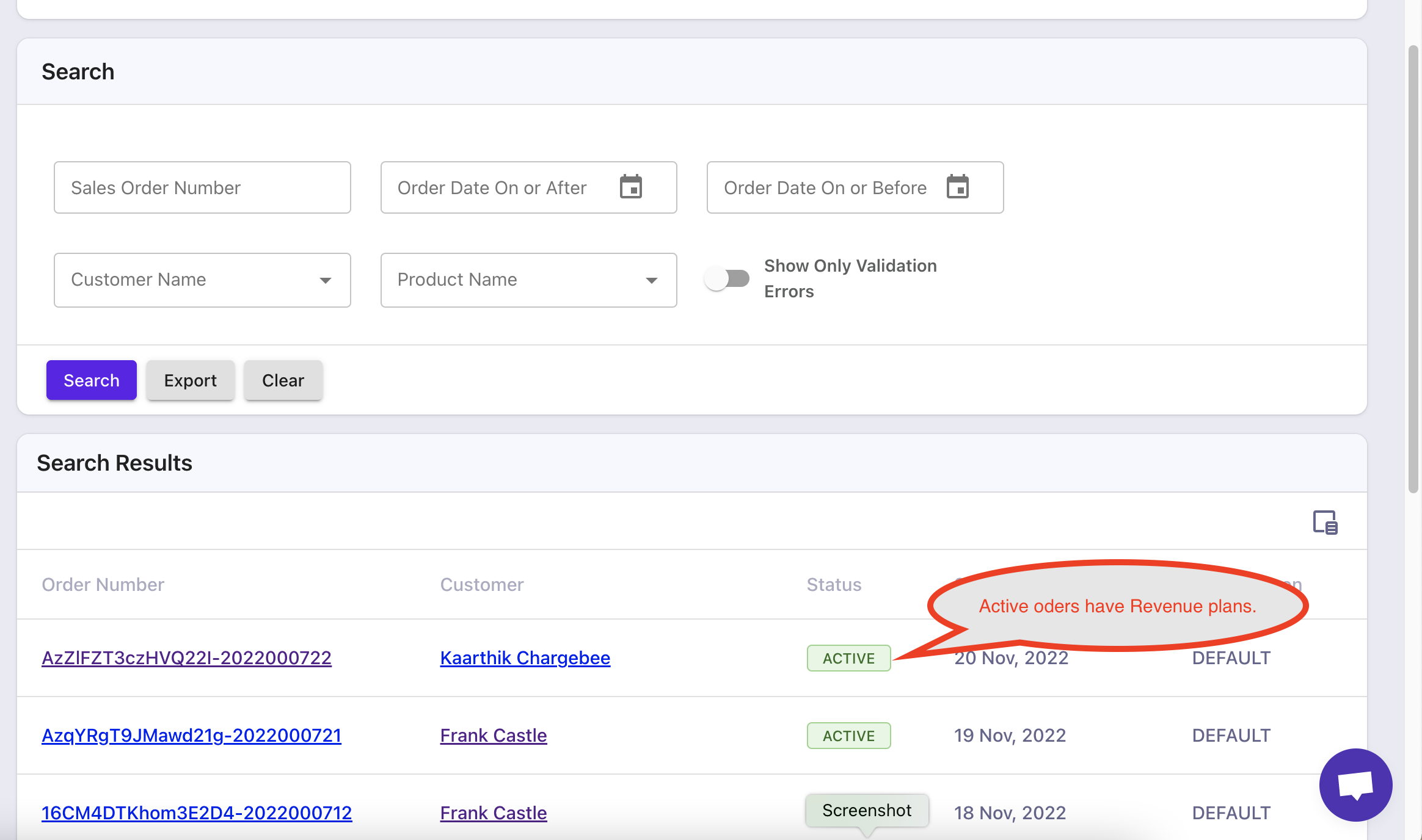
image

Clicking through to a sales order and you can get to the Arrangements.
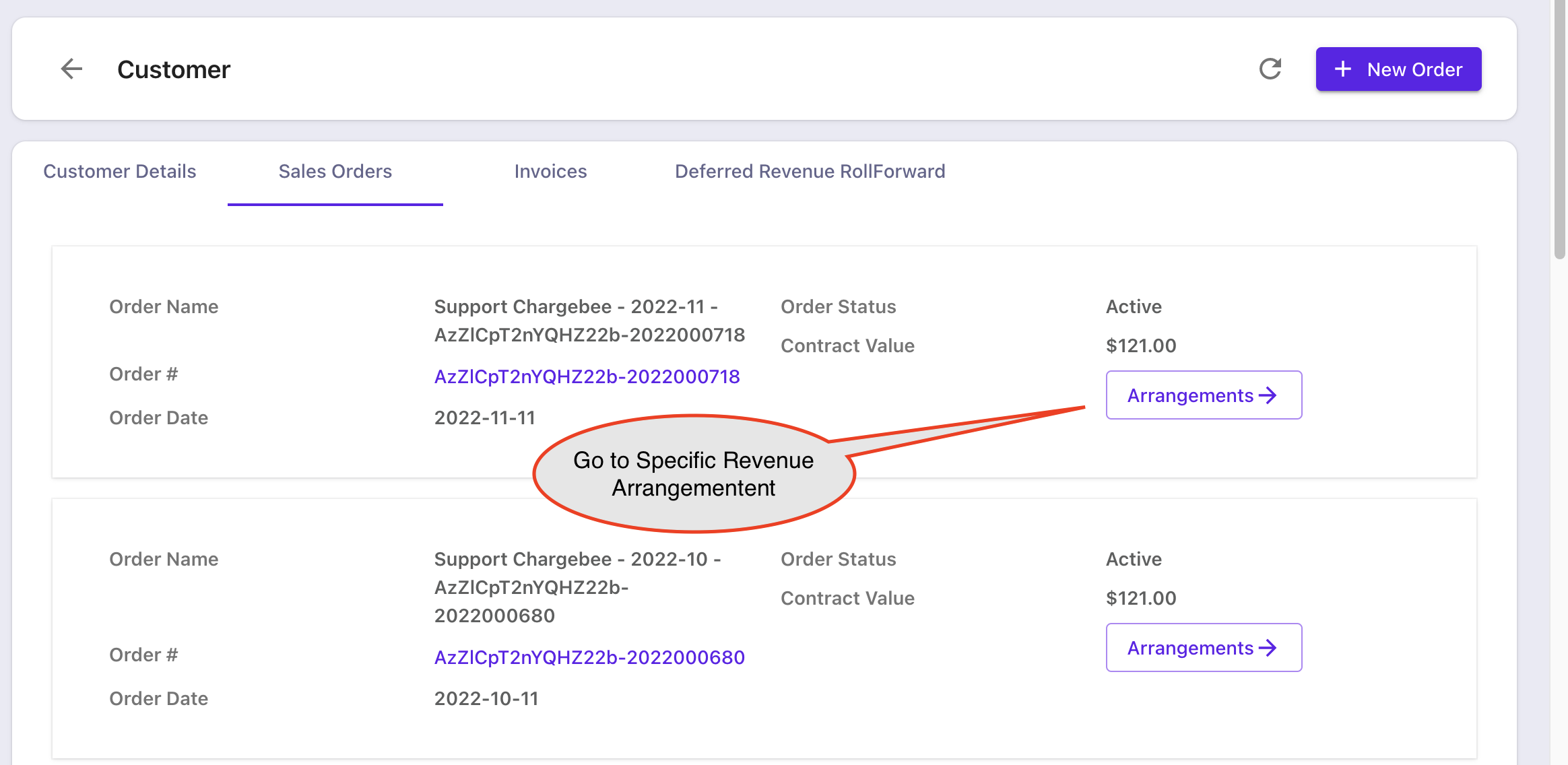
image

Once in the Arrangements, you can look at the revenue accounting by expanding and getting into the revenue elements as shown below.
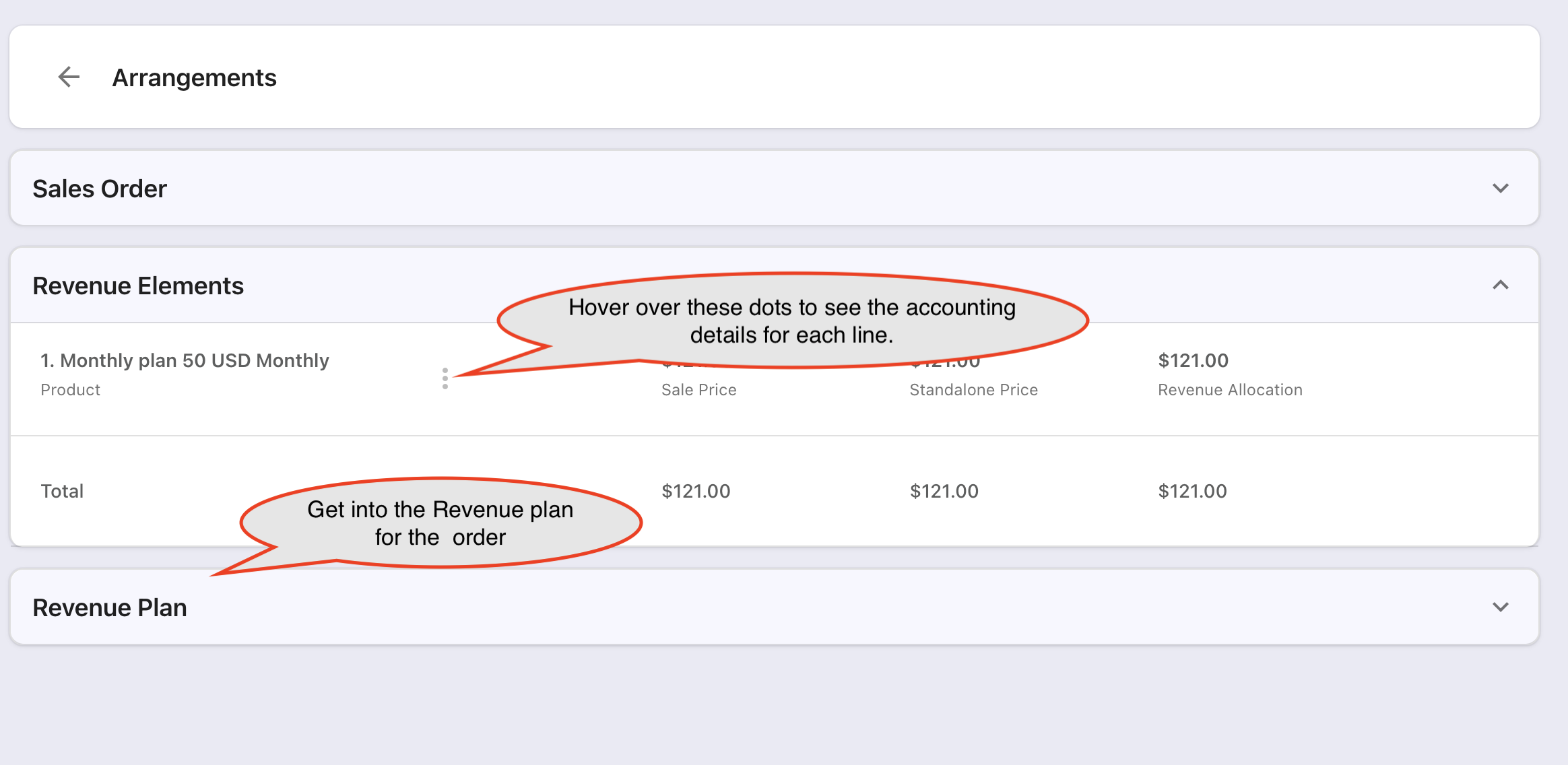
image

If you want to see the accounting calculations, hover over the element and you will see something like this.
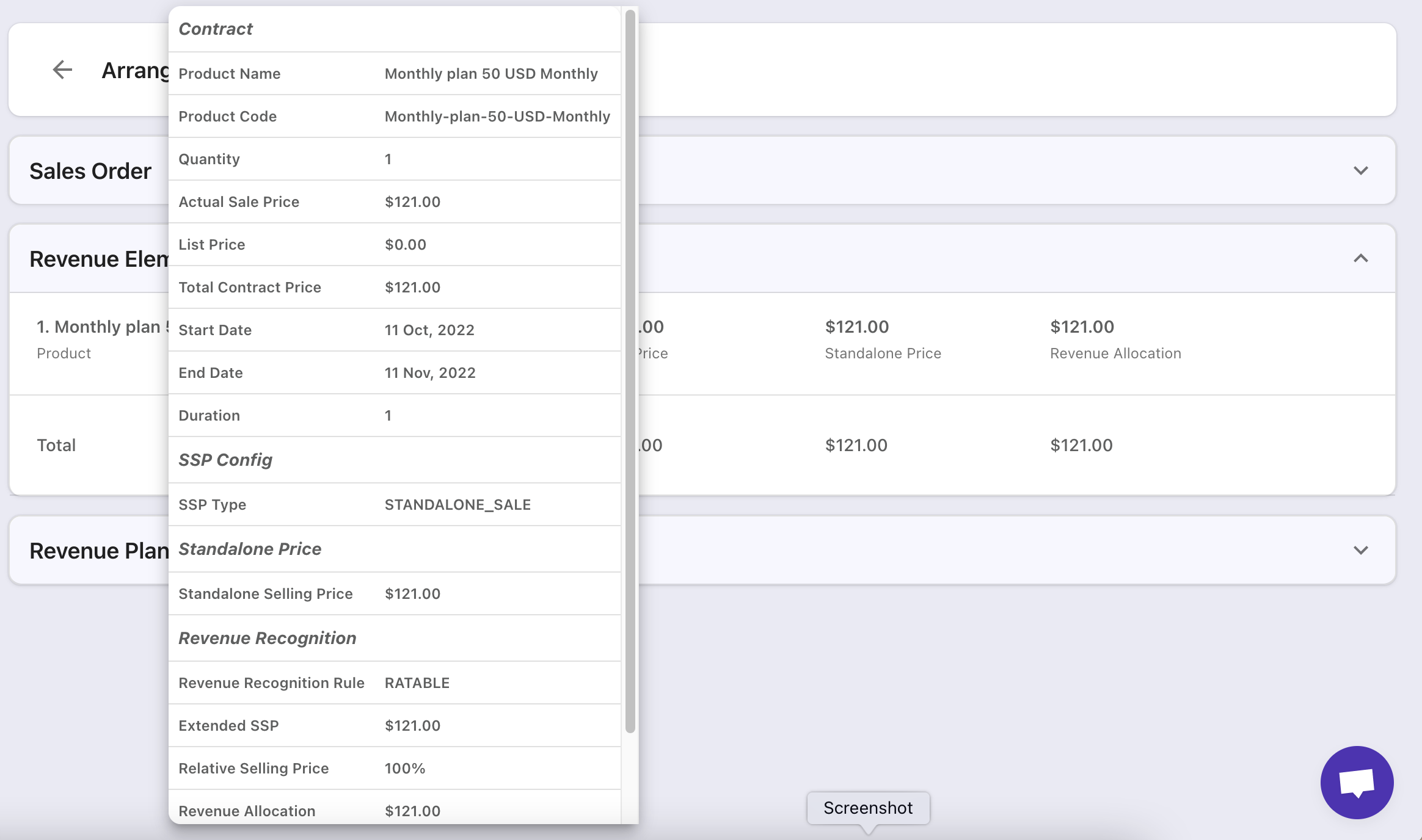
image

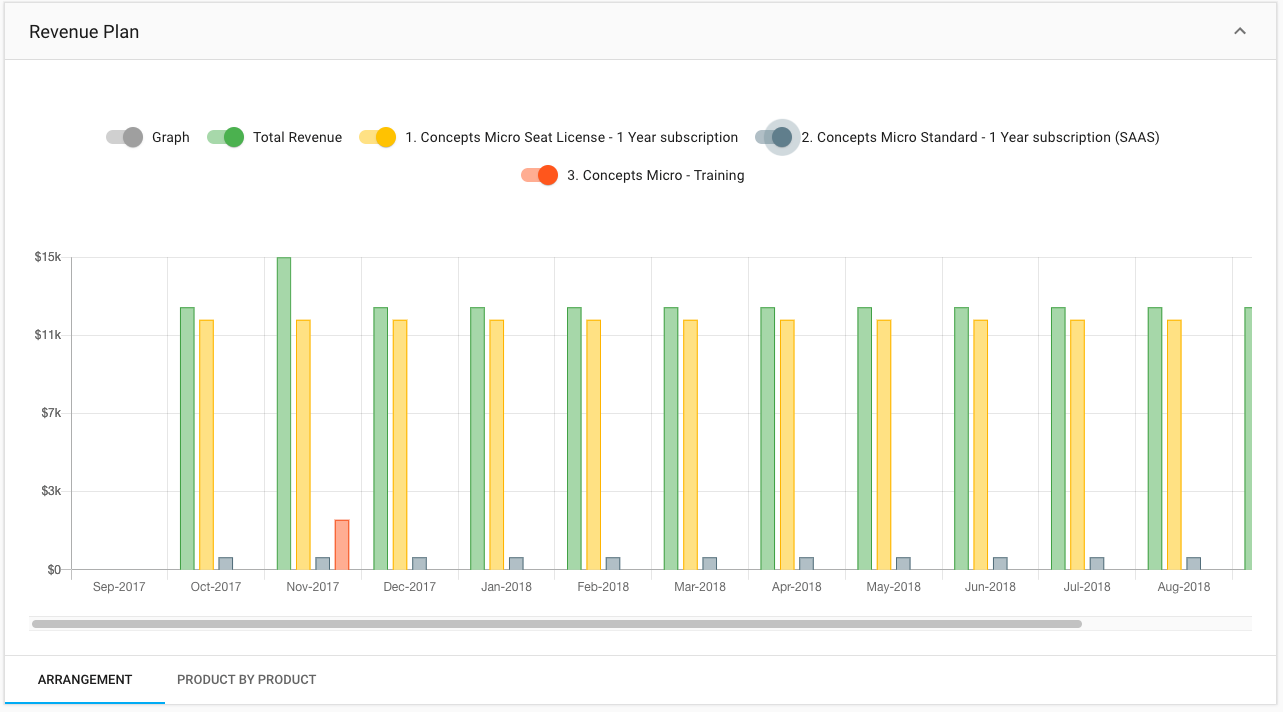
You can also see the overall plan by clicking on the plan, either see it graphically over time, or you can flip the Graph switch on the top right to see it as numbers or break it out by product by product.
image

Now, you have finished setting up all your 606 accounting and revenue numbers in detail.

Related Articles

What is the difference between default and advanced accounting treatment on the credit notes in RevRec?
What are the revenue recognition methods in RevRec and their associated rules?
What are the types of Ratable Revenue Recognition plans in RevRec?
What are the standalone selling price rules in RevRec?
How to check the customers revenue plan on RevRec?
What is the Standalone Selling Price in RevRec?
How to check consumption based Revenue Recognition in RevRec?
How to maintain your SSP library?
How is the Percent Net Revenue Reallocation is calculated in RevRec?
How is the decreased subscription value within the billing period is calculated in RevRec?
How to configure Product Catalog in RevRec?
How to reconcile Delivery data and Invoice data in RevRec?
What does the 'Unbilled Receivable' amount represent in RevRec?
What is SSP Versioning in RevRec?
What is SSP Analyzer in RevRec?
Enable passthrough feature for products in Revrec
RevRec - Accounting Journal Posting
Zero Dollar Invoice Sync RevRec

Show more

Was this article helpful?