New in Chargebee: Explore Reveal and understand your payment performance end-to-end.Try Now
Docschargebee docs
HomeBillingPaymentsRevRecGrowthReveal
Support

Product Updates


  • Release Notes

Getting Started with RevRec


  • About Chargebee RevRec
  • Quick Start Guide
  • Site Configuration
  • Conversion
  • RevRec Essential
  • Articles and FAQ

Revenue Recognition


  • Configuring Product Catalog
  • Standalone Selling Price
  • Configuring Revenue Rules
  • Recognizing Discounts
  • Revenue Arrangement
  • Prior Period Adjustment
  • Pending Collectibility
  • Chargebee Billing Features
  • Articles and FAQ

Expense Recognition


  • Recognizing Expenses
  • Articles and FAQ

Multi Currency


  • Multi-Currency
  • Articles and FAQ

Multi Entity


  • Multi-Entity

Data Processing & Validation


  • Overview
  • Automated Data Synchronization
  • Importing Data in Bulk
  • Input via User Interface
  • Control Checks
  • Automated Import and Export
  • Understanding Errors
  • Articles and FAQ

Adjustments


  • Manual Adjustments

Reports & Analytics


  • Overview of RevRec Reporting
  • RevRec Standard Reports
  • Articles and FAQ

General Ledger & Accounting Close


  • Journal Account Mapping
  • Understanding Journal Entries
  • Creating Journal Entries
  • Journal Posting & Closing Accounting Period
  • Articles and FAQ

Integrations


  • HubSpot
  • Salesforce
  • QuickBooks Online
  • Xero
  • Sage Intacct
  • NetSuite
  • Stripe
  • Mobile Stores
  • Articles and FAQ

RevRec Premium


  • Overview
  • Quick Start Guide
  • Site Configuration
  • Getting Around RevRec Premium
  • General Ledger & Accounting Close
  • Reports & Analytics
  • Integrations
  1. Revrec
  2. Revenue Recognition
  3. Articles and FAQ
  4. Revenue Recognition
  1. Revrec
  2. Revenue Recognition
  3. Articles and FAQ
  4. Revenue Recognition

What is the Standalone Selling Price in RevRec?

Scope

What is the Standalone Selling Price in RevRec?

How to determine SSP rules in RevRec?

What is our standard SSP library in RevRec?

Summary

The SSP (Standalone Selling Price) is defined as the price at which a provider would sell a promised good or service separately to a customer. Once the standalone selling prices have been determined, a provider will apply the relative values to the total contract consideration and estimate the amount of the transaction price to be recognized as each promise is fulfilled.

Solution ASC 606 is most commonly understood as a that you can read more about on the AICPA site here. After identifying the contract, and determining performance obligations and the transaction price, the next step is to allocate the transaction price to the performance obligations based on the "standalone selling price" or SSP.

ASC 606 requires additional consideration and documentation of the standalone selling price or in the case when the standalone selling price is not directly observable or when variable consideration is part of the transaction price.

Determining the SSP A provider will determine the standalone selling price for each of the performance obligations. This should be done primarily by using available observable transaction history that the provider might already have for the sold item in their own data. The standard does provide alternative methods for determining the SSP when a provider's actual selling price for the same good or service is unavailable but does not require their use if a more suitable method is available with more observable inputs.

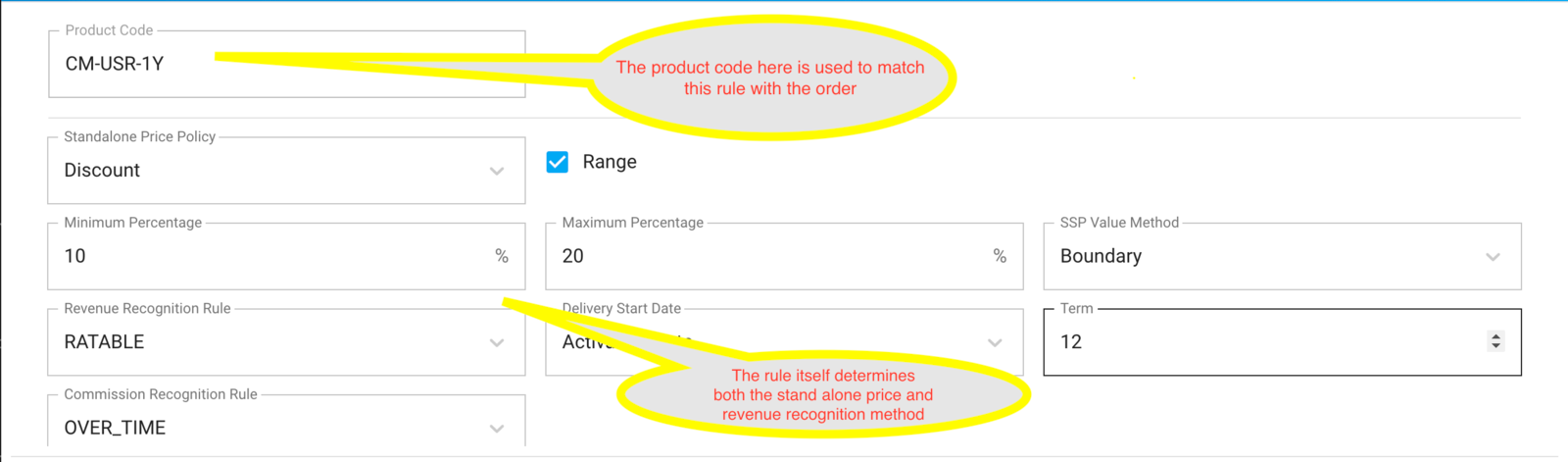
Our Standalone Selling Price Library RevRec supports determining the stand-alone selling price of each line item automatically within an order by using a rules-based approach. The rules use a matching approach to match the sale order SKU or product code (or a combination of other fields) to "look up" the rule in the SSP library for each line item.

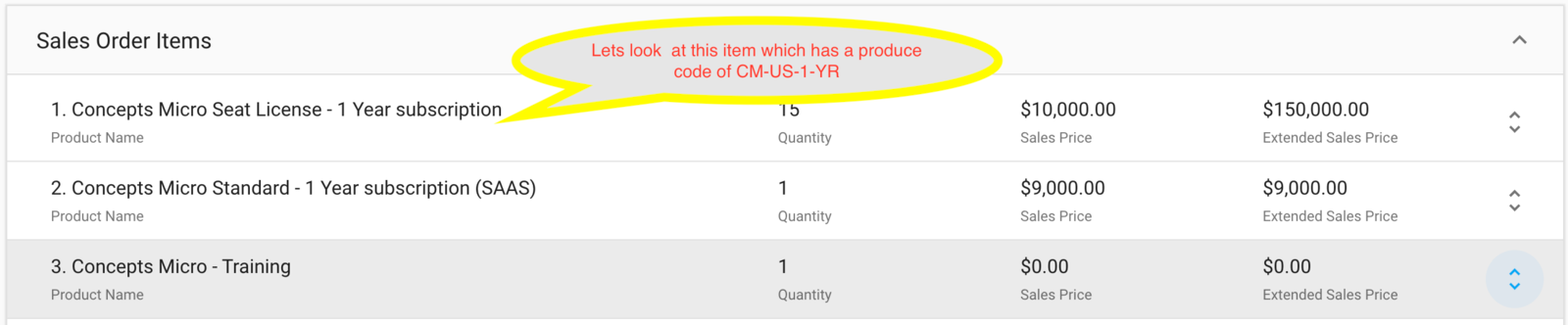
A simple example best illustrates the concept, here we have ordered several line items but let's focus on the "Concepts Micro Seat License Subscription" sold for $150K.
image

On seeing this product, RevRec will go to the configured library and find the corresponding rule (in this case looking it up by product code).
image

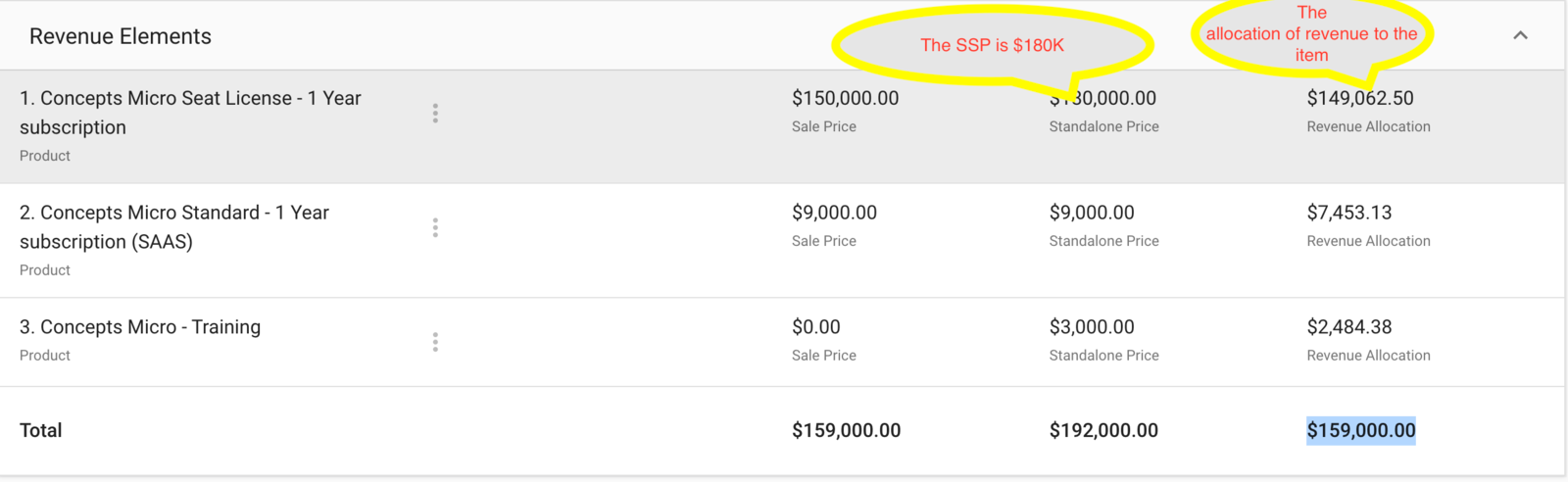
Once the price has been determined the system will automatically use the stand-alone price to allocate a price to each line item from an order in the revenue arrangement and determine the relative selling price. You can see this when you click into a revenue arrangement.
image

Subsequent to this the rest of the revenue workflow also works automatically, going through revenue recognition and managing all balances automatically for you.

Related Articles

What is the difference between default and advanced accounting treatment on the credit notes in RevRec?
What are the revenue recognition methods in RevRec and their associated rules?
How to understand your revenue plans and their accounting in RevRec?
What are the types of Ratable Revenue Recognition plans in RevRec?
What are the standalone selling price rules in RevRec?
How to check the customers revenue plan on RevRec?
How to check consumption based Revenue Recognition in RevRec?
How to maintain your SSP library?
How is the Percent Net Revenue Reallocation is calculated in RevRec?
How is the decreased subscription value within the billing period is calculated in RevRec?
How to configure Product Catalog in RevRec?
How to reconcile Delivery data and Invoice data in RevRec?
What does the 'Unbilled Receivable' amount represent in RevRec?
What is SSP Versioning in RevRec?
What is SSP Analyzer in RevRec?
Enable passthrough feature for products in Revrec
RevRec - Accounting Journal Posting
Zero Dollar Invoice Sync RevRec

Show more

Was this article helpful?