New in Chargebee: Explore Reveal and understand your payment performance end-to-end.Try Now
Docschargebeedocs
HomeBillingPaymentsRevRecGrowthReveal
Support

Product Updates


  • Release Notes

Getting Started with RevRec


  • About Chargebee RevRec
  • Quick Start Guide
  • Site Configuration
  • Conversion
  • RevRec Essential
  • Articles and FAQ

Revenue Recognition


  • Configuring Product Catalog
  • Standalone Selling Price
  • Configuring Revenue Rules
  • Recognizing Discounts
  • Revenue Arrangement
  • Prior Period Adjustment
  • Pending Collectibility
  • Chargebee Billing Features
  • Articles and FAQ

Expense Recognition


  • Recognizing Expenses
  • Articles and FAQ

Multi Currency


  • Multi-Currency
  • Articles and FAQ

Multi Entity


  • Multi-Entity

Data Processing & Validation


  • Overview
  • Automated Data Synchronization
  • Importing Data in Bulk
  • Input via User Interface
  • Control Checks
  • Automated Import and Export
  • Understanding Errors
  • Articles and FAQ

Adjustments


  • Manual Adjustments

Reports & Analytics


  • Overview of RevRec Reporting
  • RevRec Standard Reports
  • Articles and FAQ

General Ledger & Accounting Close


  • Journal Account Mapping
  • Understanding Journal Entries
  • Creating Journal Entries
  • Journal Posting & Closing Accounting Period
  • Articles and FAQ

Integrations


  • HubSpot
  • Salesforce
  • QuickBooks Online
  • Xero
  • Sage Intacct
  • NetSuite
  • Stripe
  • Mobile Stores
  • Articles and FAQ

RevRec Premium


  • Overview
  • Quick Start Guide
  • Site Configuration
  • Getting Around RevRec Premium
  • General Ledger & Accounting Close
  • Reports & Analytics
  • Integrations
  1. Revrec
  2. Revenue Recognition
  3. Articles and FAQ
  4. Revenue Recognition
  1. Revrec
  2. Revenue Recognition
  3. Articles and FAQ
  4. Revenue Recognition

How to reconcile Delivery data and Invoice data in RevRec?

Scope

Example: Reconcile Delivery Data in RevRec

How to view delivery logs in RevRec?

How to handle expired units in RevRec?

How to reconcile Invoice Data in RevRec?

Solution

Delivery Data

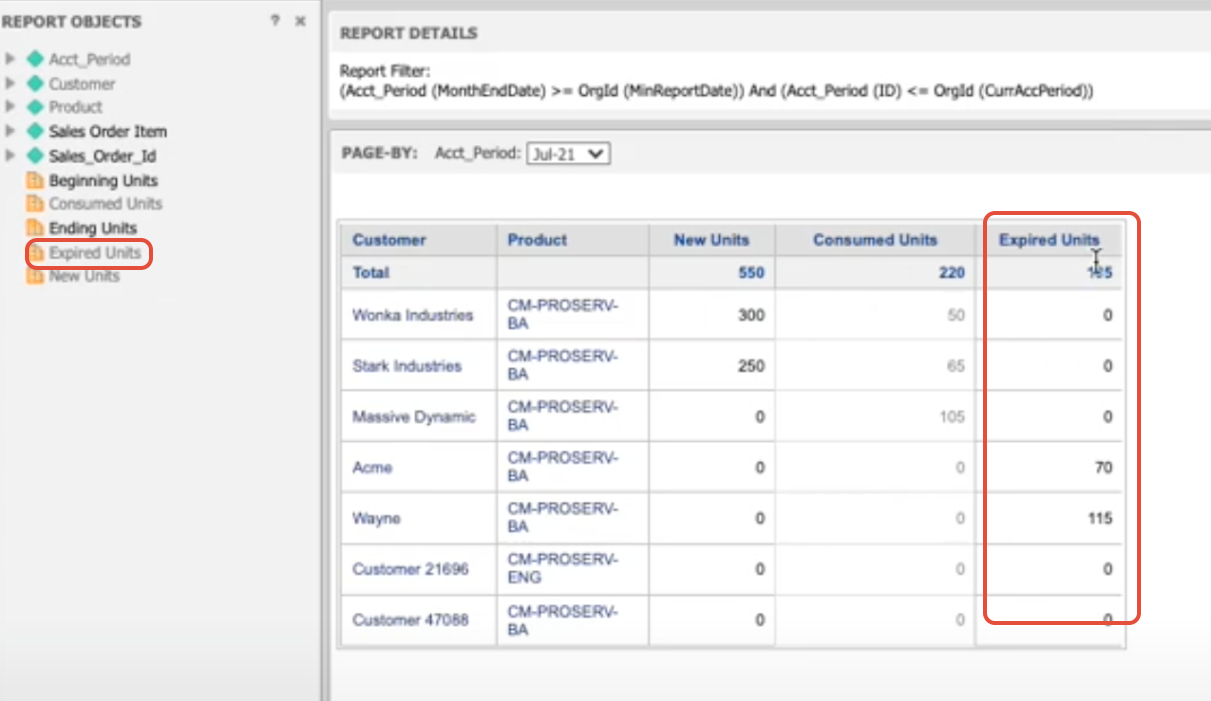
The following steps demonstrate how to reconcile delivery data from your delivery systems to what is in RevRec. It explains how to view new units sold vs consumed units for the open accounting period. This will give the user an option to analyze the data if there are differences of any kind. The report also illustrates expired units, which were not consumed at the end of a contract and hence expired unused in the period.

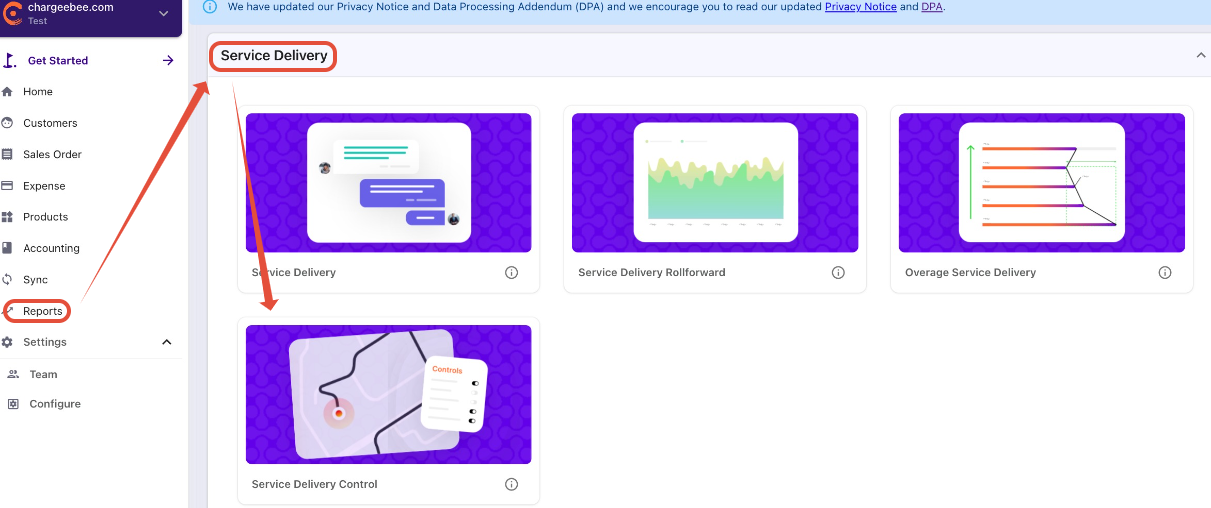
Delivery Data: RevRec > Reports > Service Delivery > Service Delivery Control

Invoice Data: Reports > Control and Validation > Invoice Control

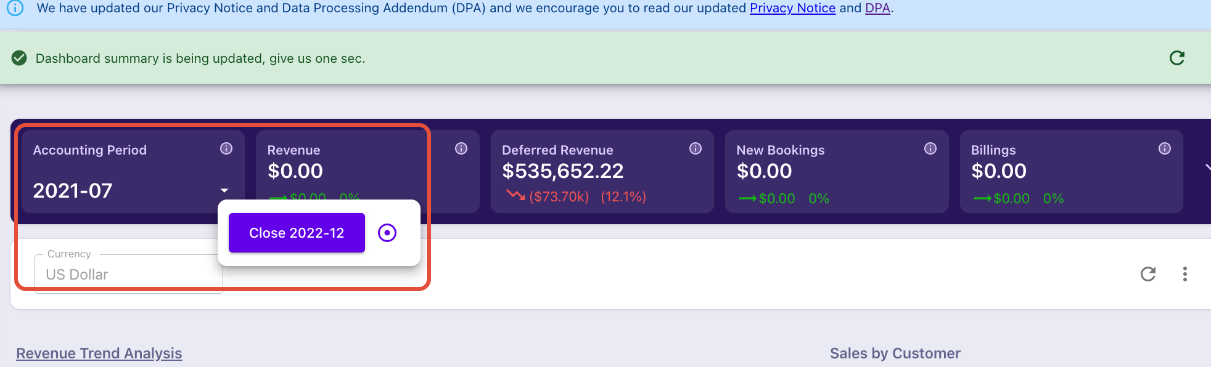
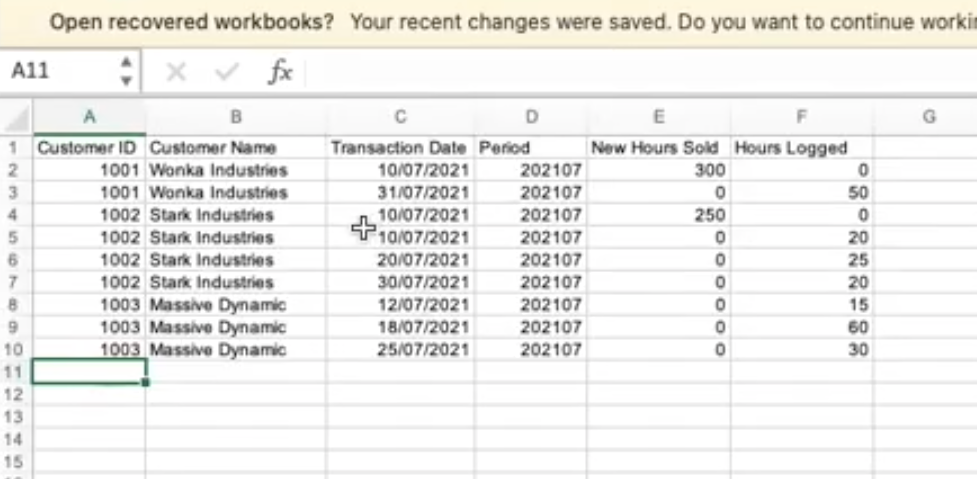
Say, for example, we are about to close the Accounting period for July 2021, before closing we need to reconcile what was delivered and what was sold in the month of July with the source center.
image

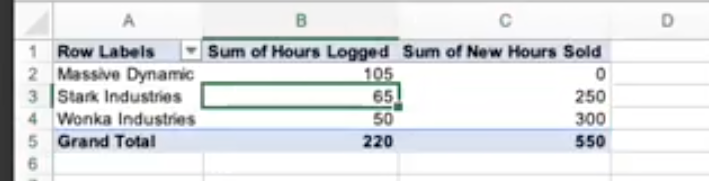
Below, we have the source center sheet and we have converted it into the pivot form for better understanding.
image
image

To check this we will navigate to RevRec > Reports > Service Delivery > Service Delivery Control
image

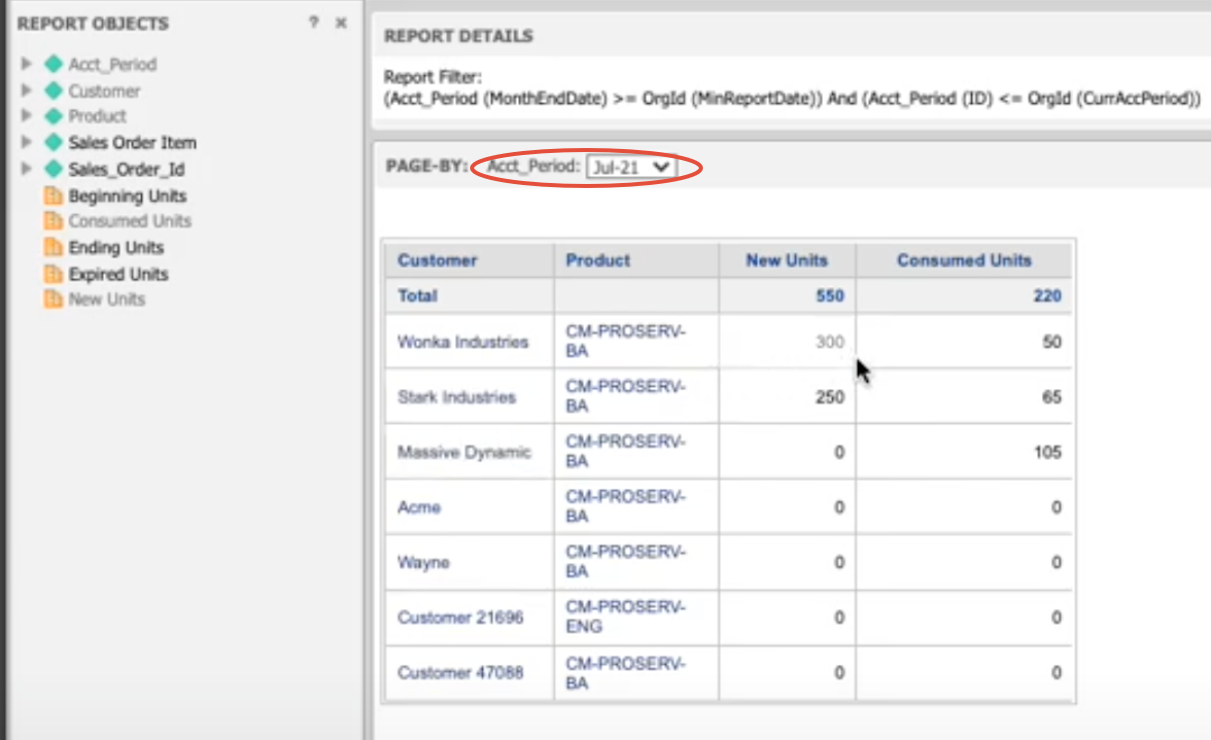
Then select the Accounting Period that you need to verify for our example, it's July 2021 and then we will see the report and source center data matches in RevRec.
image

Also, you can click on Expired Units to check the list of expired units also if you do not want the units to expire you can update the Service Delivery end date of the units on the contract.
image

Invoice Data

The following steps demonstrate how to reconcile invoice data from your source systems to what is in RevRec. It explains how to view new billings for the open accounting period. This will give the user an option to analyze the data if there are differences of any kind.

Solution

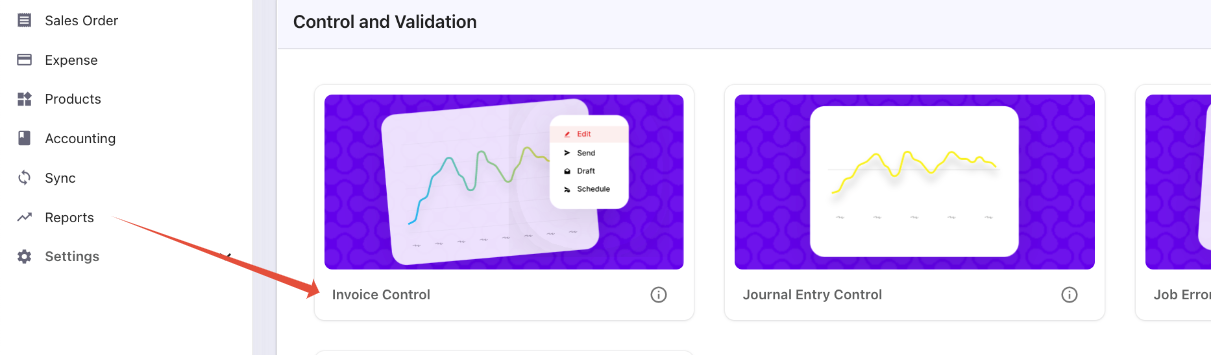
Navigate from Reports > Control and Validation > Invoice Control
image

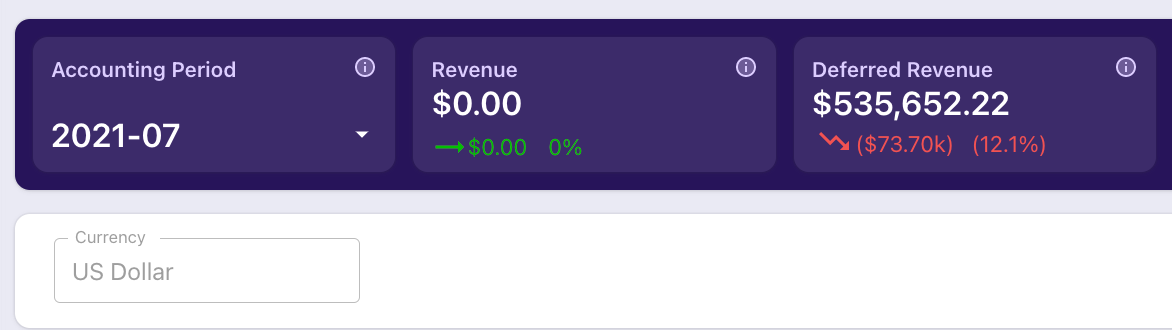
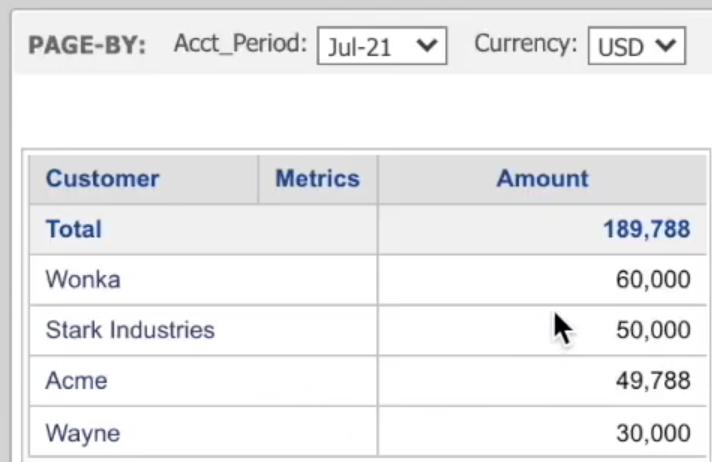
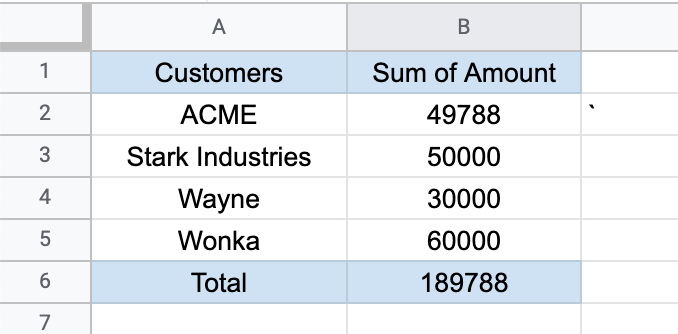
The purpose of this report is to reconcile the data that we have in RevRec with the source at the end of the accounting period. In our example, Before we close the accounting in July 2021 we would like to reconcile the invoice data with the source center
image

For reference, we have created a pivot table of the source center to match the corresponding RevRec invoice control data, referred to in the screenshot below.
image
image

Related Article and Documentation

Configuring Product Catalog

Related Articles

What is the difference between default and advanced accounting treatment on the credit notes in RevRec?
What are the revenue recognition methods in RevRec and their associated rules?
How to understand your revenue plans and their accounting in RevRec?
What are the types of Ratable Revenue Recognition plans in RevRec?
What are the standalone selling price rules in RevRec?
How to check the customers revenue plan on RevRec?
What is the Standalone Selling Price in RevRec?
How to check consumption based Revenue Recognition in RevRec?
How to maintain your SSP library?
How is the Percent Net Revenue Reallocation is calculated in RevRec?
How is the decreased subscription value within the billing period is calculated in RevRec?
How to configure Product Catalog in RevRec?
What does the 'Unbilled Receivable' amount represent in RevRec?
What is SSP Versioning in RevRec?
What is SSP Analyzer in RevRec?
Enable passthrough feature for products in Revrec
RevRec - Accounting Journal Posting
Zero Dollar Invoice Sync RevRec

Show more

Was this article helpful?