Docschargebeedocs

HomeBillingPaymentsRevRecGrowthReveal
Support

Product Updates


  • Release Notes

Getting Started


  • Overview
  • Chargebee Billing Data Centers
  • Object Relationship Model
  • Understanding Sites
  • Developer Resources
  • Chargebee Tech Glossary
  • Articles and FAQ

Implementing Chargebee


  • Implementation Guide
  • Go-live Checklist
  • Articles and FAQ

AI in Chargebee


  • Chargebee Agents
  • Chargebee Copilot
  • Chargebee MCP Server (Model context protocol)

Product Catalog


  • Product Catalog Overview
  • Coupons
  • Articles and FAQ

Subscriptions


  • Working with Subscriptions
  • Billing
  • Orders
  • Articles and FAQ

Customers


  • Managing Customers
  • Account Hierarchy
  • Email Notifications
  • Branding
  • Configure Multiple Languages
  • Articles and FAQ

Invoices, Credit Notes and Quotes


  • Invoices
  • Credit Notes
  • Quotes [Legacy]
  • Transactions
  • Articles and FAQ

Taxes


  • Overview
  • Configuring Taxes
  • Country-specific Taxes
  • Articles and FAQ

Hosted Capabilities


  • Overview
  • Hosted Checkout
  • Hosted Self-Serve Portal
  • Hosted Pages Features
  • Additional Hosted Pages
  • Payment Components
  • Managing payments with ChargebeeJS
  • Mobile-Optimized Hosted Pages
  • Articles and FAQ

Site Configuration


  • Users & Roles
  • Custom Fields & Metadata
  • Mandatory Fields
  • File Attachments & Comments
  • Advanced Filter Options
  • Multicurrency Pricing
  • Multi-decimal Support
  • Configuring Reason Codes
  • Events and Webhooks
  • API Keys
  • Time Zone
  • Time Machine
  • Transfer Configurations
  • Articles and FAQ

Reports and Analytics


  • RevenueStory
  • Home Dashboard
  • Frequently Asked Questions
  • FAQs for Classic Reports Sunset
  • Articles and FAQ

Integrations


  • Sales
  • Customer Support and Success
  • Finance
  • Tax
  • Marketing
  • Stitch
  • Collaboration
  • Contract Management
  • Order Management
  • Mobile Subscriptions (Legacy)
  • Other Integrations
  • Articles and FAQ

Data Privacy & Security


  • Two Factor Authentication
  • SAML Single Sign-On
  • System for Cross-Domain Identity Management (SCIM)
  • EU-GDPR
  • Consent Management
  • Personal Data Management
  • Compliance Certificates
  • HIPAA Guidelines
  • PCI Recommendations and Integration Types
  • Articles and FAQ

Data Operations


  • Bulk Operations
  • Migration
  • Articles and FAQ
  1. Billing
  2. Integrations
  3. Articles and FAQ
  4. QuickBooks Online
  1. Billing
  2. Integrations
  3. Articles and FAQ
  4. QuickBooks Online

QuickBooks invoice mapping and sync

Problem Statement

You need to understand how invoice sync from Chargebee to QuickBooks Online works for voided invoices (synced as credit notes) and for tax-inclusive vs tax-exclusive invoices.

Solution

Tax-inclusive and tax-exclusive invoices

Chargebee syncs both tax-exclusive and tax-inclusive invoices to QuickBooks in a consistent way. The tax line is synced as a separate line item and appears on the invoice in QuickBooks. The behavior is the same for both tax types.
Sample invoice sync to QuickBooks

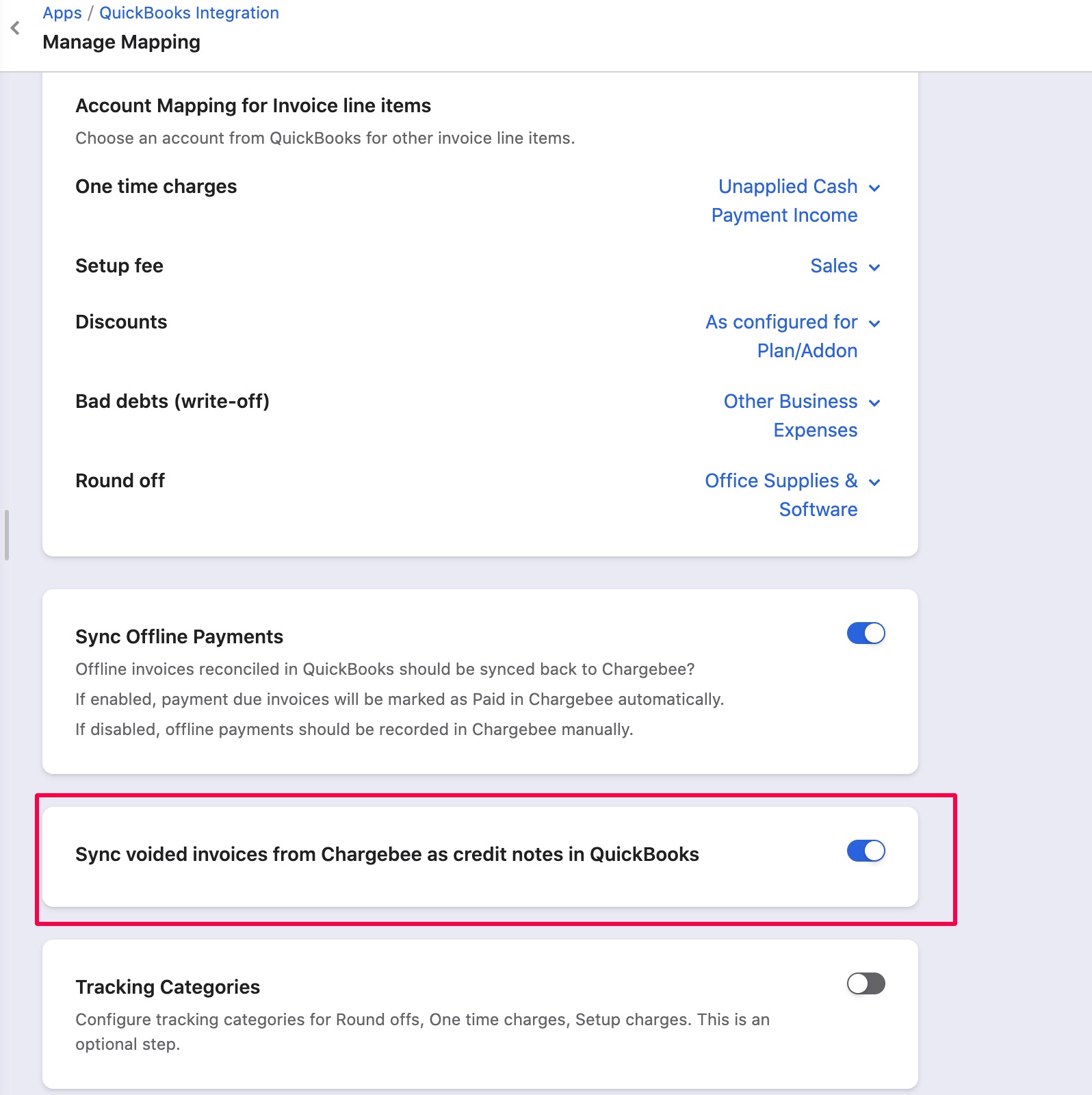
Sync voided invoices as credit notes in QuickBooks

You can turn on "Sync voided invoices from Chargebee as credit notes in QuickBooks" under Apps > QuickBooks > Manage Mapping.

Behavior when the option is off vs on:

| Scenario | Sub-scenario | Result | |----------|--------------|--------| | Option off | Create invoice → void in Chargebee → sync to QuickBooks | Invoice syncs to QuickBooks in Voided status. | | Option off | Create invoice → sync to QuickBooks → void in Chargebee → sync again | Invoice syncs to QuickBooks in Voided status. | | Option on | Create invoice → void in Chargebee → sync to QuickBooks | Invoice is not synced (skipped). | | Option on | Create invoice → sync to QuickBooks → void in Chargebee → sync again | A credit note for the same amount is created in QuickBooks; the invoice status in QuickBooks changes from open/payment due to Paid. |

Related Articles

QuickBooks - Error code:6000; Business validation error
QuickBooks error code 620: TxnID cannot be linked
QuickBooks - Error code:2500; Third-party request failed
QuickBooks (QBO) sync errors
QuickBooks Online sync error 6140 and 6430
How to change the date format for Payment Gateway statements?
Accounting code provided doesn't exist in QuickBooks
QuickBooks Online - Error code 6200/6210: Account period closed
Steps to Reconcile Payments between Chargebee and QuickBooks
QBO Error Code:2050
Quickbooks Online error: Sync has failed to complete, you can try again after some time or contact Chargebee Support.
Quickbooks sync error: TRANSACTION - CREATE_FAILED (null)
Prerequisites of Xero/QuickBooks Reconciliation Plug-in
Error 'Null/No' while syncing invoices with QuickBooks Online
How to download gateway statements in QuickBooks/Xero?
Plan could not be created as the Account name you provided does not exist in Quickbooks Online
Error "Entity is not present in Quickbooks" in Quickbooks Online
'How to solve the error "Error: Not a valid product or service name. Names must have at least one character and cannot include tabs, newlines or '':''?'
QB error: Sync status: CREATE_FAILED, The payment chart of account for the invoice payment gateway ELAVON and currency USD was not mapped

Show more

Was this article helpful?