Chargebee Pay is available to pre-qualified Chargebee Billing customers.
Dispute Management
When using Chargebee Pay, effective dispute management is critical for maintaining operational integrity and customer trust. Disputes may arise when a user does not recognize a charge, is unhappy with a product or service, or suspects fraudulent activity. These scenarios can occur at any point in the transaction journey, from the initial charge to settlement, and can impact your revenue and business reputation if not handled effectively. Learn how to handle disputes within Chargebee Pay and navigate chargebacks effectively.
What is a dispute?
A dispute occurs when a cardholder questions a transaction through their bank. The issuing bank initiates a formal review process, which may result in funds being temporarily or permanently deducted from your account.
Note
Disputes are different from refunds. Unlike voluntary refunds initiated by the merchant, disputes are initiated by the customer through their bank.
Common causes of disputes
Disputes can stem from a wide range of issues, each with its own set of implications and required responses.
- Fraudulent charges: Transactions that seem unauthorized or suspicious.
- Technical issues: Problems during processing due to insufficient funds or related issues.
- Clerical errors: Mistakes such as double billing or incorrect amounts.
- Quality concerns: Goods or services not meeting expectations or not delivered as promised.
Types of disputes
Disputes in payment transactions can arise in different forms based on the level of concern raised and the customer’s issuing bank’s response. Understanding the type of dispute helps you determine the appropriate action and timeline for resolution.
These are the three primary types of disputes you may encounter when using Chargebee Pay.
-
Notification: A notification is an informational alert sent to you when potential fraudulent activity is detected. While no immediate funds are deducted, the notification acts as an early warning and may escalate to a chargeback if the 3D Secure liability shift is not in place.
-
Inquiry: An inquiry occurs when the issuing bank requests additional information about a transaction before deciding whether to escalate it to a chargeback. Although no immediate funds are deducted at this stage, failure to respond promptly may result in a chargeback and the subsequent deduction of funds.
-
Chargeback: A chargeback is a formal dispute initiated by the issuing bank to reverse a transaction on behalf of the customer. In this case, funds are immediately withdrawn from your merchant account. If you choose to contest the chargeback, you must respond with supporting documentation. Accepting the chargeback or failing to respond by the specified deadline will result in a permanent deduction of the disputed funds. Once a customer files a chargeback, you can choose to either accept the dispute or respond with evidence to defend the transaction.
Dispute flow and process
Understanding how disputes are handled in Chargebee Pay is essential for reducing revenue loss and resolving customer concerns efficiently. This section walks you through the dispute flow and lifecycle, from the moment a dispute is raised to its final resolution. You’ll also learn how to respond to disputes effectively using the Chargebee Pay portal.
Dispute stakeholders
Each dispute involves several key parties, each with a specific role in the resolution process:
- Cardholder (Customer): Customer initiates the dispute through their bank for reasons such as fraud, billing issues, or service dissatisfaction.
- Merchant (You): You review and respond to disputes via the Chargebee Pay portal by submitting evidence within the required timeframe (typically 7–10 days).
- Issuing Bank: The customer’s bank, which reviews the dispute and decides its outcome based on the evidence provided.
- Acquiring Bank: Your payment processor, which debits the disputed amount and forwards evidence between you and the issuing bank.
- Chargebee Pay: Provides tools to manage disputes, submit evidence, and track response deadlines in real time.
Stages of a dispute
Once a customer initiates a chargeback, the dispute moves through a series of defined stages. Each stage reflects the current status of the dispute and helps you understand what actions are required and what to expect next. Chargebee Pay provides real-time updates as the dispute progresses.
- Open: A chargeback has been initiated, and the disputed funds have been withdrawn from your merchant account. The dispute is currently awaiting your response. If you accept the chargeback or fail to respond within the deadline, the status will change to Lost.
- Responded: You have submitted evidence to challenge the dispute, and Chargebee Pay has forwarded your documentation to the issuing bank for review. Please note that once submitted, documents cannot be edited or withdrawn.
- Won: The issuing bank has accepted your evidence, and the disputed amount has been credited back to your merchant account. This marks the final resolution of the dispute in your favor.
- Lost: The dispute was not resolved in your favor. This may have occurred because you accepted the dispute, missed the response deadline, or the issuing bank rejected your evidence. As a result, the funds remain permanently deducted from your account.
Dispute process overview
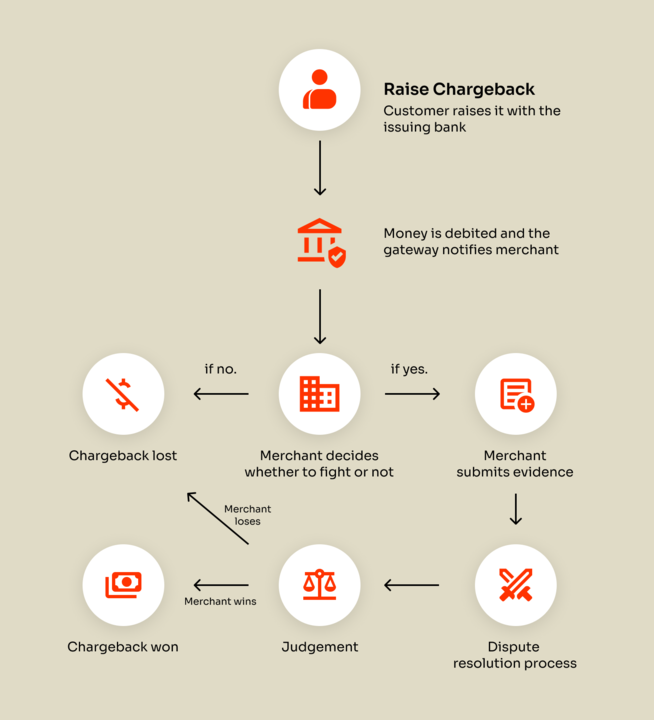
If the merchant has delivered the product or service and wishes to respond to the chargeback, they must provide evidence to support their case and challenge the dispute. Depending on the payment method and the bank's terms, the customer can raise a chargeback anytime between 45 and 180 days (up to 13 months for SEPA). The acquiring bank debits the amount from the merchant's account. The merchant is generally given 7–10 days to submit the evidence. The dispute then goes through a resolution process, which can take approximately 30–90 days. If the evidence is valid, the merchant wins the dispute; if not, they lose the chargeback.
Defend disputes where you have evidence that the transaction is valid or the transaction amount is high. If you defend the chargeback, the dispute will move through the lengthy and possibly costly dispute process.
Note
A chargeback fee is charged for every filed chargeback. Therefore, we strongly advise you to only defend a chargeback when you have sufficiently compelling evidence.
You are allowed to upload defense documents at the following stages:
- Request for Information stage
- First chargeback stage
For the defense material to qualify, you must upload it within the given time frame and meet the requirements of the reason code.
- Chargeback Initiated The customer raises a chargeback request through their issuing bank. Depending on the payment method and the bank’s policies, this can occur anywhere from 45 to 180 days after the transaction (up to 13 months for SEPA).
- Funds Debited The acquiring bank immediately debits the disputed amount from the merchant’s account.
- Merchant Notification The merchant is notified of the chargeback and is typically given 7–10 days to respond.
- Submit Evidence If the merchant has provided the product or service, they can submit supporting evidence to validate the transaction and dispute the chargeback.
- Review and Resolution The chargeback case goes through a resolution process, which can take approximately 30–90 days, depending on the payment network and the banks involved.
- Outcome If the submitted evidence is deemed valid, the merchant wins the chargeback, and the funds are returned. If the evidence is insufficient or invalid, the chargeback is upheld, and the customer retains the disputed amount.
Dispute timeframes
Dispute timeframes vary by issuing bank. Once a chargeback is initiated, the merchant must respond with supporting documents within the specified deadline. Typically, cardholders have up to 120 calendar days from the transaction or fulfillment date to raise a dispute. In some cases, Visa and Mastercard may allow up to 540 days.
| Scheme | Chargeback Initiation | Merchant Response Time (from Notification of Chargeback) | Issuer's Decision (from defense submission date) |
|---|---|---|---|
| Visa | 120 days | 9 days (US/Canada), 18 days (rest) | 60 days |
| Mastercard | 120 days | 40 days | 70 days |
| American Express | 120 days | 14 days | 50 days |
| Diners | 120 days | 25 days | 60 days |
| Discover | 120 days | 25 days | 80 days |
| CUP | 180 days | 30 days | 20 days |
| JCB | 120 days | 40 days | 35 days |
| SEPA | Up to 13 months (first 8 weeks "no questions asked") | Cannot be defended | Cannot be defended |
| BACS (UK) | No current limit | Cannot be defended | Cannot be defended |
| ACH | Typically 60 days | Cannot be defended | Cannot be defended |
Understanding the timelines for different payment networks is crucial, especially since some disputes are considered non-defendable. The table below outlines the typical dispute windows for common payment methods such as ACH, SEPA, and BACS.
| Payment Method | Dispute Window | Defensibility |
|---|---|---|
| SEPA | Up to 13 months (first 8 weeks unconditional) | Typically non-defendable |
| BACS (UK) | No explicit time limit | Generally non-defendable |
| ACH | Typically 60 days (varies by region) | Usually non-defendable |
Note
It is not possible to defend chargebacks for direct debit payment methods like ACH, SEPA, and BACS because these systems are designed to favor the payer and offer limited or no mechanisms for merchants to dispute claims.
Chargebee Pay automatically tracks and displays dispute response deadlines within the Chargebee Pay portal. This ensures that merchants can act within the allowable defense period and respond to customers on time.
Dispute resolution workflow
Chargebee Pay provides a streamlined workflow to help you respond efficiently through the Chargebee Pay portal. Follow the steps below to respond to disputes:
- Log in to your Chargebee Billing site.
- Navigate to Chargebee Pay portal > Payments > Disputes.
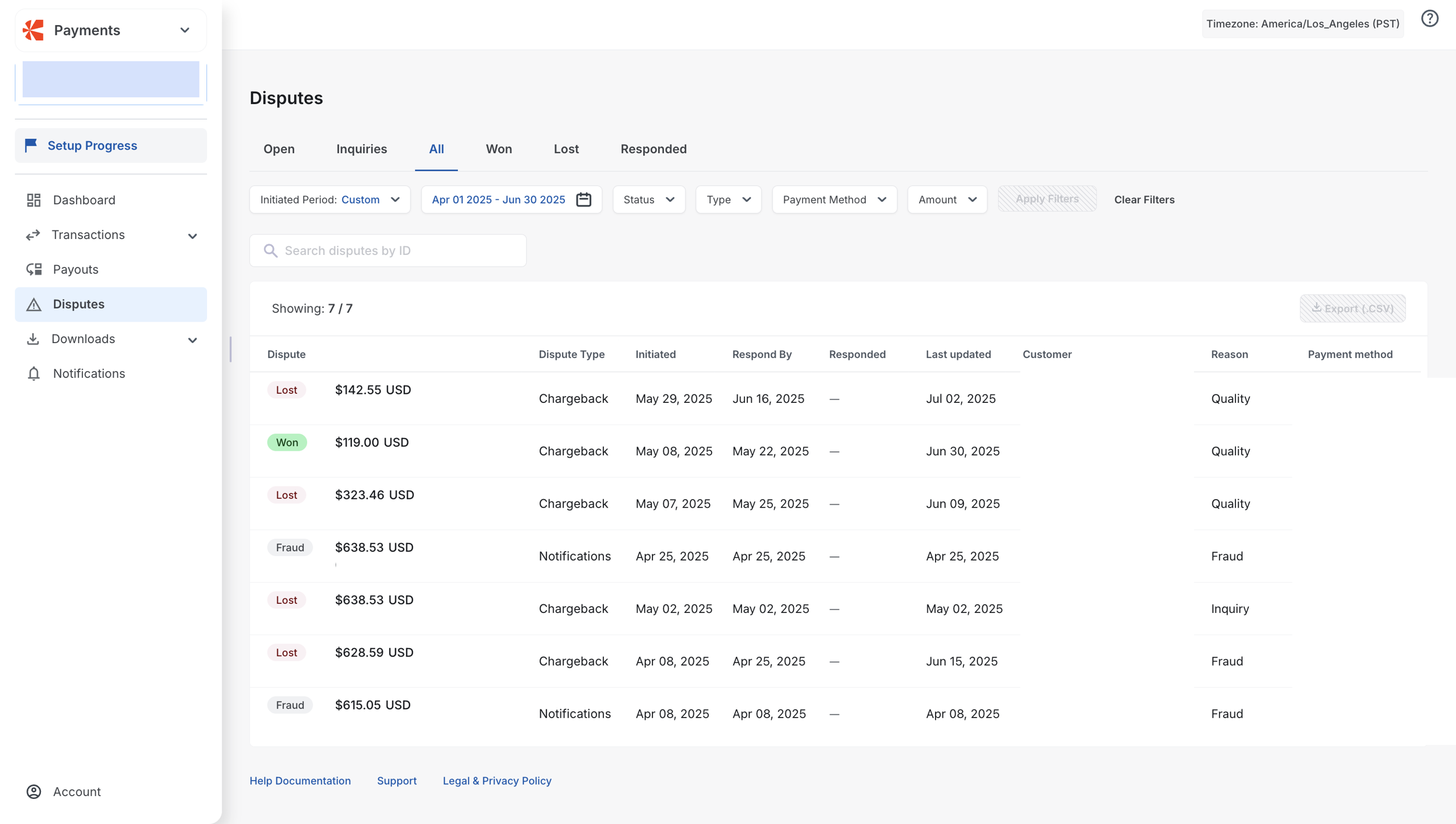
- Use filters such as status, date, and payment method to locate the specific dispute.
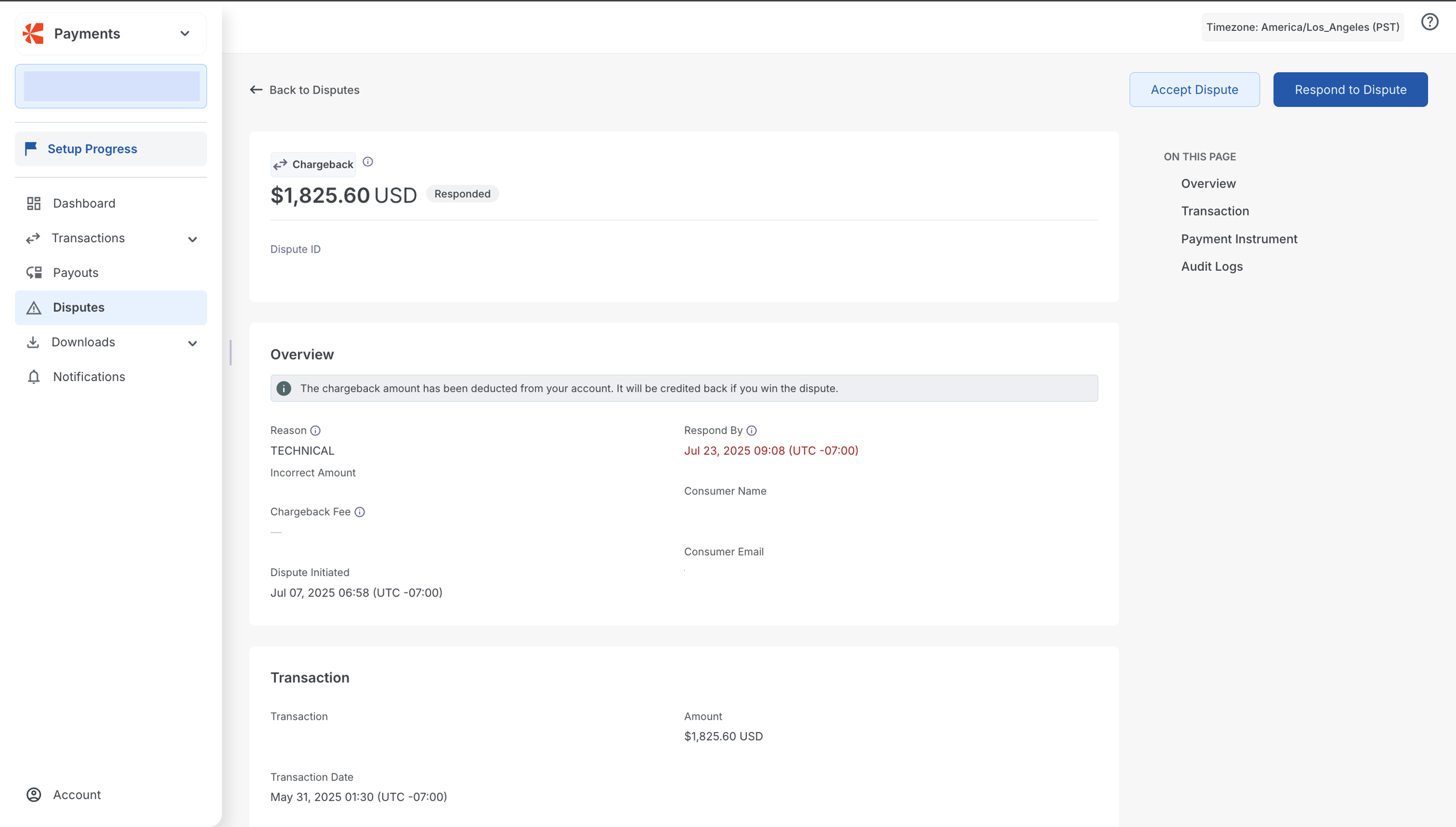
- Review the dispute details, including the reason for the dispute, such as fraudulent activity, quality issues, or service cancellation; the disputed amount; the response deadline; and the customer's details.
- Click Respond to dispute.
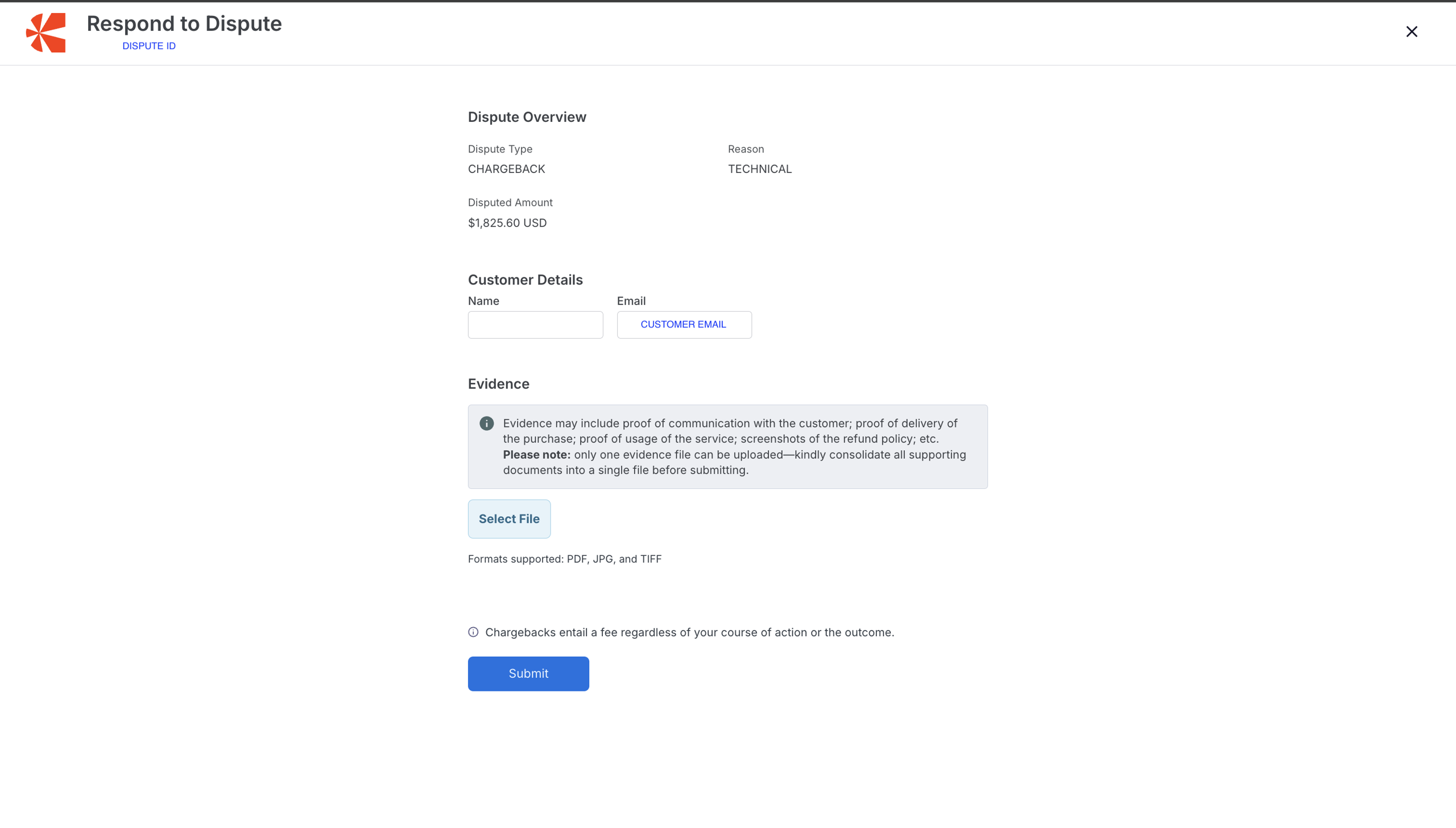
- Upload supporting evidence in one of these accepted formats: PDF, JPG, TIFF. Note that the uploaded evidence cannot be modified or withdrawn once submitted.
- Click Submit. You’ll receive a confirmation once the dispute details have been successfully submitted.
Evidence submission
Evidence submission involves providing documentation to support a merchant’s case during a payment dispute or chargeback. When a customer disputes a transaction, the merchant can submit evidence to demonstrate that the charge was valid and that the product or service was delivered as expected.
Chargebee Pay forwards this evidence to the issuing bank for review. The bank evaluates the documentation and determines whether to reverse or uphold the chargeback.
What to include
Submit clear, complete, and relevant documentation. Accepted file formats include PDF, JPG, and TIFF. Ensure that the page size is A4 if you are uploading evidence in JPG format.
Examples of valid evidence
- Proof of delivery, such as shipping receipts or tracking information.
- Clearly stated refund or cancellation policies were shared with the customer.
- Communication from the customer confirming receipt or satisfaction.
- Documentation that proves the customer used the service or product.
- Transaction receipts or invoices issued to the customer.
Note
Once submitted, evidence cannot be modified or withdrawn.
What happens after submission
After you submit evidence:
- The dispute status changes to Responded in the Chargebee Pay portal.
- Chargebee Pay forwards the documentation to the issuing bank.
- The bank reviews the evidence and updates the outcome:
- Won: The bank accepts the evidence, and the disputed amount is credited back to your account.
- Lost: The bank rejects the evidence, and the funds remain with the customer.
Chargeback guidelines
When defending a dispute, you must upload one or more supporting documents. The number and type of required documents vary depending on the dispute type.
-
Accepted file formats
- JPG: up to 10 MB. Ensure that the page dimension is A4.
- TIFF: up to 10 MB
- PDF: up to 2 MB
-
Network-specific guidelines
-
American Express: The American Express chargeback flow
- Optional: Request for Information: The American Express chargeback process starts with a Request for Information (RFI). You can fulfill this request by uploading the necessary documents within 14 days. The reason code of the RFI specifies why the cardholder disputed the transaction. At this point, funds are not yet deducted from your account.
Note
If you do not respond to an RFI and subsequently receive a chargeback for the disputed transaction, you cannot defend the chargeback.
-
Responded: Chargebee Pay received your defense documents and forwarded them to the scheme. It is no longer possible to change these documents.
-
Notification of Chargeback: Under certain circumstances, American Express does not send an RFI and initiates a chargeback directly. In this case, the chargeback process starts from the Notification of Chargeback stage.
Note
Submit your defense documents within 14 days of receiving the Notification of Chargeback.
-
Chargeback: A chargeback has been filed, and the amount is debited. This usually occurs a few days after you receive the notification of chargeback.
-
Chargeback Won: The issuer has reviewed and accepted the defense. The disputed amount will be transferred to your account. In the normal flow, this is the final status. However, in some cases, the cardholder may supply new evidence and challenge the decision, and this may lead to a second chargeback.
-
Diners and Discover: The Diners/Discover chargeback flow
- Optional: Request for Information: The Request for Information (RFI) is initiated when the cardholder does not recognize or does not agree to a charge, and requests more information from their bank. For an RFI, always upload information that can help the cardholder recognize the charge or that can support your position that the transaction is valid. You can upload information within 18 days of the RFI for Diners/Discover.
Note
We recommend that you always respond to RFIs as soon as you receive them. If you do not respond to an RFI before the issuer sends a chargeback on the transaction, you might not be able to defend the chargeback.
Recommendations on Request for Information documents are:
- For physical goods:
- Order confirmation/copy invoice.
- Proof that goods are delivered (DHL/UPS signed proof of delivery).
- For digital goods:
- Order confirmation/copy invoice.
- Proof that services are downloaded/used (date and time of download, IP address, and email address that was used for the download).
Note
Maximum file size is 3 MB.
-
Responded: Chargebee Pay received your defense documents and forwarded them to the scheme. It is no longer possible to change these documents.
-
Notification of Chargeback: The issuing bank initiated a Notification of Chargeback (NoC). The NoC can follow from a Request for Information (RFI), or the RFI step is skipped and the NoC occurs immediately after the payment status is set to Settled or Refunded.
-
Chargeback: A chargeback has been filed, and the amount is debited. This usually occurs a few days after you receive the notification of chargeback.
-
Chargeback Won: The issuer has reviewed and accepted the defense. The disputed amount will be transferred to your account. In the normal flow, this is the final status. However, in some cases, the cardholder may supply new evidence and challenge the decision, and this may lead to a second chargeback.
-
Mastercard: Mastercard chargeback flow
-
Notification of Chargeback: The issuing bank initiated a Notification of Chargeback (NoC). The dispute process has started, and money will be withdrawn from your account. The chargeback debit usually occurs a few days after you receive the NoC.
-
Chargeback: A chargeback has been filed, and the amount is debited. This usually occurs a few days after you receive the notification of chargeback.
Note
You must provide your defense documents within 40 days. There is no opportunity later in the process to provide information or to update information you provided.
-
Responded: Chargebee Pay received your defense documents and forwarded them to the scheme. It is no longer possible to change these documents.
-
Chargeback Won: The issuer has reviewed and accepted the defense. The disputed amount will be transferred to your account. In the normal flow, this is the final status. However, in some cases, the cardholder may supply new evidence and challenge the decision, and this may lead to a second chargeback.
Note
A maximum of 19 pages is allowed per chargeback defense document.
-
-
Visa: Visa chargeback flow
-
Notification of Chargeback: The issuing bank initiated a Notification of Chargeback (NoC). The dispute process has started, and money will be withdrawn from your account. The chargeback debit usually occurs a few days after you receive the NoC.
-
Chargeback: A chargeback has been filed, and the amount is debited. This usually occurs a few days after you receive the notification of chargeback.
Note
From 21 July 2025, the response timeframe for disputes opened on payments processed locally in the United States and Canada is 9 days. For disputes opened before this date in the United States or Canada, and for all other countries and regions, the response timeframe is 18 days.
-
Responded: Chargebee Pay received your defense documents and forwarded them to the scheme. It is no longer possible to change these documents.
-
Chargeback Won: The issuer has reviewed and accepted the defense. The disputed amount will be transferred to your account. In the normal flow, this is the final status. However, in some cases, the cardholder may supply new evidence and challenge the decision, and this may lead to a second chargeback.
-
-
Was this article helpful?