


Quote within guardrails. Close without rework.
Sales reps quote within constraints. Finance closes without reconciliation work. The rules engine and the billing engine are the same system.
AI products are complex to sell. Quoting them consistently is harder still.
Complex AI catalog
It used to take years of growth before a product catalog became hard to manage. AI products compress that timeline drastically. Usage tiers, add-ons, and multiple pricing models arrive even before your first enterprise rep does.
Scattered logic
Pricing logic lives in your catalog, spreadsheets, CRM, and reps' heads. For AI companies shipping new models constantly, that fragmentation compounds fast.
Acquired teams, new rules
Acquired teams bring their own pricing logic, legacy SKUs, and discount policies. Without a shared context layer, the same rules get applied differently by every team and business unit.
Selling Rules are the logic layer between your pricing strategy and your quotes
Selling Rules are configurable constraints that govern what can and can't be quoted, enforced automatically at the point of deal creation.
Discount & Pricing Rules
Control exactly how discounts and prices are applied on every quote. Set different discount limits by customer tier, rep role, or product family. Protect margin with floor pricing and non-discountable items. Apply automatic discounts for volume, contract duration, bundles, or promotions.
Bundling & Compatibility Rules
Define which products belong together and which can never appear on the same quote. Required add-ons are auto-added, incompatible combinations are blocked, and dependencies are enforced before the quote is even saved.
Quantity & Minimum Rules
Set minimum quantities by customer segment, whether enterprise, mid-market, or SMB, so deals never go out below your pricing floor. Enforce quantity dependencies between add-ons, auto-apply volume tier pricing, and lock quantities on items where exact counts matter.
Catalog Visibility
Show or hide plans and add-ons based on who is selling, who they are selling to, and how. Surface only HIPAA-compliant items for healthcare customers, hide enterprise plans for SMB deals, or show different catalogs to inbound and outbound teams.
Usage Limits & Overrides
Usage entitlements are part of the deal, so they need the same guardrails as pricing. Reps can view and override API limits, prepaid credits, and seat caps directly from the quote form, but only within the boundaries you have defined. Anything beyond that routes for approval automatically.
Form & Field Rules
Control what appears on the quote form based on deal context. Show integration fields only when custom integration is selected. Surface security and legal fields for enterprise deals. Set default payment terms by customer risk or deal size. Auto-add GDPR or SLA clauses for specific regions.
Describe the rule. We build it.
Most CPQ rule builders require SQL-like logic that only an admin can write. Chargebee's Selling Rules work differently. Describe what you need in plain language. CPQ interprets it, structures it, and shows it to you for review before it goes live.
Rules can be as granular as you need: multiple conditions, customer segments, geographies, without involving a developer or a CPQ admin. Test in sandbox, confirm, deploy.
AND WHEN deal_value < $250,000
ENFORCE hard_block → no exceptions
Solve a different problem for every team.
The same feature solves a different problem depending on who you ask.
See it in action.
Get a demo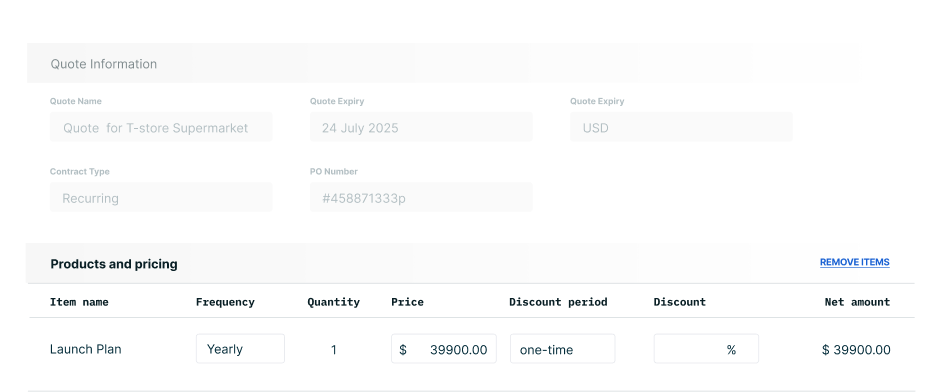
Go from rule configuration to closed deal
Selling Rules operate entirely within Chargebee CPQ's quote workflow.
Configure rules your way
Describe a rule in plain language via the Copilot, or configure directly in the UI. No developer required.
Rules enforce at quote creation
The rules engine validates every selection in real time.
Exceptions route for approval
With great power comes great responsibility to override selling rules.
Approved quote becomes subscription
The quote converts into a live Chargebee Billing subscription.
See how teams close faster with fewer errors.
Complex Deals, Zero Quoting Friction
"It drastically cuts time to quote complex deals. We spend less time on admin and more time closing deals."
Salesforce and Chargebee, Always in Sync
"The seamless data sync between Salesforce and Chargebee ensures our data is always in parity. Whether running reports in Salesforce or Chargebee, the data is perfectly aligned."
Two-Way Sync Between HubSpot and Chargebee
"The integration between Chargebee and HubSpot is allowing us to spend less time worrying about moving data between systems and more time focused on serving our partners."
Selling Rules are one part of the full quote-to-revenue flow
Every feature in Chargebee CPQ is built on the same billing engine. Quotes become subscriptions automatically at close.
One catalog to rule them all
Configure products, pricing models, and discounts in one catalog. Apply discounts at line item or invoice level, as a percentage or flat amount.
Build hybrid quotes, without code
Multi-product bundles, usage add-ons, one-time fees, and more in one quote. Custom fields and form layouts, no engineering needed.
Built-in approval hierarchy
Multi-level approval workflows built into the quoting flow. Live deal status inside the CRM. Proposals go out in one click once a deal clears.
Multiple levers for negotiation
Set custom entitlements on API limits, credits, seat counts, or any usage metric. Overrides route through approval workflows.
Sign. Bill. Done.
Send, track, and receive signatures from inside the quoting flow. Billing starts automatically the moment a customer signs.
Quote from Salesforce or HubSpot
Quote directly from Salesforce and HubSpot. Subscriptions are created automatically on close. Real-time quote status visible in the CRM.
FAQs
How complex can a selling rule get?
Do Selling Rules apply only to quotes?
Do I need a developer or CPQ admin to configure rules?
What happens when a rep tries to bypass a rule?
How do selling rules connect to Chargebee Billing?
Can rules be tested before going live?
A selling rule that lives outside your CPQ is just a suggestion.
Your pricing rules deserve better than a spreadsheet and a prayer. Selling Rules enforce them where it counts.