Can I change the organization address format in the Invoices?
Problem Statement
How do I add my company's VAT number to the organization address on invoices? Can I configure the organization address as a single line of text?
Solution
Chargebee lets you customize the Organization Address Format on invoices, credit notes, and quotes. You can display the address with VAT number and other details in a single line, expanded form, or custom format.
Format options:
- Expanded: The address is displayed as a block with each part on a new line.
- Single Line: The address is laid out in a single sentence.
- Custom: Edit the text directly or use Mail Merge fields (click Show Address Fields to insert them).
For more details, see Customizing invoices, credit notes, and quotes.
Steps to Set It Up
- Go to Chargebee Dashboard.
- Navigate to Configure Chargebee > Customize Invoices, Credit Notes, and Quotes > General Settings.
- Under Organisation Address Format, click Change Format.
- Choose the format (Expanded, Single Line, or Custom) and click Apply.
- Click Apply Changes.
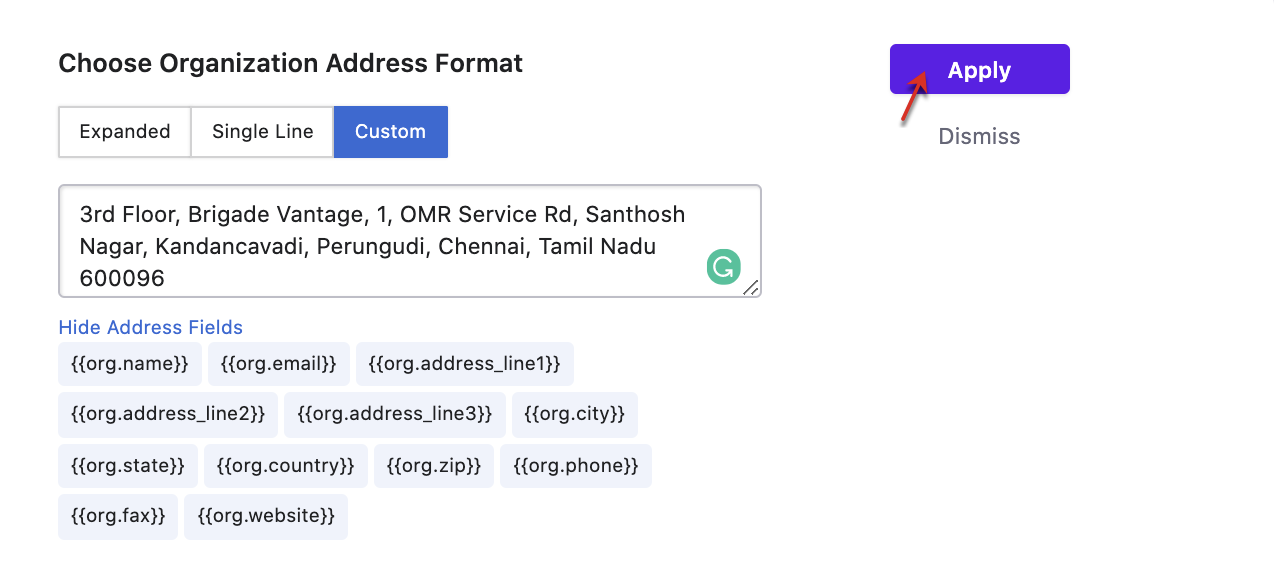
Use the Preview Invoice option to see how the address appears on the PDFs.
Here's a video on the same.
Note
If the organization address format is updated, it will only apply to upcoming or newly created invoices, credit notes, and quotes.
Was this article helpful?