New in Chargebee: Explore Reveal and understand your payment performance end-to-end.Try Now
Docschargebee docs
HomeBillingPaymentsRevRecGrowthReveal
Support

Product Updates


  • Release Notes

Getting Started


  • Overview
  • Chargebee Billing Data Centers
  • Object Relationship Model
  • Understanding Sites
  • Chargebee Tech Glossary
  • Articles and FAQ

Implementing Chargebee


  • Implementation Guide
  • Go-live Checklist
  • Articles and FAQ

AI in Chargebee


  • Chargebee Agents
  • Chargebee Copilot
  • Chargebee MCP Server (Model Context Protocol)

Developer Resources


  • Developer Resources Overview
  • Articles and FAQ

Product Catalog


  • Product Catalog Overview
  • Coupons
  • Articles and FAQ

Subscriptions


  • Working with Subscriptions
  • Billing
  • Orders
  • Articles and FAQ

Customers


  • Managing Customers
  • Account Hierarchy
  • Email Notifications
  • Branding
  • Configure Multiple Languages
  • Articles and FAQ

Entitlements


  • Entitlements Overview
  • Features Overview
  • Feature Management
  • Managing Product Entitlements
  • Subscription Entitlements
  • Customer Entitlements
  • Grandfathering Entitlements
  • Articles and FAQ

Usage Based Billing


  • Understanding Usages
  • Setting up Usage Based Billing
  • Usage Alerts
  • Metered Billing
  • Articles and FAQ

Chargebee CPQ


  • Chargebee CPQ
  • Chargebee CPQ for Salesforce
  • Chargebee CPQ for HubSpot

Invoices, Credit Notes, and Quotes


  • Invoices
  • Credit Notes
  • Quotes [Legacy]
  • Transactions
  • Articles and FAQ

Taxes


  • Overview
  • Configuring Taxes
  • Country-specific Taxes
  • Articles and FAQ

Hosted Capabilities


  • Overview
  • Hosted Checkout
  • Hosted Self-Serve Portal
  • Hosted Pages Features
  • Additional Hosted Pages
  • Payment Components
  • Pricing Table
  • Managing Payments with Chargebee.js
  • Mobile-Optimized Hosted Pages
  • Articles and FAQ

Site Configuration


  • Users & Roles
  • Custom Fields & Metadata
  • Approvals
  • Mandatory Fields
  • File Attachments & Comments
  • Advanced Filter Options
  • Multicurrency Pricing
  • Multi-decimal Support
  • Configuring Reason Codes
  • Events and Webhooks
  • API Keys
  • Time Zone
  • Time Machine
  • Transfer Configurations
  • Articles and FAQ

Multi Business Entity


  • Multi Business Entity Overview
  • Customer Transfer Overview
  • Articles and FAQ

Mobile Subscriptions


  • Overview
  • Omnichannel Subscriptions
  • Omnichannel One-Time Orders
  • Mobile Subscriptions (Legacy)

Reports and Analytics


  • RevenueStory
  • Home Dashboard
  • Frequently Asked Questions
  • FAQs for Classic Reports Sunset
  • Articles and FAQ

Integrations


  • Sales
  • Customer Support and Success
  • Finance
  • Tax
  • Marketing
  • Stitch
  • Collaboration
  • Contract Management
  • Ecommerce Management
  • Articles and FAQ

Data Privacy & Security


  • Two Factor Authentication
  • SAML Single Sign-On
  • System for Cross-Domain Identity Management (SCIM)
  • EU-GDPR
  • Consent Management
  • Personal Data Management
  • Compliance Certificates
  • HIPAA Guidelines
  • PCI Recommendations and Integration Types
  • Articles and FAQ

Data Operations


  • Bulk Operations
  • Migration
  • Articles and FAQ
  1. Billing
  2. Hosted Capabilities
  3. Articles and FAQ
  4. Chargebee JS
  1. Billing
  2. Hosted Capabilities
  3. Articles and FAQ
  4. Chargebee JS

Why coupon with the full discount is asking for payment information?

Problem Statement

You want to understand why coupon with the full discount is asking for payment information.

Solution

Scope

Why coupon with the full discount on checkout is asking for payment information?

How to skip a payment for a subscription with a full discount on checkout?

My customer has applied for a full discount and it is asking for payment on checkout

Summary

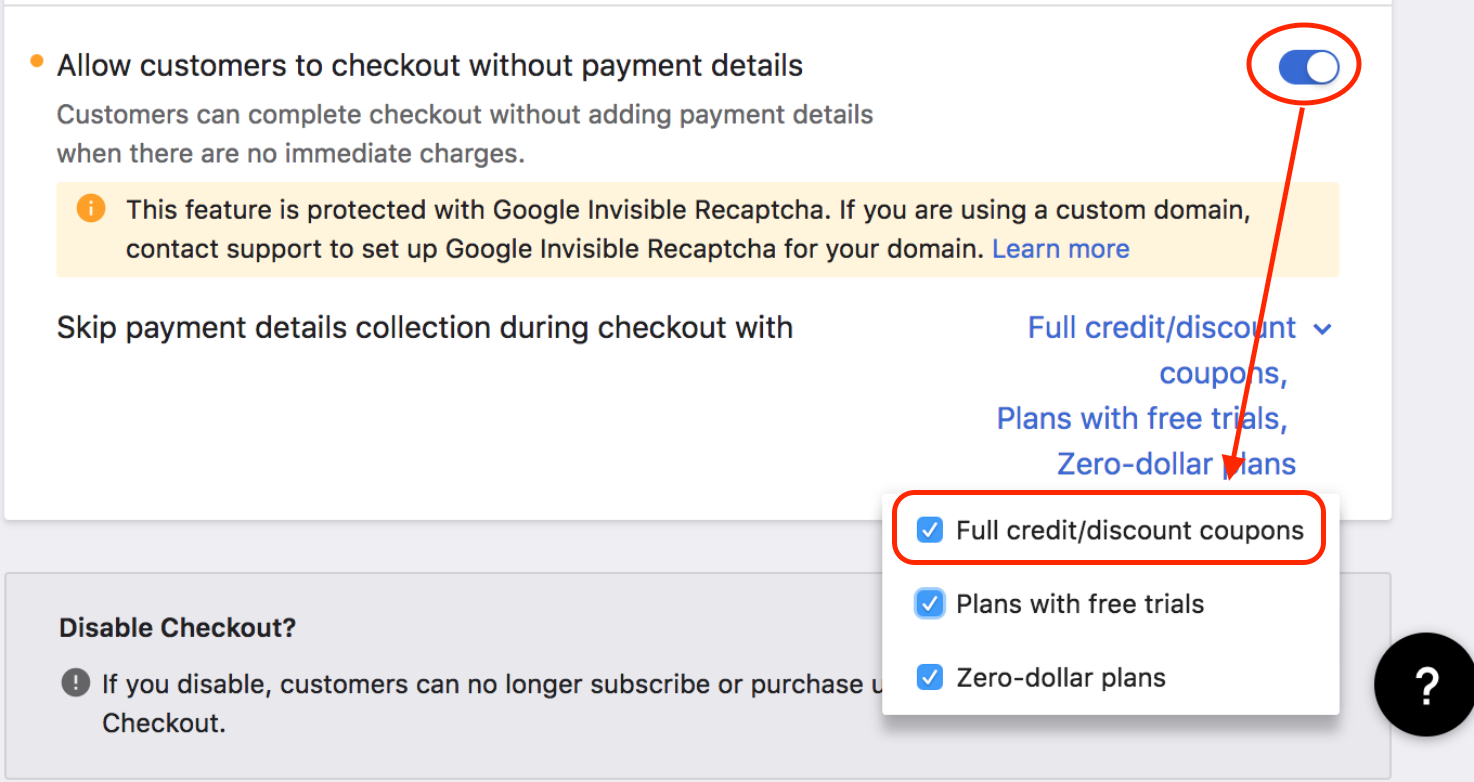
Though coupons with full discount by percentage or fixed amount are applied at checkout, customers will be insisted to update the payment method by default. In order to skip the payment method, enable Allow customers to checkout without payment details enabled for Full credit/discount coupons from Settings > Configure Chargebee > Checkout & Self-Serve Portal > Checkout.

Note: This is not applicable on Checkout Hpv2 (Single Page Checkout)

Solution

Checkout V3:

Before we skip the payment method, ensure the full discount coupon requirements are met.

  1. Discount Type: Ensure a full discount is provided in terms of Percentage (100%) or Fixed amount (if the plan's price is $50 & the fixed amount is also $50).

  2. Apply on: If this is selected as 'Each Specified item' then the specified plans, addons & charges that are 100% discounted should be included on the coupon details page.

  3. Duration: You can choose 'One Time, Forever' however if it's 'Limited Period' ensure this coupon is active

  4. Validity Till: If this is mentioned, ensure that it's within the coupon validity.

  5. Maximum Redemptions: If this is mentioned, ensure the coupon is not maxed out the number of redemptions provided.

Once the Coupons fulfill all the above prerequisites, then navigate to Settings > Configure Chargebee > Checkout & Self-Serve Portal > Checkout > Allow customers to checkout without payment details enabled.

Then ensure Skip payment details collection during checkout with Full credit/discount coupons
image

Note
1.
This feature is applicable only for new subscriptions created through checkout.
2. In case you are using the checkout only to collect payment information from your customers, this option will not have any effect (i.e payment information will be collected from all your customers).
3. You can disable this setting any time you wish in the future. Once you disable this, all the new subscriptions (free/trial/coupons) created post disabling this option will require payment information during the checkout process itself.

Refer to this link for the In-app checkout (v3) FAQ

Was this article helpful?