New in Chargebee: Explore Reveal and understand your payment performance end-to-end.Try Now
Docschargebeedocs
HomeBillingPaymentsRevRecGrowthReveal
Support

Product Updates


  • Release Notes

Payment Methods


  • Payment Methods Overview
  • Cards
  • Direct Debit
  • Bank Based Payments
  • Wallets
  • Vouchers
  • Articles and FAQ

Payment Gateways and Configuration


  • Payment Gateways Overview
  • Chargebee Test Gateway
  • Stripe
  • PayPal Payment Services
  • Chargebee Pay
  • Adyen
  • Authorize.net
  • Bambora (formerly Beanstream)
  • Bank of America
  • BluePay
  • BlueSnap
  • Braintree
  • Checkout.com
  • CyberSource
  • dLocal
  • EBANX
  • Ecentric
  • Elavon
  • E-xact Direct Integration
  • eWay Rapid
  • Global Payments
  • GoCardless
  • J.P. Morgan Mobility Payment Solutions
  • Metrics Global
  • Mollie
  • Moneris
  • Network Merchants Incorporated (NMI)
  • Nuvei
  • Orbital (Chase Paymentech)
  • Pay.com
  • Paymill
  • Paystack
  • Pin Payments
  • QuickBooks Payments
  • Razorpay
  • Sage Pay
  • Solidgate
  • Twikey
  • Windcave
  • Worldline Online Payments(formerly Ingenico)
  • Worldpay
  • Articles and FAQ

Level 2/3 Data Support


  • Level 2/3 Data Support

Advanced Routing


  • Advanced Routing

Dunning


  • Dunning
  • Articles and FAQ

Offline Checkout


  • Offline Checkout
  • Articles and FAQ

Transaction Sync & Invoice Mapping


  • Transaction Sync and Invoice Mapping

Fraud Management


  • Fraud Management

Error Handling


  • Errors with Root Cause and Troubleshooting

Payment Lifecycle Logs


  • Payment Intents
  • Transactions
  • Gateway Activity Logs
  • Articles and FAQ

Others


  • Reach (Merchant of Record)
  • Payment Verification
  • Bulk Deletion of Payment Methods
  • Custom Payment Methods
  • Payment Initiator Parameter
  • PSD2 and Strong Customer Authentication
  • RBI e-Mandate
  • RBI Tokenization Regulations
  • Chargeback Management
  • Transaction Descriptors
  • Payment Preferences
  • Visa Trial Rules
  • Mastercard Trial Rules
  • Co-badged Card Compliance
  • Articles and FAQ
  1. Payments
  2. Dunning
  3. Articles and FAQ
  4. Dunning
  1. Payments
  2. Dunning
  3. Articles and FAQ
  4. Dunning

Error- "No Applicable gateways found" during Checkout

**This article also covers **What are smart routing rules?

How to configure my default gateway?

You are seeing this error because you do not have a gateway assigned for the particular currency (based on the plan).

Smart Routing Rules, allows you to configure which gateway will be used by default when you have multiple gateways for the same payment methods/currency. Eg, 2 Stripe or 2 GoCardless accounts configured in Chargebee.

It is recommended to configure default gateways for each payment method and currency.

All you need to do is go to; Settings » Configure Chargebee » Payment Gateways » Manage Rules » Select Gateway against Currency & Payment Type
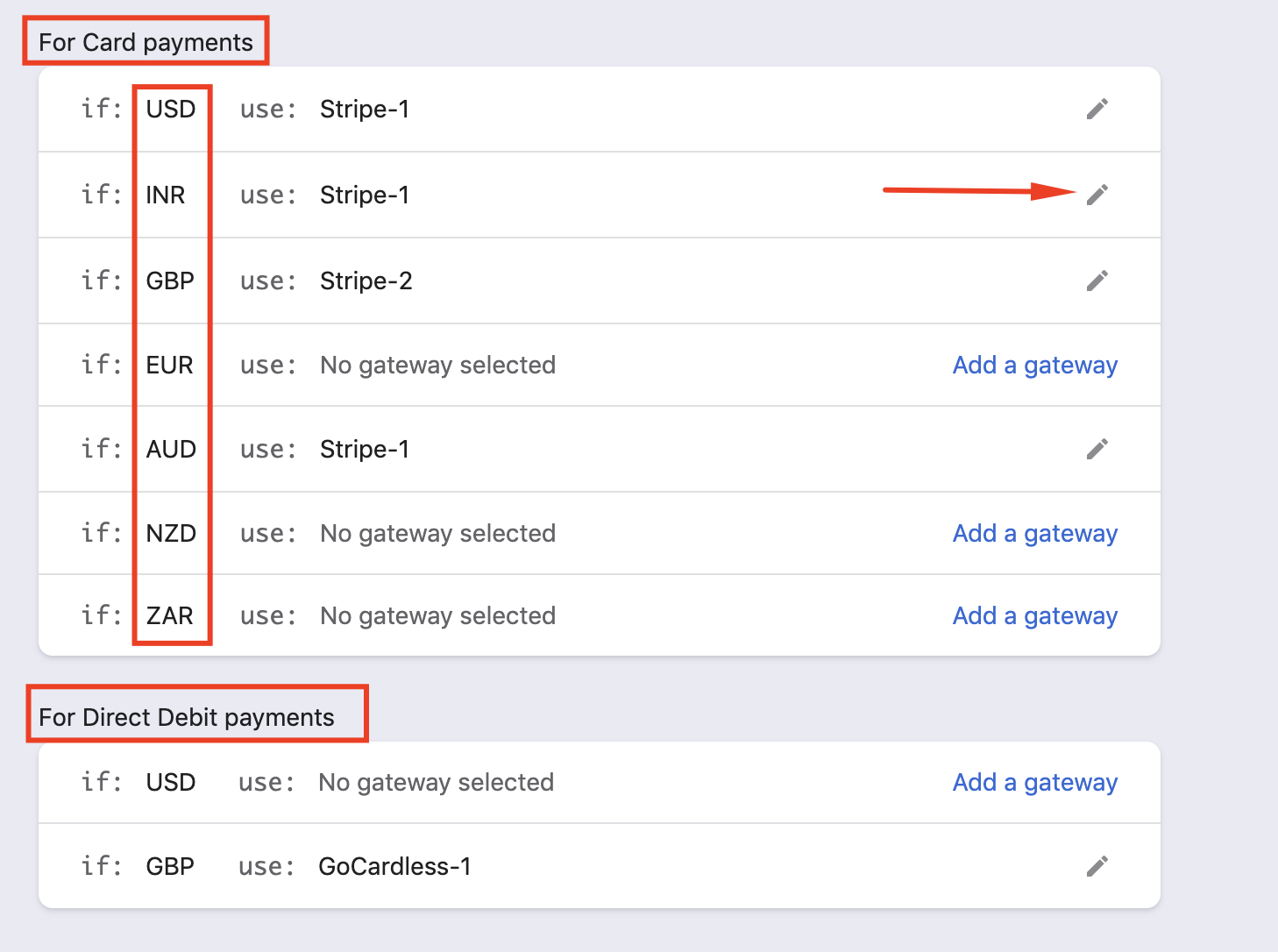
image

Read more on Smart Routing rules.

If you have any further questions, please reach out to support.

Related Articles

What happens when dunning retries expire?
What is Smart Dunning?
When does dunning take place?
What is dunning in Chargebee?
How to enable dunning in subscriptions?
Can dunning occur when a subscription is paused?
Find the list of active subscriptions with invoices dunning state
How do I avoid unpaid invoices for active subscriptions?
Smart and Manual Dunning Management

Show more

Was this article helpful?