



Build usage threshold alerts with Chargebee
When a customer approaches the edge of what they have paid for, you can warn them, alert your team, or act inside your product, automatically. This is how usage thresholds turn quiet billing data into retention, expansion, and control.
Three outcomes you build on
one signal
The same event, a customer running low, means something different to each team. This recipe gives Product, RevOps, and Finance the experiences to build on it.
A customer who silently hits a wall churns. One who gets a timely, helpful nudge feels looked after. Surprise overage bills are a top driver of involuntary churn, warnings remove the surprise.
Unbounded usage on AI-heavy plans burns margin fast. Thresholds let you cap, gate, or require an upgrade before consumption runs past what the plan can support. Predictable cost, protected margin.
A customer hits the limit. Here’s what happens next.
Every usage alert is a decision point. The four steps below are the recipe: from the moment Chargebee detects a breach, to the action you take. Set up the alert once. The rest runs on signal.
Pick the metric and the line: 80% of AI actions, or any usage level that matters.
Every action the customer takes counts against their plan, automatically.
The line is breached. Chargebee flags the customer and tells you instantly.
Email the customer, ping your team, or gate the product. Your call.
Configure once. Chargebee watches forever.
Set up as many alerts as you need: one for your Growth plan at 80%, another for Scale at 90%, a separate one for AI Actions vs API calls. Each alert runs independently and watches every qualifying subscription automatically.
An 80% threshold means different things on a Starter plan vs. a Growth plan. Scoping alerts to specific item prices means your response playbook (the tone, the offer, the urgency) is always calibrated to the right tier.
Save the alert and Chargebee starts monitoring immediately. It fires an alert_status_changed event to your webhook. Everything below runs off that.
Curious what makes real-time alerting work under the hood? See how we built real-time usage alerts , including how we handle billing state, alert evaluation, and the edge cases that make usage alerts different from typical infrastructure alerts.
The alert fires. What happens next?
You’ve told Chargebee what to watch. Now decide what the signal actually triggers: how you gate the product, what you offer the customer, and how your GTM team gets looped in. Below are four patterns we see most often. Use them as a starting point.
Cap and enforce
Protect margin on entry plans. Warn early, then stop usage at the limit until they upgrade.
1. Create the 70% warning alert:
ALERT_WARN_ID=$(curl ... -d "threshold[value]=70" | jq '.alert.id')2. Create the 100% gate alert:
ALERT_GATE_ID=$(curl ... -d "threshold[value]=100" | jq '.alert.id')# One POST per threshold. Store the returned alert.id for each. # --- Alert 1: 70% warn --- curl -s -X POST https://{SITE}.chargebee.com/api/v2/alerts \ -u {API_KEY}: \ -d type=usage_exceeded \ -d "name=ai_actions_warn_70" \ -d metered_feature_id=ai_actions \ -d "threshold[value]=70" # Save as: ALERT_WARN_ID = response.alert.id # --- Alert 2: 100% hard gate --- curl -s -X POST https://{SITE}.chargebee.com/api/v2/alerts \ -u {API_KEY}: \ -d type=usage_exceeded \ -d "name=ai_actions_gate_100" \ -d metered_feature_id=ai_actions \ -d "threshold[value]=100" # Save as: ALERT_GATE_ID = response.alert.id
// 1. Verify signature — reject spoofed requests
const sig = req.headers['chargebee-webhook-signature']
if (!verifyHmac(sig, req.rawBody, WEBHOOK_SECRET)) {
  return res.status(401).send('Invalid signature')
}

// 2. Acknowledge fast — Chargebee retries on timeout
res.status(200).send('OK')

const { alert, alert_status } = req.body.content
if (alert_status.alarm_status !== "in_alarm") return  // cleared = billing period reset

// 3. Deduplicate — Chargebee retries on non-2xx
if (await redis.get(`cb_event:${req.body.id}`)) return
await redis.setex(`cb_event:${req.body.id}`, 86400, 1)

// 4. Route by alert.id
const subId = alert_status.subscription_id
const sub  = await chargebee.subscription.retrieve(subId).request()

if (alert.id === process.env.ALERT_WARN_ID) {
  await sendWarningEmail({ customer: sub.customer, pct: 70 })
}

if (alert.id === process.env.ALERT_GATE_ID) {
  await chargebee.subscriptionEntitlement.setAvailability(subId, {
    is_enabled: false,
    "subscription_entitlements[feature_id][0]": "ai_actions",
  })
  await sendLimitReachedEmail({ customer: sub.customer })
}
Allow & alert your team
Never block a big account. Let usage run, but ping your AM so a human reaches out.
curl -s -X POST https://{SITE}.chargebee.com/api/v2/alerts \
  -u {API_KEY}: \
  -d type=usage_exceeded \
  -d "name=ai_actions_am_alert_70" \
  -d metered_feature_id=ai_actions \
  -d "threshold[value]=70" \
  # Scope: Growth + Enterprise plans only
  -d "filter_conditions[field][0]=plan_price_id" \
  -d "filter_conditions[operator][0]=not_equals" \
  -d "filter_conditions[value][0]=starter_monthly_usd"
# Save as: ALERT_AM_ID = response.alert.id
const sig = req.headers['chargebee-webhook-signature']
if (!verifyHmac(sig, req.rawBody, WEBHOOK_SECRET)) return res.status(401).end()
res.status(200).send('OK')

const { alert, alert_status } = req.body.content
if (alert_status.alarm_status !== "in_alarm") return
if (await redis.get(`cb_event:${req.body.id}`)) return
await redis.setex(`cb_event:${req.body.id}`, 86400, 1)

// Enrich: retrieve full subscription + customer record
const sub = await chargebee.subscription
  .retrieve(alert_status.subscription_id).request()

// Confirm it's still in_alarm — guard against race conditions
const statuses = await chargebee.alertStatus
  .list({ subscription_id: alert_status.subscription_id }).request()
const current = statuses.list.find(
  x => x.alert_status.alert_id === alert.id
)
if (current?.alert_status.alarm_status !== "in_alarm") return

// No gate. Notify AM — they own the conversation.
await notifySlackAM({
  customer:    sub.customer,
  planId:      sub.subscription.plan_id,
  subId:       alert_status.subscription_id,
  triggeredAt: alert_status.alarm_triggered_at,
})
Escalate in steps
Build awareness gradually: a gentle in-app nudge, then email, then a firm prompt to upgrade.
const thresholds = [
  { name: "ai_nudge_50",  value: 50, env: "ALERT_ID_50"  },
  { name: "ai_warn_80",   value: 80, env: "ALERT_ID_80"  },
  { name: "ai_gate_100",  value: 100, env: "ALERT_ID_100" },
]

for (const t of thresholds) {
  const res = await chargebee.request("POST", "/api/v2/alerts", {
    type: "usage_exceeded",
    name: t.name,
    metered_feature_id: "ai_actions",
    "threshold[value]": t.value,
  })
  console.log(t.env, '=', res.alert.id)  // paste into .env
}
const sig = req.headers['chargebee-webhook-signature']
if (!verifyHmac(sig, req.rawBody, WEBHOOK_SECRET)) return res.status(401).end()
res.status(200).send('OK')

const { alert, alert_status } = req.body.content
if (alert_status.alarm_status !== "in_alarm") return
if (await redis.get(`cb_event:${req.body.id}`)) return
await redis.setex(`cb_event:${req.body.id}`, 86400, 1)

const sub = await chargebee.subscription.retrieve(alert_status.subscription_id).request()

// Route by alert.id — your mapping, not a Chargebee concept
const actions = {
  [process.env.ALERT_ID_50]:  () => showInAppBanner(alert_status.subscription_id),
  [process.env.ALERT_ID_80]:  () => sendWarningEmail({ customer: sub.customer, pct: 80 }),
  [process.env.ALERT_ID_100]: async () => {
    await chargebee.subscriptionEntitlement.setAvailability(
      alert_status.subscription_id,
      { is_enabled: false, "subscription_entitlements[feature_id][0]": "ai_actions" }
    )
    await sendLimitReachedEmail({ customer: sub.customer })
  },
}
await actions[alert.id]?.()
Prompt a refill
For prepaid balances: warn when running low, then offer a one-click top-up before they hit zero.
curl -s -X POST https://{SITE}.chargebee.com/api/v2/alerts \
  -u {API_KEY}: \
  -d type=usage_exceeded \
  -d "name=ai_credits_low_60" \
  -d metered_feature_id=ai_credits \
  -d "threshold[value]=60"
# Save as: ALERT_CREDITS_ID = response.alert.id
const sig = req.headers['chargebee-webhook-signature']
if (!verifyHmac(sig, req.rawBody, WEBHOOK_SECRET)) return res.status(401).end()
res.status(200).send('OK')

const { alert, alert_status } = req.body.content
if (alert_status.alarm_status !== "in_alarm") return
if (await redis.get(`cb_event:${req.body.id}`)) return
await redis.setex(`cb_event:${req.body.id}`, 86400, 1)

const sub = await chargebee.subscription.retrieve(alert_status.subscription_id).request()

// Generate a Chargebee-hosted top-up checkout URL
const page = await chargebee.hostedPage
  .checkoutOneTimeForItems({
    subscription_id: alert_status.subscription_id,
    item_prices: [{ item_price_id: "ai_credits_topup_1000", quantity: 1 }],
  }).request()

await sendCreditLowEmail({
  customer:  sub.customer,
  topup_url: page.hosted_page.url,   // CB-hosted, no PCI scope
  credits_remaining: 400,          // retrieve live if needed
})
Inform the right people. Prompt
the next best step.
When the alert fires, the same webhook can trigger notifications across every surface you care about—customer-facing, internal, or both. Use any lane (email, Slack, in-app) with any pattern from Step 2 above.
Email the customer
Shows the customer their exact usage and gives them one clear action: upgrade now or keep watching.
Slack your team
Gives your AM the account, usage, and plan value the moment it matters, with a one-click action already in the message.
Act inside the product
Shows live usage status inside the product and surfaces an upgrade path without the customer ever leaving the page.
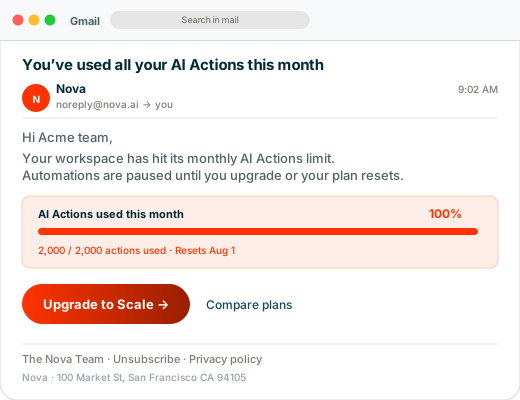
Status and a clear next step, delivered to the customer
The customer gets a clear, human email before anything disrupts them. No surprise, no bill shock, just a helpful heads-up and an easy way to keep going.
- Shows exactly how much they have used
- One-click upgrade, pre-filled to the right plan
- Sent the moment they cross, not days later
async function sendWarningEmail(ctx) {
  const { customer, sub } = ctx

  // Dynamic template variables for your ESP template
  const templateVars = {
    workspace_name: customer.company,
    used_count:     ctx.used,       // from usage API or webhook payload
    total_quota:    ctx.limit,
    pct_used:       ctx.pct + '%',
    reset_date:     formatDate(sub.current_term_end),
    upgrade_url:    `https://app.example.com/billing?ref=alert&sub=${sub.id}`,
  }

  await sgMail.send({
    to:                  customer.email,
    from:                'billing-alerts@example.com',
    templateId:          'd-abc123usage80pct',
    dynamicTemplateData: templateVars,
  })
}

// 100% limit-reached email: same shape, different template
async function sendLimitReachedEmail(ctx) {
  await sgMail.send({
    to:                  ctx.customer.email,
    from:                'billing-alerts@example.com',
    templateId:          'd-def456usage100pct',
    dynamicTemplateData: {
      workspace_name: ctx.customer.company,
      support_url:    'https://example.com/support',
      upgrade_url:    `https://app.example.com/billing?ref=gated`,
    },
  })
}
Your team gets the signal and the next move in one message
The account owner gets pinged the instant a key customer crosses a line, with everything they need to act right there in the message.
- Account, plan, and how far over they are
- Buttons to open the account or start an upsell
- Routed to the right channel or person automatically
async function notifySlackAM(ctx) {
  const { customer, planId, triggeredAt, subId } = ctx

  // Route to the right AM channel by plan tier
  const channel = planId.includes('enterprise')
    ? process.env.SLACK_AM_ENTERPRISE_WEBHOOK
    : process.env.SLACK_AM_GROWTH_WEBHOOK

  const ago = timeAgo(triggeredAt)  // e.g. '2 minutes ago'

  await fetch(channel, {
    method: 'POST',
    headers: { 'Content-Type': 'application/json' },
    body: JSON.stringify({
      blocks: [
        { type: 'section',
          text: { type: 'mrkdwn', text:
            `🚨 *${customer.company}* is at 70% of quota` } },
        { type: 'section', fields: [
          { type: 'mrkdwn', text: `*Plan:*\n${planId}` },
          { type: 'mrkdwn', text: `*Usage:*\n70% of quota` },
          { type: 'mrkdwn', text: `*Triggered:*\n${ago}` },
          { type: 'mrkdwn', text: `*Sub ID:*\n${subId}` },
        ] },
        { type: 'actions', elements: [{
          type: 'button', style: 'primary',
          text: { type: 'plain_text', text: 'View in Chargebee' },
          url: `https://app.chargebee.com/subscriptions/${subId}`,
        }] },
      ],
    }),
  })
}
- Go to api.slack.com/apps → Create new app → Incoming Webhooks
- Enable Incoming Webhooks → Add to Workspace → pick channel
- Copy the webhook URL → add to env as
SLACK_AM_ENTERPRISE_WEBHOOK - Repeat for each channel tier (Growth, Enterprise, etc.)
- For @-mentions or dynamic channel routing, swap to a bot token +
chat.postMessageinstead
Status and upgrade path, right where they are hitting the limit
A banner or gate inside your product, shown exactly when it matters. The highest-converting place to prompt an upgrade, because they are in the flow of getting value.
- Soft banner at warning, firm gate at the limit
- Reflects their real, live usage
- Upgrade without ever leaving the page
// Proxy endpoint: GET /api/chargebee/alert-status?sub=:subId
// Server calls Chargebee, client never touches Chargebee credentials

async function getAlertState(subId) {
  const res = await fetch(`/api/chargebee/alert-status?sub=${subId}`)
  const { statuses } = await res.json()

  // Map alert IDs to a flat lookup
  const alerts = {}
  for (const s of statuses) {
    alerts[s.alert_id] = s.alarm_status
  }
  return alerts
}

// In your React/Vue component:
const alerts = await getAlertState(currentUser.subscriptionId)

const uiState =
  alerts['starter_100pct_stop'] === "in_alarm"
    ? 'BLOCKED'     // show modal, disable feature buttons
  : alerts['starter_80pct_warn'] === "in_alarm"
    ? 'WARNING'     // show banner, allow usage
  : 'NORMAL'        // full access

// Cache this per session. Invalidate when alert_status_changed fires
// on your webhook endpoint so the next page load re-fetches.
Turn alerts into expansion conversations.
Usage alerts stop surprises and create expansion moments. Chargebee watches the threshold automatically, routes alerts to your team at the moment of maximum impact, and wires notifications into email, Slack, and your product. Customers get warned before overspend — you focus on the conversation, not the infrastructure.