How to cancel subscriptions with an unpaid invoice?
Problem Statement
How do I filter unpaid invoices and cancel the related subscriptions?
Solution
Unpaid invoices result from payment failures. You can void or delete them from the Chargebee UI or via bulk operations. Use filters to list active subscriptions (offline or online) with unpaid invoices.
Note:
To reduce unpaid invoices and keep subscriptions Active, configure Dunning with an appropriate final action.
Steps to Set It Up
- Go to Invoices, credit notes, and quotes > Invoices
- Apply the Unpaid Invoices filter (add more filters if needed)
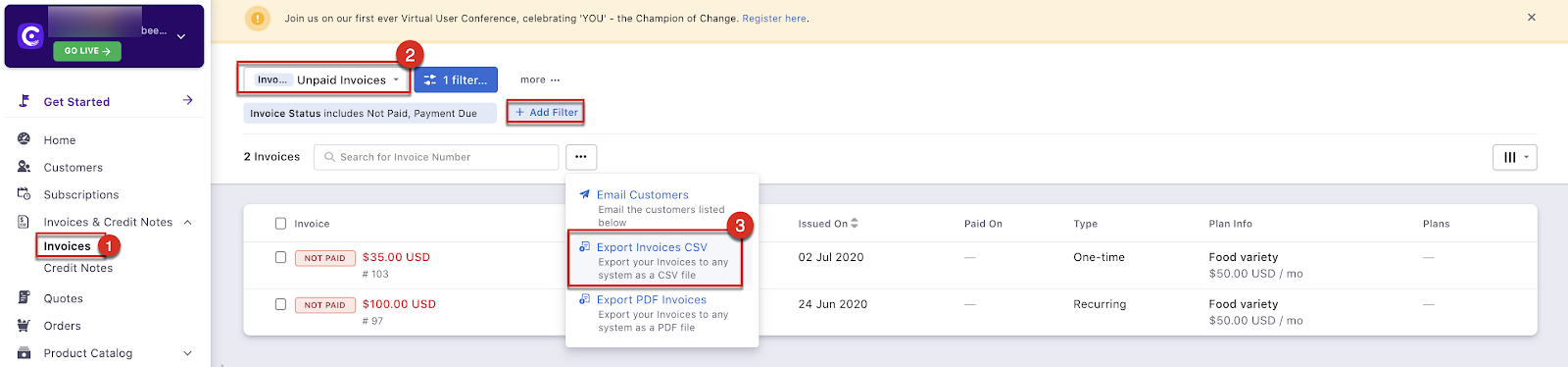
- Choose an action:
- Follow up: Email customers to collect payment
- Void invoices: Use the Void Invoices bulk operation
Bulk void via CSV:
- Click Export Invoices CSV to download the filtered list
- Open Invoices.csv and note the invoice IDs (Column C) to void
- Go to Settings > Import & Export Data > Choose a bulk operation > Void Invoices
- Upload a CSV with the invoice IDs and run the operation
Note:
You can delete invoices instead of voiding them, but deleting data from Chargebee is not recommended. Chargebee also provides an A/R aging report for unpaid invoices by period.
See Bulk operations for details.
Was this article helpful?