Product Updates
Getting Started
- Overview
- Chargebee Billing Data Centers
- Object Relationship Model
- Chargebee Tech Glossary
- Articles and FAQ
Implementing Chargebee
AI in Chargebee
Developer Resources
Product Catalog
Subscriptions
Customers
Entitlements
Usage Based Billing
Chargebee CPQ
Invoices, Credit Notes, and Quotes
Taxes
Hosted Capabilities
- Overview
- Payment Components
- Managing Payments with Chargebee.js
- Mobile-Optimized Hosted Pages
- Articles and FAQ
Site Configuration
- Mandatory Fields
- File Attachments & Comments
- Advanced Filter Options
- Multi-decimal Support
- Configuring Reason Codes
- API Keys
- Time Zone
- Time Machine
- Transfer Configurations
- Articles and FAQ
Multi Business Entity
Mobile Subscriptions
Reports and Analytics
Integrations
Data Privacy & Security
- Two Factor Authentication
- SAML Single Sign-On
- System for Cross-Domain Identity Management (SCIM)
- EU-GDPR
- Consent Management
- Personal Data Management
- Compliance Certificates
- HIPAA Guidelines
- PCI Recommendations and Integration Types
- Articles and FAQ
Data Operations
How to unbilled charges for a customer and subscription?
Problem Statement
You want to know how to unbilled charges for a customer and subscription.
Scope
View unbilled charges at the subscription level
Detailed view of unbilled charges at the customer level.
API call to view unbilled charges.
Solution
You can view all unbilled charges for a particular customer or for a particular subscription
Note
Total Unbilled charges for a specific customer We have updated our summary box to provide a more streamlined and elegant user experience. With this upgrade, hyperlinks have been added to the summary box, allowing users to easily access related information. The Total Unbilled charges on Summary Section is available at the top of the Customer details page which provides a total amount due of a customer and hyperlink that directs to the details. Refer to this link for more details.
Subscription Level
All unbilled charges for a subscription are listed on its details page:
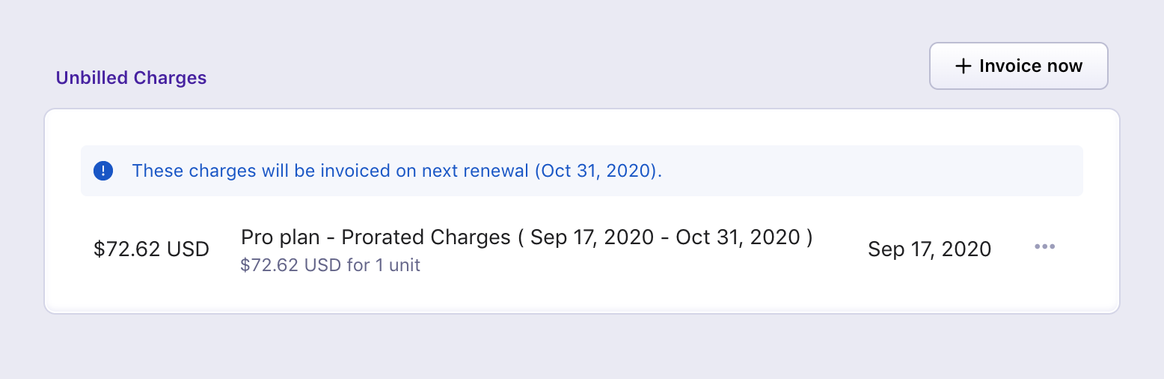
The section also shows the date on which the charges would be invoiced (same as the subscription renewal date).
Customer Level
All unbilled charges for a customer (across all subscriptions under it) are listed on its details page.
API
If you'd like to view the details of any changes that Chargebee makes to the list of unbilled charges, you can use the List unbilled charges API call. The is_voided parameter is set as true for unbilled charges that have been invoiced already. For such charges, voided_at parameter is also available.
Was this article helpful?