What happens to Subscription and other entities once the subscription is paused?
Problem Statement
This article helps you understand what happens to subscription and other entities once the subscription is paused.
Solution
Scope
Once I pause a subscription what happens to renewals and unbilled charges?
How to change subscription plan for a paused subscription?
What are the limitation on change subscription on paused subscription?
How to manage cancellation on paused subscription?
Subscription Changes/Cancellation on paused subscription
Summary
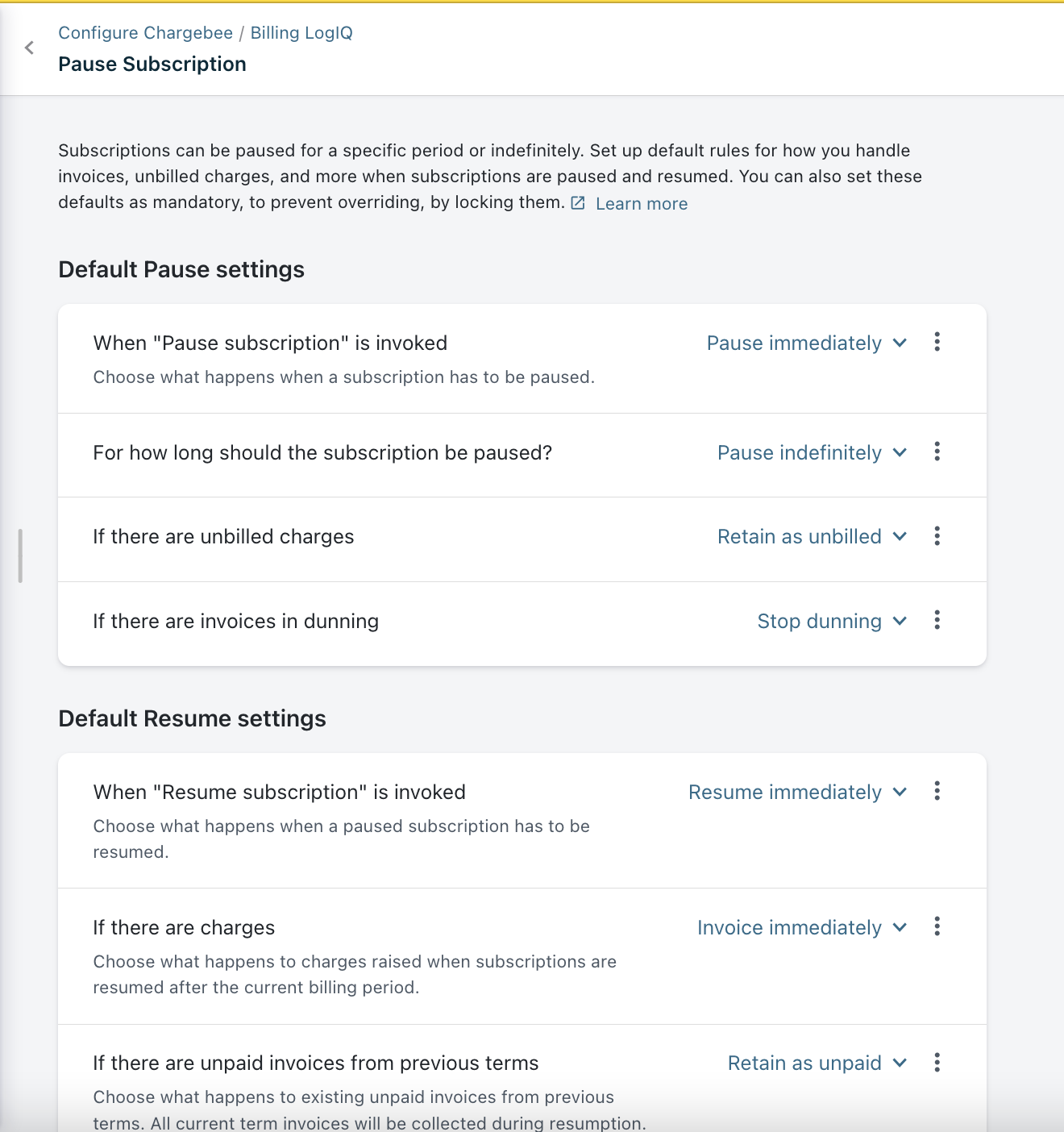
Chargebee relies on site-level Pause subscription configurations while pausing/resuming a subscription. You can choose to allow overriding the default settings via the Chargebee site and-or via API when a subscription is paused/resumed. These settings help you determine the actions against unbilled charges, date of subscription pause and resumption as well as action against invoices in dunning.
Solution
Navigate from Settings > Configure Chargebee > Billing LogIQ > Pause Subscription. You can Configure the default settings on how to handle the subscriptions, invoices, and charges when you pause or resume.
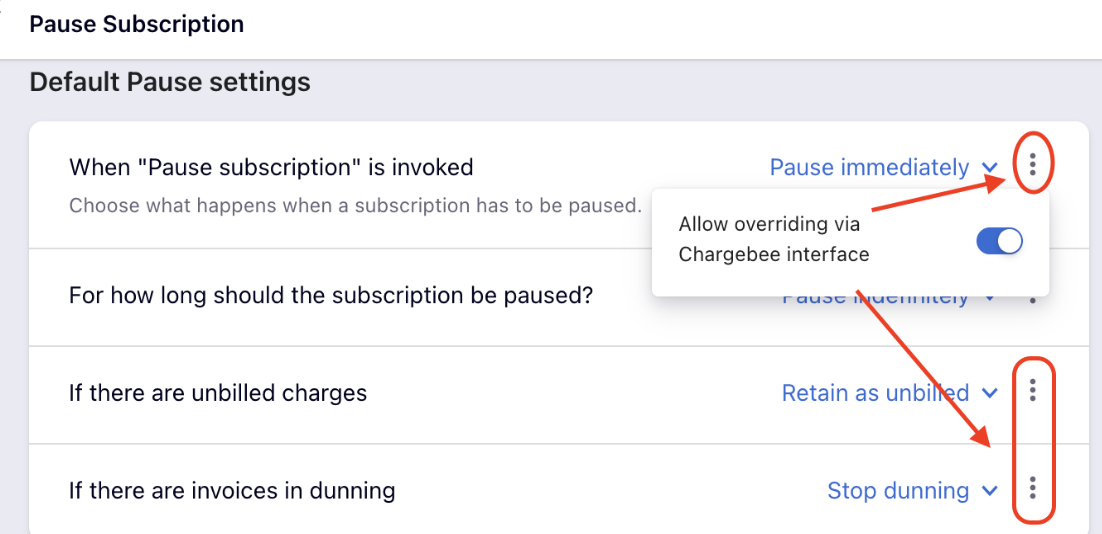
Apart from the above configuration settings, You can choose to allow overriding the default settings via the Chargebee site and-or via API, when a subscription is paused/resumed. When overriding is locked, users will not be able to change the settings.
Via UI
Once Pause Subscription has been enabled for your site, you can pause an active subscription by following the below step.
-
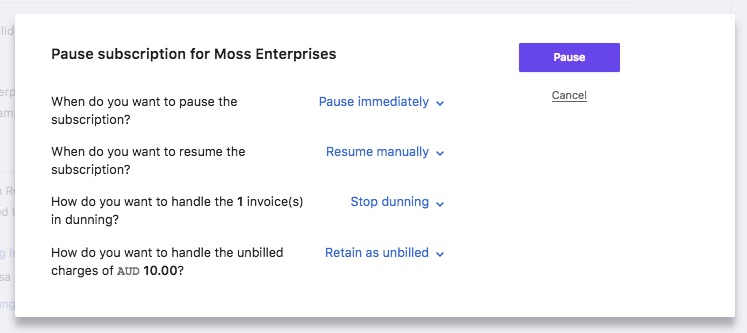
Navigate to the subscription details page and click Pause Subscription. The default setting defined gets preloaded and the necessary options can be overridden if allowed.
-
Choose when you want to pause the subscription:
Note: Only subscriptions in ACTIVE state can be paused.
Subscription Changes/Cancellation
-
Edit subscription will not be allowed when the subscription is paused. You can make changes once the subscription resumes.
-
Scheduled subscription changes (except cancellation) will be removed when the subscription is paused or scheduled to be paused.
-
Subscription cancellation (whether immediate or scheduled) will take place even if the subscription is on pause or scheduled for a pause.
-
Advance invoices cannot be raised on a subscription that's on pause. If there are any advance invoices raised on a subscription that is paused later, credits will be created for the invoice.
-
The next billing date/time cannot be changed if the subscription is on pause. However, if the subscription is scheduled to be paused at the end of the term, the next billing date/time can be changed to a date/time that falls within the date/time of resumption.
-
Record payment, write-off, or void can be performed on past invoices linked to the paused subscription.
Renewals and Charges
-
Subscription renewals will not go through if the subscription is paused.
-
Subscription renewal reminder emails will not be sent to the customer during the pause period.
-
Unbilled charges linked to the subscription will be invoiced when the subscription is resumed post the billing term.
Billing Cycle
-
Whenever you resume the subscription, the billing cycle will remain intact.
-
Managing the billing cycle of a paused subscription depends on the subscription period of the plan. For a monthly plan, pausing the subscription for 2 months, will not affect the billing cycle of the subscription. However, for a yearly plan, pausing the subscription for 2 months will mean that your customer is losing 2 months of the service period.
Unbilled Charges
You can deal with unbilled charges while pausing a subscription as below:
-
Invoice now: You can choose to invoice the unbilled charges linked to the invoice right when the subscription is paused. If the subscription's Auto Collection is ON, Chargebee will try and collect the payment. If the payment fails, or Auto Collection is OFF, the invoice will be closed and marked as Unpaid.
-
Retain as Unbilled: If you choose to retain the unbilled charges, the charges will be invoiced when the subscription resumes and the charges will be added in the next invoice raised - on resumption (if out of term) or the next invoice raised post resumption or can be invoiced manually. Also the user can choose to retain resumption charges as unbilled.
Dunning
When the subscription is paused, you can choose to continue dunning or stop dunning for related invoices.
-
If you choose to continue dunning for a paused subscription, the final action will override even if the subscription is on pause.
-
If you have enabled Consolidated invoicing and choose to stop dunning for a paused subscription, Chargebee will check if there is at least one active subscription listed in the invoice, and will not stop dunning for the said invoice. However, the said subscription will be paused.
Reporting/Analytics
-
MRR of a paused subscription will be considered as $0 and will be accounted only on resumption.
-
Subscriptions scheduled for pause and/or resumption will be accounted in CMRR
-
Subscriptions on pause will not show up in reports as churn. You can filter the subscriptions that are paused.
Discounts/Coupons
If a discount is applied to a subscription and the subscription is paused, the coupon duration will not be extended. The coupon may expire even if the subscription is paused.
Related Article and Documentation
Was this article helpful?