How do I avoid unpaid invoices for active subscriptions?
Problem Statement
This article explains how to avoid unpaid invoices with active subscriptions and how to configure dunning so subscriptions are cancelled or handled when payment fails.
Related Scenarios
- Unpaid invoices with active subscriptions
- Bulk cancelling subscriptions for users with unpaid invoices
- Adding a dunning lock to cancel subscription
Solution
Unpaid invoices with active subscriptions can occur when payment fails and dunning has expired. In dunning settings, you can choose what happens to the subscription and invoice when the last retry fails.
Configure dunning
- Go to Chargebee Dashboard > Configure Chargebee > Dunning for online/offline payments.
- Choose one of these approaches:
- Cancel subscriptions and mark the invoice as Void or Delete.
- Keep subscriptions active and mark the invoice as Void, Reverse, or Write-off.
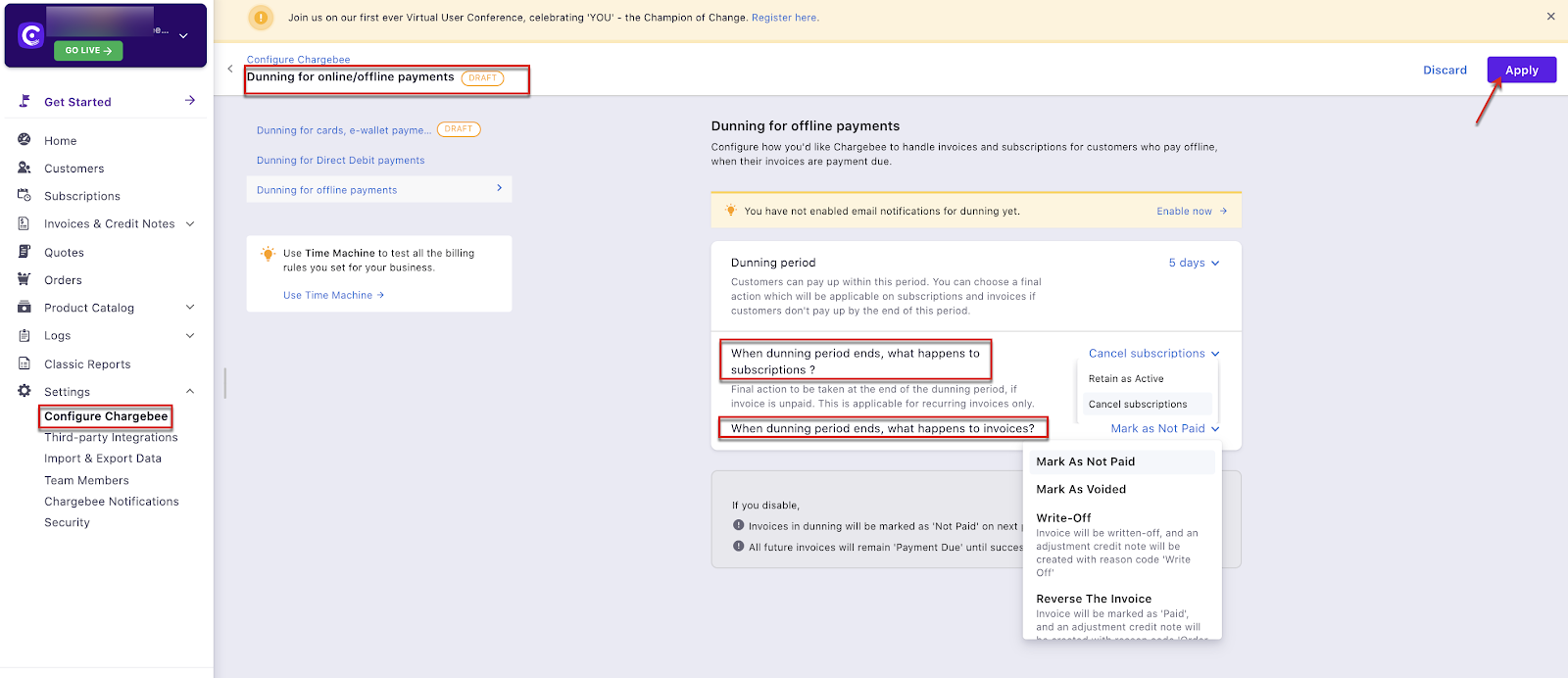
Dunning is supported for Offline and Online subscriptions.
Important Notes
- Configure offline and online dunning separately.
- Dunning settings apply only to future invoices and subscriptions, not to subscriptions that are already active with unpaid invoices.
Was this article helpful?