New in Chargebee: Explore Reveal and understand your payment performance end-to-end.Try Now
Docschargebee docs
HomeBillingPaymentsRevRecGrowthReveal
Support

Product Updates


  • Release Notes

Getting Started


  • Overview
  • Chargebee Billing Data Centers
  • Object Relationship Model
  • Understanding Sites
  • Chargebee Tech Glossary
  • Articles and FAQ

Implementing Chargebee


  • Implementation Guide
  • Go-live Checklist
  • Articles and FAQ

AI in Chargebee


  • Chargebee Copilot
  • MCP Servers
    • Knowledge Base MCP Server
    • Data Lookup MCP Server
    • Onboarding MCP Server
    • Custom MCP Server

Developer Resources


  • Developer Resources Overview
  • API Explorer
  • Articles and FAQ

Product Catalog


  • Product Catalog Overview
  • Coupons
  • Articles and FAQ

Subscriptions


  • Working with Subscriptions
  • Billing
  • Orders
  • Articles and FAQ

Customers


  • Managing Customers
  • Account Hierarchy
  • Email Notifications
  • Branding
  • Configure Multiple Languages
  • Articles and FAQ

Entitlements


  • Entitlements Overview
  • Features Overview
  • Feature Management
  • Managing Product Entitlements
  • Subscription Entitlements
  • Customer Entitlements
  • Grandfathering Entitlements
  • Articles and FAQ

Usage Based Billing


  • Understanding Usages
  • Setting up Usage Based Billing
  • Usage Alerts
  • Prepaid credits
  • Metered Billing
  • Articles and FAQ

Chargebee CPQ


  • Chargebee CPQ
  • Chargebee CPQ for Salesforce
  • Chargebee CPQ for HubSpot

Invoices, Credit Notes, and Quotes


  • Invoices
  • Credit Notes
  • Quotes [Legacy]
  • Transactions
  • Articles and FAQ

Taxes


  • Overview
  • Configuring Taxes
  • Country-specific Taxes
  • Articles and FAQ

Hosted Capabilities


  • Overview
  • Hosted Checkout
  • Hosted Self-Serve Portal
  • Hosted Pages Features
  • Additional Hosted Pages
  • Payment Components
  • Pricing Table
  • Managing Payments with Chargebee.js
  • Mobile-Optimized Hosted Pages
  • Articles and FAQ

Site Configuration


  • Users & Roles
  • Custom Fields & Metadata
  • Approvals
  • Mandatory Fields
  • File Attachments & Comments
  • Advanced Filter Options
  • Multicurrency Pricing
  • Multi-decimal Support
  • Configuring Reason Codes
  • Events and Webhooks
  • API Keys
  • Time Zone
  • Time Machine
  • Transfer Configurations
  • Articles and FAQ

Multi Business Entity


  • Multi Business Entity Overview
  • Customer Transfer Overview
  • Articles and FAQ

Mobile Subscriptions


  • Overview
  • Omnichannel Subscriptions
  • Omnichannel One-Time Orders
  • Mobile Subscriptions (Legacy)

Reports and Analytics


  • RevenueStory
  • Home Dashboard
  • Frequently Asked Questions
  • FAQs for Classic Reports Sunset
  • Articles and FAQ

Integrations


  • Sales
  • Customer Support and Success
  • Finance
  • Tax
  • eInvoicing
  • Marketing
  • Stitch
  • Collaboration
  • Contract Management
  • Ecommerce Management
  • Articles and FAQ

Data Privacy & Security


  • Two Factor Authentication
  • SAML Single Sign-On
  • System for Cross-Domain Identity Management (SCIM)
  • EU-GDPR
  • Consent Management
  • Personal Data Management
  • Compliance Certificates
  • HIPAA Guidelines
  • PCI Recommendations and Integration Types
  • Articles and FAQ

Data Operations


  • Bulk Operations
  • Migration
  • Articles and FAQ
  1. Billing
  2. AI in Chargebee
  3. MCP Servers
  4. Knowledge Base MCP Server
  1. Billing
  2. AI in Chargebee
  3. MCP Servers
  4. Knowledge Base MCP Server

Chargebee Knowledge Base MCP Server

Overview

The Chargebee Knowledge Base MCP Server lets AI clients answer questions using Chargebee docs and API references. For an overview of Chargebee MCP servers, see Chargebee MCP Servers.

Most useful when you need to:

  • Understand the concepts and features of Chargebee products.
  • Answer how-to questions about Chargebee workflows.
  • Generate code snippets for integrating with Chargebee REST API and Chargebee.js.

Configure Knowledge Base MCP server

You can configure MCP servers as follows:

  1. Log in to Chargebee Billing.
  2. Navigate to Settings > Configure Chargebee > Agentic AI > MCP Servers.
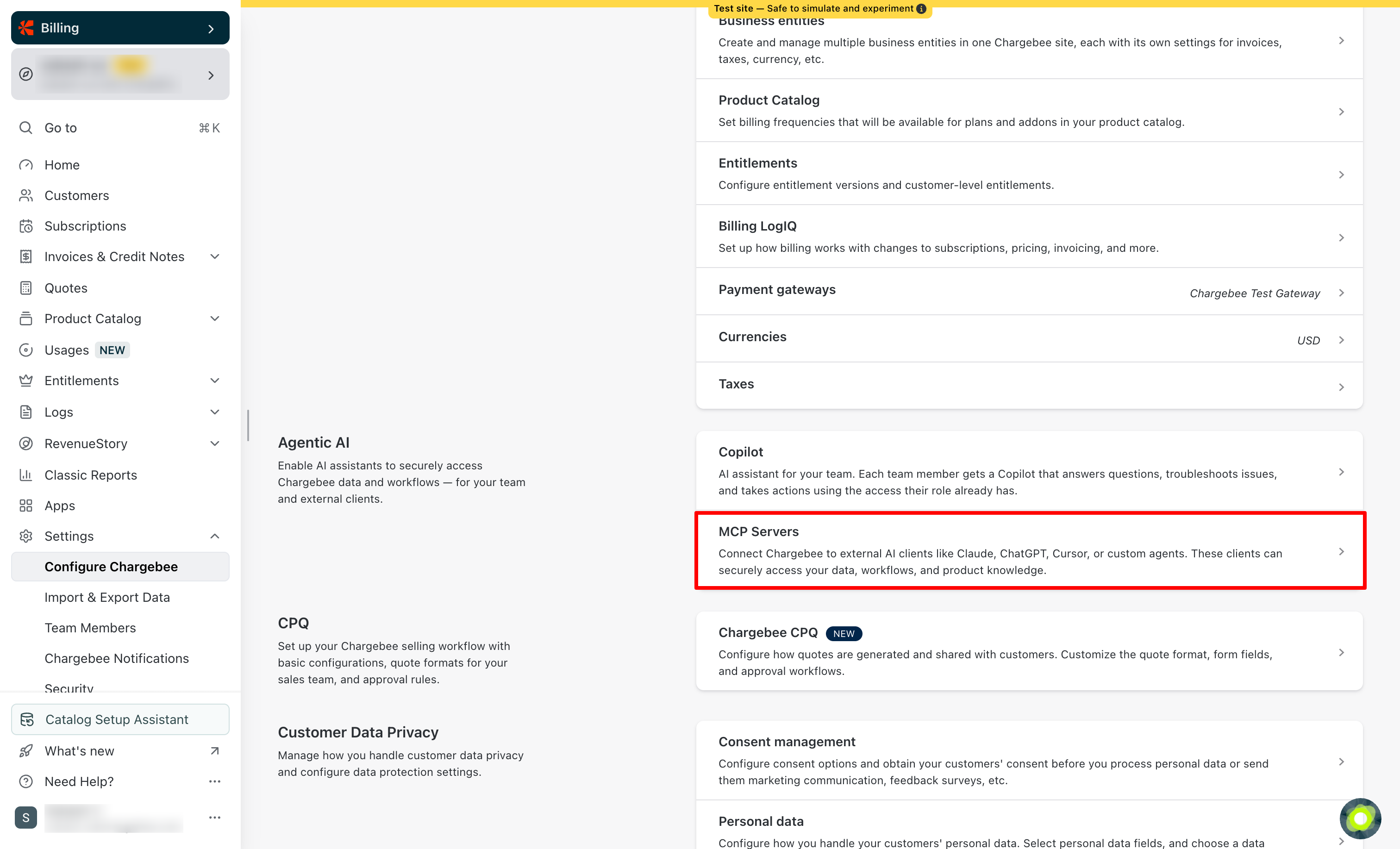
    Agentic AI menu
  3. Select the Chargebee Knowledge Base MCP Server to open its configuration page.
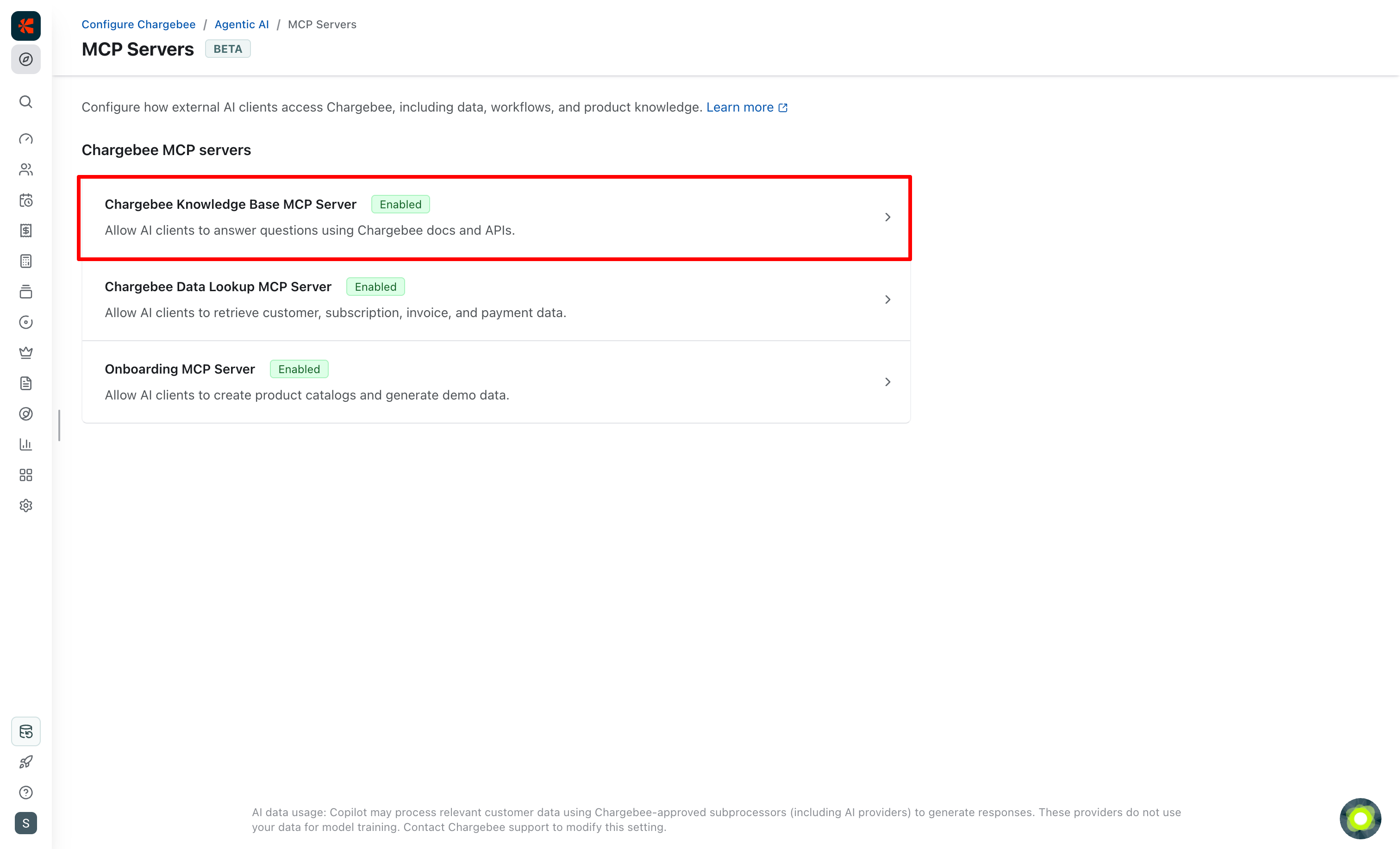
    MCP servers list with Knowledge Base MCP Server highlighted

Access and authentication

Under the Access & Authentication tab, turn on the MCP Access toggle to allow external AI clients to access this server via MCP.
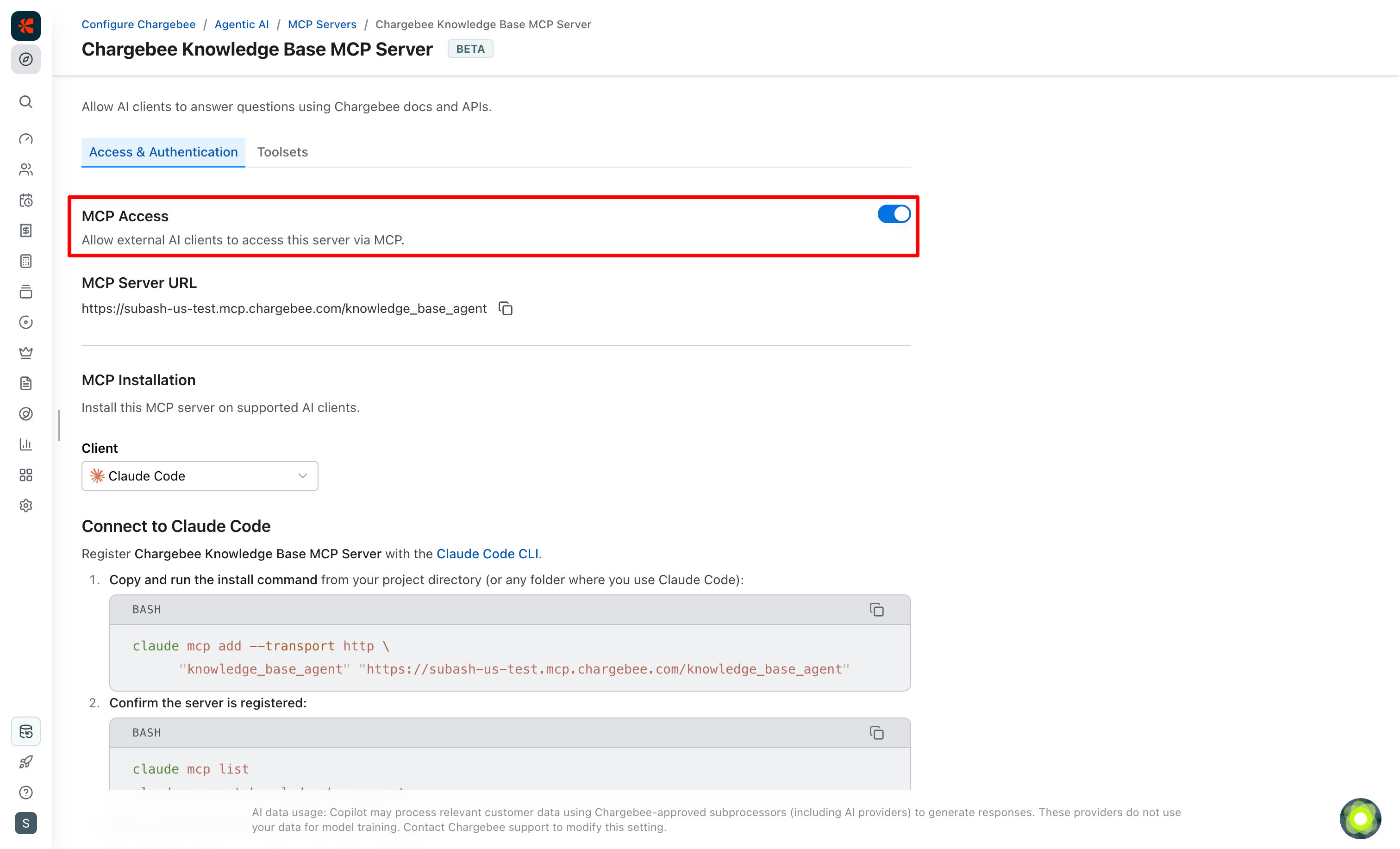
Knowledge Base MCP server access and authentication

Server URLs

Under MCP Server URL, you'll find the server URL for this MCP server for your Chargebee site. Depending on your site's data center, you will see a URL in one of the following formats:

US data center

https://YOUR-CHARGEBEE-SUBDOMAIN.mcp.chargebee.com/knowledge_base_agent

EU data center

https://YOUR-CHARGEBEE-SUBDOMAIN.mcp.eu.chargebee.com/knowledge_base_agent

AU data center

https://YOUR-CHARGEBEE-SUBDOMAIN.mcp.au.chargebee.com/knowledge_base_agent

Note

The Chargebee Knowledge Base MCP Server does not require authentication because its tools access publicly available information only.

Installation

Under the Access & Authentication tab, under MCP Installation, you'll find specific installation instructions for each AI client.

Examples

Claude Code
claude mcp add --transport http "knowledge_base_agent" "https://YOUR-CHARGEBEE-SUBDOMAIN.mcp.chargebee.com/knowledge_base_agent"
Claude Desktop and Cursor
{
  "mcpServers": {
    "knowledge_base_agent": {
      "url": "https://YOUR-CHARGEBEE-SUBDOMAIN.mcp.chargebee.com/knowledge_base_agent"
    }
  }
}

Note

For supported AI clients, you can use the Add MCP to... button to add the MCP server to your client directly.

Toolsets

Under the Toolsets tab, you'll find the toolset available for the Chargebee Knowledge Base MCP server. This MCP server provides the Product Knowledge toolset with the following tools:

  • Generate Code Snippet: Offers detailed API documentation and implementation guidance for Chargebee's features. Generates code snippets in various programming languages.
  • Explain Chargebee Docs: Provides clear explanations of features, configurations, and best practices. Helps troubleshoot common issues and understand Chargebee's functionalities in depth.
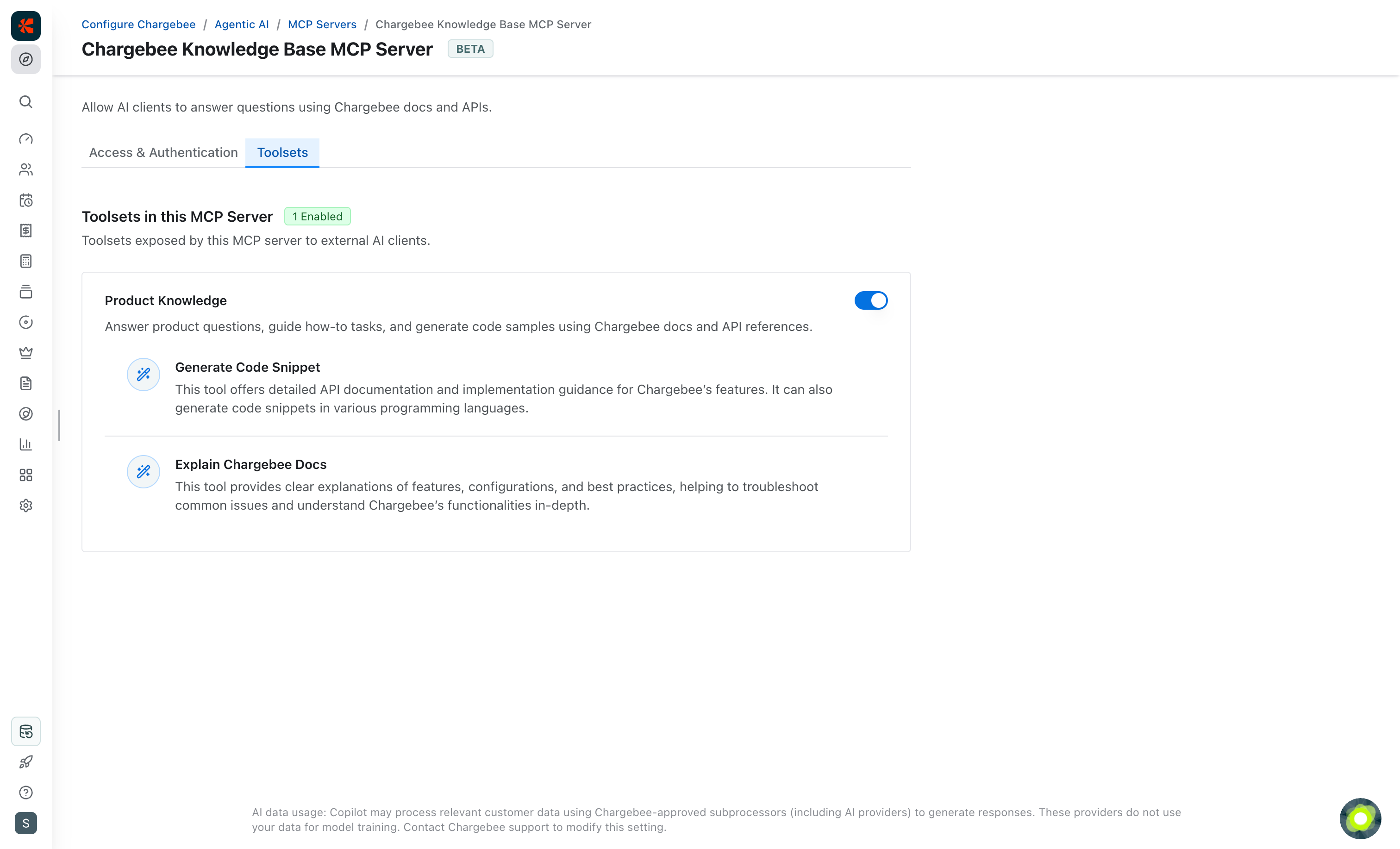
Knowledge Base MCP server toolsets

See also

  • Chargebee Data Lookup MCP Server: Retrieve customer, subscription, invoice, and payment data from your Chargebee site.
  • Onboarding MCP Server: Create product catalogs and generate demo data for test and sandbox sites.
  • Custom MCP Server: Combine Chargebee tools into a server tailored to your use case.

Was this article helpful?