How can I merge two customer records in Chargebee?
Problem Statement
I accidentally created a duplicate customer record that has payment-related information. How do I merge it with the other customer record in Chargebee?
Related scenario: I have created a customer record with the desired ID. How do I merge the pre-existing customer record into the new one?
Solution
You can merge two customer records using the bulk operation Merge two customer child resources. The same capability is available via the Merge Customers API once enabled on your site.
Steps to Set It Up
- Go to Settings > Import & Export Data > Choose a Bulk Operation > Showing = Customers > Merge two customer child resources > Proceed > Download Sample CSV
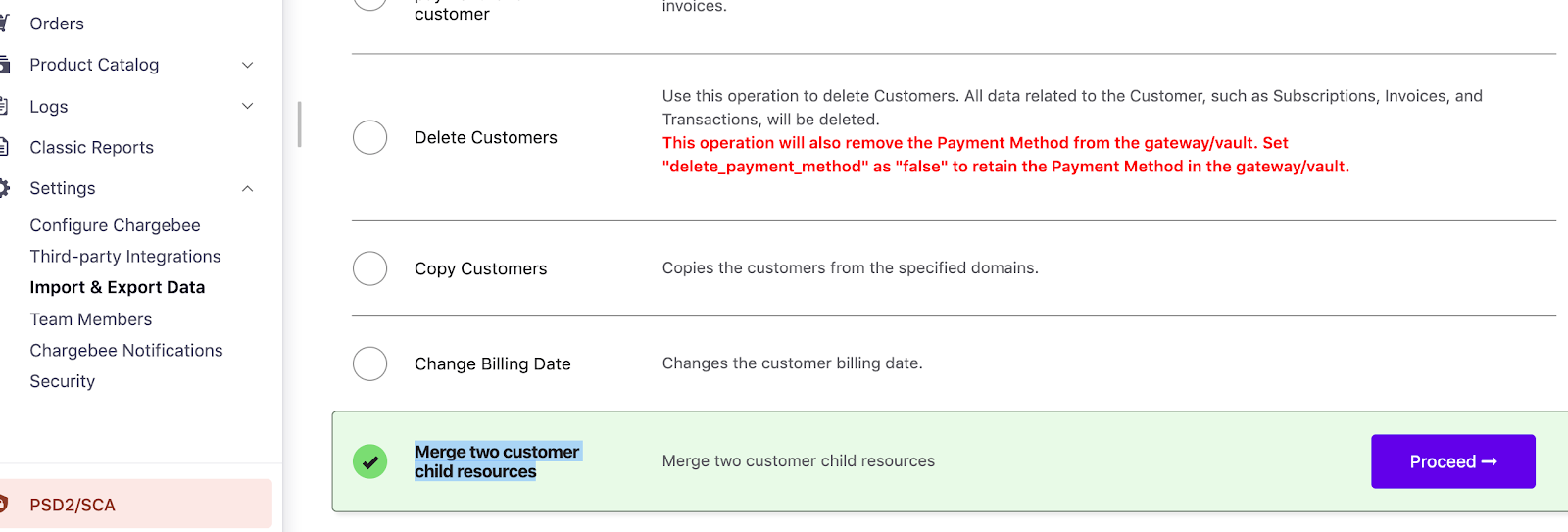
- Specify the From and To customer IDs in the CSV and save the file.
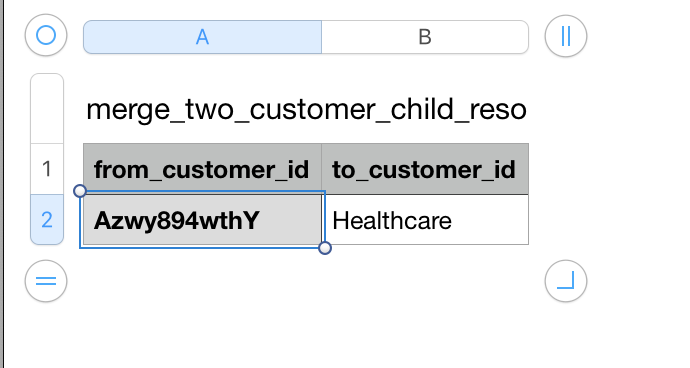
- Upload the CSV file in Chargebee.
Additional Information
- The merge moves the source (From) customer's payment methods, subscriptions, invoices, credit notes, transactions, unbilled charges, and orders to the target (To) customer.
- Events and email logs are not moved.
- The operation runs asynchronously.
- The returned customer object is the target (To) customer.
- The source customer record remains in Chargebee unless you delete it manually.
Important Notes
Note
Merge operations are not easily reversible. Test on your Test site first and contact support to enable this on your Live site.
Note
Related Articles
Show more
Was this article helpful?