Where can I export non-recurring addons or charges in Chargebee?
Problem Statement
You want to export non-recurring addons or charges from Chargebee.
Related Scenarios
- I am not able to export charges from the subscription page
- I cannot find non-recurring addons or charges on the subscription page
- Where can I export non-recurring addons in Chargebee?
Solution
You can export non-recurring addons or charges for your customers from the Invoices Index Page. You cannot export Non-recurring addons in Legacy Product Catalog or Charges in Latest Product Catalog from the Subscription Index Page because only recurring items are available there.
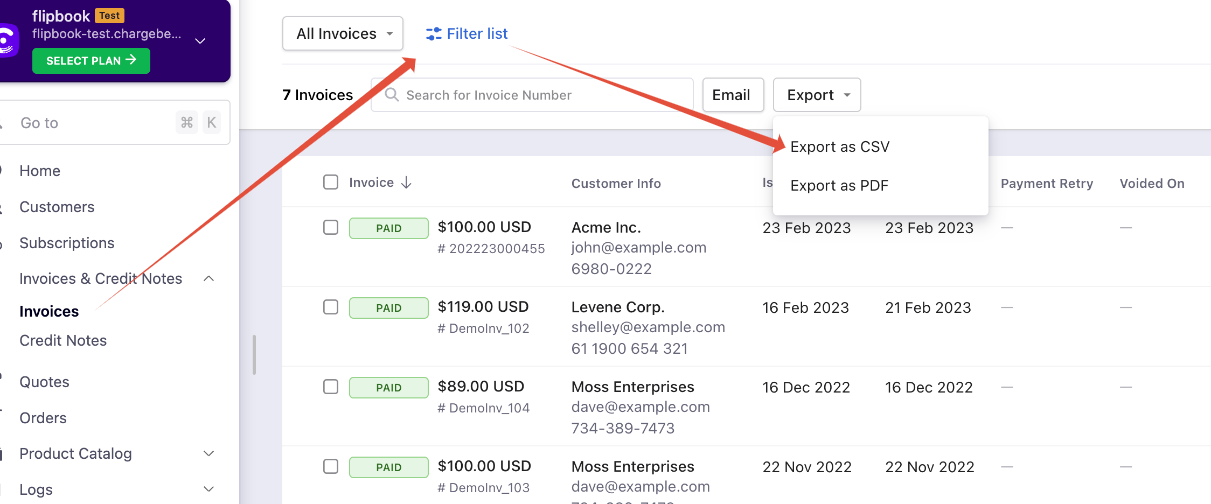
Step 1: Navigate to Invoices & Credit Notes > Invoices > Choose filter as 'All Invoices' > Export > Export as CSV.
Note
With the recent UI enhancement, you can now scroll the index pages — Customers, Subscriptions, Invoices, and Credit Notes — vertically. Earlier, the pages were paginated, which could prolong your search; however, with the new enhancement, as you scroll down, the list loads all other data on a single page, as highlighted in the screenshot below. Refer to this link for more information.
Once you export, you will find a zip folder. Look for LineItems.csv and use a filter in the Excel sheet to define the list of non-recurring addons in Legacy Product Catalog and Charges in Latest Product Catalog.
- Non-recurring addons under 'Entity type' is 'Ad Hoc' in Legacy Product Catalog.

- Charges under 'Entity type' is 'Charge Item Price' in Latest Product Catalog.

Note
- To download or export the complete Product Catalog (Plans, Addons, and Charges), navigate to Settings > Import and Export Data > Manual Export > Product Catalog > Export File > Download Data.
LineItems.csvalso includes details such as Subscription ID, Customer ID, Customer Name, Email Address, Customer Company, Tax Amount, and line item-level tax.
Related Articles
Was this article helpful?