How to configure Tax API in Chargebee?
Problem Statement
You want to know how to configure tax api in chargebee.# Scope
What is Tax API?
What are the benefits of Tax API?
What is Tax Service Provider Interface?
Summary
When processing checkout sessions and creating invoices for the merchant's customer, Chargebee needs to perform the following operations:
-
Checking whether customer shipping addresses are valid for the purpose of tax calculation
-
Estimate taxes applicable on an invoice and its line items
-
Submit invoice and credit note documents for tax reconciliation
-
Validate customer shipping addresses for the purpose of product delivery
Chargebee relies on external services to fulfill these needs. These external services or tax services may be of one of the following:
-
Tax service providers that offer APIs for calculating tax.
-
In-house tax calculation software used by the merchant.
Solution
To communicate with the tax service, Chargebee needs a tax service adapter that acts as a connector with the service. Chargebee connects to the adapter using the Tax Service Provider Interface (SPI).
You must implement this SPI by building a tax service adapter app in order to integrate the tax service with Chargebee. You would typically do this when you are one of the following:
-
A tax service provider wanting to integrate your service with Chargebee.
-
A merchant looking to integrate your in-house tax calculation software with Chargebee.
-
A system integrator building a connector between a tax service provider and Chargebee.
The sequence diagram below illustrates how Chargebee interacts with the tax service via the adapter:
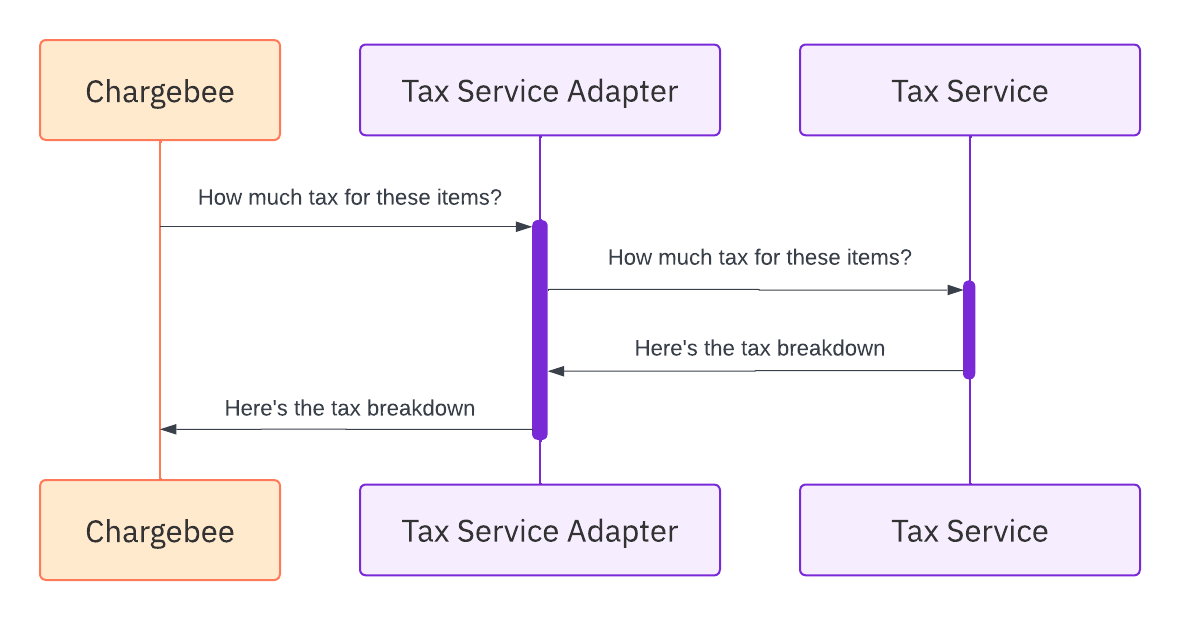
How Chargebee communicates with a Tax Service via the Adapter.
API calls made to the adapter
Chargebee makes calls to the tax service adapter SPI on various occasions as described below.
Authenticating Chargebee calls
POST {server.url}/credentials/validate
This endpoint is called when the merchant connects their Chargebee site to the tax service adapter.
Importing Chargebee Product Catalog
While importing merchants' Product Catalog from Chargebee into the tax system, it is important to handle both Legacy Product Catalog and Latest Product Catalog. The configurations resource provides information on the version of the Product Catalog for a specific Chargebee site.
This is not applicable if the tax provider allows merchants to map products with tax codes in Chargebee
Checking addresses and taxability
The address validation and taxability check endpoints are used to preempt tax calculation failures that can happen on invoice creation.
Address validation
POST {server.url}/address/validate
This endpoint is called whenever a shipping address for a customer is added or updated.
Note
The endpoint is only called when "shipping address validation" has been enabled by the merchant in the app configuration
Note: Implementing this endpoint is optional. However, it is strongly recommended so that Chargebee can flag addresses that are not shippable
Taxability check
POST {server.url}/address/check-taxability
This endpoint is called in each of the following cases:
-
When the merchant triggers an action that checks all the existing shipping addresses in the Chargebee site to see if the tax can be calculated for them. This option is available to the merchant while connecting their Chargebee site to the adapter. It usually manifests as a button labeled Run Check on the Chargebee UI.
-
When the shipping address for any customer is added or updated. Note: The endpoint is only called for this case when "partial address validation" is enabled in Chargebee by the merchant.
Estimating taxes
POST {server.url}/tax-estimate
Chargebee calls this endpoint before an invoice (or invoice estimate) is generated so that taxes can be added to it.
Submitting invoices and credit notes
POST {server.url}/invoices
POST {server.url}/credit-notes
The invoice and credit note submission endpoints are called asynchronously when an invoice is closed and a credit note is created respectively.
Note
A closed invoice is one that is no longer in pending status
Committing invoices and credit notes
POST {server.url}/invoices/{invoiceId}/commit
POST {server.url}/credit-notes/{creditNoteId}/commit
If the merchant configuration is set accordingly, the commit endpoints for invoices and credit notes are invoked asynchronously when the invoice/credit note status changes to a certain value.
Voiding invoices and credit notes
POST {server.url}/invoices/{invoiceId}/void
POST {server.url}/credit-notes/{creditNoteId}/void
These endpoints are called asynchronously whenever an invoice or credit note status changes to voided.
App publishing and support
You can publish your tax adapter service as an app on the Chargebee Marketplace. This allows multiple tenants (merchants) to discover and use your app. If you're building the adapter for specific tenants, you can publish it as a private app so that it will receive requests from the specified tenants only.
For any help and support in setting up the service, do write to us at taxation@chargebee.com.
JSON Schema for Tax Provider
JSON (JavaScript Object Notation) is a widely used, text-based data format that is both simple and lightweight. It is commonly used for transmitting data between web applications and servers, and it can be easily read and maneuvered by humans and machines alike.
JSON Schema, on the other hand, is an official standard established by the Internet Engineering Task Force (IETF) that defines the structure and constraints of a JSON document. It provides a way to describe the expected properties and types of data for a given application, as well as the rules for how that data should be interacted with.
Given below is the Chargebee Tax Provider JSON Schema. By utilizing this JSON Schema, you can ensure that your tax provider data is accurately structured and compliant with the requirements of the Chargebee platform. This can help to improve the consistency and validity of your data and make it easier to integrate with other applications or systems.
{
  "$schema": "http://json-schema.org/draft-06/schema#",
  "$ref": "#/definitions/RootSchema",
  "definitions": {
    "RootSchema": {
      "type": "object",
      "additionalProperties": false,
      "properties": {
        "prod": {
          "$ref": "#/definitions/CapabilityBody"
        },
        "sandbox": {
          "$ref": "#/definitions/CapabilityBody"
        }
      },
      "required": [
        "prod",
        "sandbox"
      ],
      "title": "RootSchema"
    },
    "CapabilityBody": {
      "type": "object",
      "additionalProperties": false,
      "properties": {
        "identity_configuration": {
          "$ref": "#/definitions/IdentityConfiguration"
        },
        "api_configuration": {
          "$ref": "#/definitions/APIConfiguration"
        },
        "capabilities": {
          "$ref": "#/definitions/Capabilities"
        },
        "product_identifiers": {
          "type": "array",
          "items": {
            "$ref": "#/definitions/Identifier"
          }
        },
        "customer_identifiers": {
          "type": "array",
          "items": {
            "$ref": "#/definitions/Identifier"
          }
        },
        "supported_number_of_line_items": {
          "type": "integer"
        },
        "version": {
          "type": "string"
        }
      },
      "required": [
        "api_configuration",
        "capabilities",
        "customer_identifiers",
        "identity_configuration",
        "product_identifiers",
        "supported_number_of_line_items",
        "version"
      ],
      "title": "Prod"
    },
    "APIConfiguration": {
      "type": "object",
      "additionalProperties": false,
      "properties": {
        "api_base_url": {
          "type": "string",
          "format": "uri",
          "qt-uri-protocols": [
            "https"
          ]
        },
        "credential_configuration": {
          "type": "array",
          "items": {
            "$ref": "#/definitions/CredentialConfiguration"
          }
        }
      },
      "required": [
        "api_base_url",
        "credential_configuration"
      ],
      "title": "APIConfiguration"
    },
    "CredentialConfiguration": {
      "type": "object",
      "additionalProperties": false,
      "properties": {
        "id": {
          "type": "string"
        },
        "name": {
          "type": "string"
        },
        "type": {
          "type": "string"
        },
        "is_sensitive": {
          "type": "boolean"
        },
        "is_required": {
          "type": "boolean"
        }
      },
      "required": [
        "id",
        "is_required",
        "is_sensitive",
        "name",
        "type"
      ],
      "title": "CredentialConfiguration"
    },
    "Capabilities": {
      "type": "object",
      "additionalProperties": false,
      "properties": {
        "supported_countries": {
          "type": "array",
          "items": {
            "type": "string"
          }
        },
        "supported_currencies": {
          "type": "array",
          "items": {
            "type": "string"
          }
        },
        "can_validate_shipping_address": {
          "type": "boolean"
        },
        "can_sync_invoices": {
          "type": "boolean"
        },
        "can_sync_credit_notes": {
          "type": "boolean"
        },
        "can_support_currency_inclusive_of_taxes": {
          "type": "boolean"
        },
        "is_consistent_pricing_supported": {
          "type": "boolean"
        },
        "can_have_product_identifiers": {
          "type": "boolean"
        },
        "can_have_customer_identifiers": {
          "type": "boolean"
        },
        "tax_calculation_capabilities": {
          "$ref": "#/definitions/TaxCalculationCapabilities"
        },
        "invoice_sync_capabilities": {
          "$ref": "#/definitions/SyncCapabilities"
        },
        "credit_note_sync_capabilities": {
          "$ref": "#/definitions/SyncCapabilities"
        }
      },
      "required": [
        "can_have_customer_identifiers",
        "can_have_product_identifiers",
        "can_support_currency_inclusive_of_taxes",
        "can_sync_credit_notes",
        "can_sync_invoices",
        "can_validate_shipping_address",
        "credit_note_sync_capabilities",
        "invoice_sync_capabilities",
        "is_consistent_pricing_supported",
        "supported_countries",
        "supported_currencies",
        "tax_calculation_capabilities"
      ],
      "title": "Capabilities"
    },
    "SyncCapabilities": {
      "type": "object",
      "additionalProperties": false,
      "properties": {
        "is_sync_supported": {
          "type": "boolean"
        },
        "can_commit": {
          "type": "boolean"
        },
        "can_delete": {
          "type": "boolean"
        },
        "can_void": {
          "type": "boolean"
        },
        "supported_countries": {
          "type": "array",
          "items": {
            "type": "string"
          }
        },
        "applicable_sync_types": {
          "type": "array",
          "items": {
            "type": "string"
          }
        }
      },
      "required": [
        "applicable_sync_types",
        "can_commit",
        "can_delete",
        "can_void",
        "is_sync_supported",
        "supported_countries"
      ],
      "title": "SyncCapabilities"
    },
    "TaxCalculationCapabilities": {
      "type": "object",
      "additionalProperties": false,
      "properties": {
        "accept_invalid_tax_reg_numbers": {
          "type": "boolean"
        },
        "supportedNumberOfLineItems": {
          "type": "integer"
        }
      },
      "required": [
        "accept_invalid_tax_reg_numbers",
        "supportedNumberOfLineItems"
      ],
      "title": "TaxCalculationCapabilities"
    },
    "Identifier": {
      "type": "object",
      "additionalProperties": false,
      "properties": {
        "external_id": {
          "type": "string"
        },
        "display_name": {
          "type": "string"
        },
        "is_mandatory": {
          "type": "boolean"
        },
        "is_default": {
          "type": "boolean"
        },
        "field_type": {
          "type": "string"
        }
      },
      "required": [
        "display_name",
        "external_id",
        "field_type"
      ],
      "title": "Identifier"
    },
    "IdentityConfiguration": {
      "type": "object",
      "additionalProperties": false,
      "properties": {
        "id": {
          "type": "string"
        },
        "display_name": {
          "type": "string"
        },
        "logo_url": {
          "type": "string",
          "format": "uri",
          "qt-uri-protocols": [
            "https"
          ],
          "qt-uri-extensions": [
            ".png"
          ]
        },
        "primary_description": {
          "type": "array",
          "items": {
            "type": "string"
          }
        },
        "secondary_description": {
          "type": "array",
          "items": {
            "type": "string"
          }
        },
        "signup_url": {
          "type": "string",
          "format": "uri",
          "qt-uri-protocols": [
            "https"
          ]
        },
        "consent_policy_url": {
          "type": "string"
        },
        "privacy_policy_url": {
          "type": "string"
        },
        "terms_of_service_url": {
          "type": "string",
          "format": "uri",
          "qt-uri-protocols": [
            "https"
          ]
        },
        "documentation_url": {
          "type": "string",
          "format": "uri",
          "qt-uri-protocols": [
            "https"
          ],
          "qt-uri-extensions": [
            ".html"
          ]
        },
        "support_email": {
          "type": "string",
          "format": "email"
        }
      },
      "required": [
        "consent_policy_url",
        "display_name",
        "documentation_url",
        "id",
        "logo_url",
        "primary_description",
        "privacy_policy_url",
        "secondary_description",
        "signup_url",
        "support_email",
        "terms_of_service_url"
      ],
      "title": "IdentityConfiguration"
    }
  }
}
Was this article helpful?