New in Chargebee: Explore Reveal and understand your payment performance end-to-end.Try Now

Docschargebeedocs

HomeBillingPaymentsRevRecGrowthReveal
Support

Product Updates


  • Release Notes

Getting Started


  • Overview
  • Chargebee Billing Data Centers
  • Object Relationship Model
  • Understanding Sites
  • Chargebee Tech Glossary
  • Articles and FAQ

Implementing Chargebee


  • Implementation Guide
  • Go-live Checklist
  • Articles and FAQ

AI in Chargebee


  • Chargebee Agents
  • Chargebee Copilot
  • Chargebee MCP Server (Model Context Protocol)

Developer Resources


  • Developer Resources Overview
  • Articles and FAQ

Product Catalog


  • Product Catalog Overview
  • Coupons
  • Articles and FAQ

Subscriptions


  • Working with Subscriptions
  • Billing
  • Orders
  • Articles and FAQ

Customers


  • Managing Customers
  • Account Hierarchy
  • Email Notifications
  • Branding
  • Configure Multiple Languages
  • Articles and FAQ

Entitlements


  • Entitlements Overview
  • Features Overview
  • Feature Management
  • Managing Product Entitlements
  • Subscription Entitlements
  • Customer Entitlements
  • Grandfathering Entitlements
  • Articles and FAQ

Usage Based Billing


  • Understanding Usages
  • Setting up Usage Based Billing
  • Usage Alerts
  • Metered Billing
  • Articles and FAQ

Chargebee CPQ


  • Chargebee CPQ
  • Chargebee CPQ for Salesforce
  • Chargebee CPQ for HubSpot

Invoices, Credit Notes, and Quotes


  • Invoices
  • Credit Notes
  • Quotes [Legacy]
  • Transactions
  • Articles and FAQ

Taxes


  • Overview
  • Configuring Taxes
  • Country-specific Taxes
  • Articles and FAQ

Hosted Capabilities


  • Overview
  • Hosted Checkout
  • Hosted Self-Serve Portal
  • Hosted Pages Features
  • Additional Hosted Pages
  • Payment Components
  • Pricing Table
  • Managing Payments with Chargebee.js
  • Mobile-Optimized Hosted Pages
  • Articles and FAQ

Site Configuration


  • Users & Roles
  • Custom Fields & Metadata
  • Approvals
  • Mandatory Fields
  • File Attachments & Comments
  • Advanced Filter Options
  • Multicurrency Pricing
  • Multi-decimal Support
  • Configuring Reason Codes
  • Events and Webhooks
  • API Keys
  • Time Zone
  • Time Machine
  • Transfer Configurations
  • Articles and FAQ

Multi Business Entity


  • Multi Business Entity Overview
  • Customer Transfer Overview
  • Articles and FAQ

Mobile Subscriptions


  • Overview
  • Omnichannel Subscriptions
  • Omnichannel One-Time Orders
  • Mobile Subscriptions (Legacy)

Reports and Analytics


  • RevenueStory
  • Home Dashboard
  • Frequently Asked Questions
  • FAQs for Classic Reports Sunset
  • Articles and FAQ

Integrations


  • Sales
  • Customer Support and Success
  • Finance
  • Tax
  • Marketing
  • Stitch
  • Collaboration
  • Contract Management
  • Ecommerce Management
  • Articles and FAQ

Data Privacy & Security


  • Two Factor Authentication
  • SAML Single Sign-On
  • System for Cross-Domain Identity Management (SCIM)
  • EU-GDPR
  • Consent Management
  • Personal Data Management
  • Compliance Certificates
  • HIPAA Guidelines
  • PCI Recommendations and Integration Types
  • Articles and FAQ

Data Operations


  • Bulk Operations
  • Migration
  • Articles and FAQ
  1. Billing
  2. Invoices, Credit Notes, and Quotes
  3. Articles and FAQ
  4. Invoices
  1. Billing
  2. Invoices, Credit Notes, and Quotes
  3. Articles and FAQ
  4. Invoices

How to set the invoice numbers to start from a specific number?

Problem Statement

You want to know how to set the invoice numbers to start from a specific number.

Solution

Invoices are sequentially numbered in Chargebee starting from "1".

You can also customize the numbers formats for the invoices and credit notes.

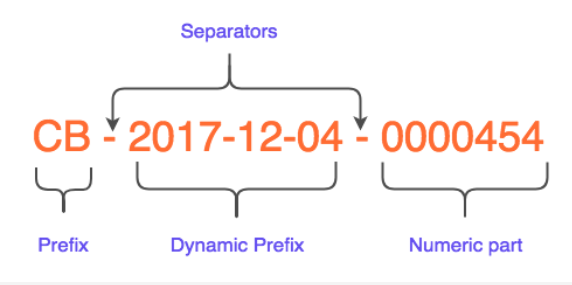
Here are the various elements you can customize in the invoice number:
image
  1. Prefix
  • An alpha-numeric prefix can be added at the beginning of the invoice number that will appear on all the invoices.
  1. Dynamic Prefix
  • You can include the date, month or year that would automatically be updated in the invoice numbers. This would be useful if you'd like to reset the invoice number sequence at the beginning of every month or year.
  1. Separators
  • You may choose to use the hyphen (-) as a separator between the prefix and the numeric parts.
  1. Numeric part
  • You can set your invoice numbers to begin from a specific number, say 50001. However, you need to ensure that this number doesn't already exist in the system(when a dynamic prefix doesn't exist).

  • You can also set a fixed number of digits for an invoice number such as 6 digits. So the number will be preceded by 0s for a lower digit number, for example, 000010 > ... > 012345 >... > 123456

Note:

  1. Although random invoice numbering is not strictly supported, Chargebee can help by allowing you to increment your invoice numbers by a value greater than 1.

  2. You need to ensure that the invoice number sequence that you set does not conflict with an existing number in your Chargebee account.

Related Articles

Sorry, we couldn't find that resource - Error
How to make partial payments in an invoice?
Can I generate an invoice for a customer who is in Dunning?
How to remove the payments linked to an invoice?
How to hide zero value line items from my customers?
Why are my invoices not getting consolidated?
What is the difference between NOT PAID and PAYMENT DUE invoices?
Is it possible to regenerate a prorated invoice?
How do I refund an invoice?
Error - No Items Found
Why am I unable to refund the refundable credits present on a credit note?
How does parent billing work when invoices are consolidated?
How to export invoices reports by gateway?
Unable to enable "I have registered for GST" field in checkout portal
Inclusive Pricing Calculation
How do I configure dunning and update dunning email settings in Chargebee?
Does dunning works without a card?

Show more

Was this article helpful?