Salesforce plugin for Chargebee - User Guide
Problem Statement
This article helps you understand salesforce plugin for chargebee - user guide.
Solution
Chargebee Data Set Up In Salesforce
After creating the connection between Salesforce and Chargebee and syncing the data, we can see all the Chargebee data in Salesforce and also create new Subscriptions.
Subscriptions
-
You can click on the "Subscriptions" tab to list all the subscriptions
-
You can click on the "New"button to create a new subscriptions.
-
You can also create a new subscription directly from opportunity. There is a button "Create Subscription", you can add this button on the Opportunity layout to create Subscription.
-
You can select the specific subscription from the list to view the subscription details.
-
On the detail page there is a button "Update Subscription" and so you can update the subscription by clicking on this button.
Create Subscription
In creation of Subscription, if you are choosing any Opportunity then you have to add the selected plan as a Opportunity Product on Opportunity then only you will be able to choose that Opportunity for that Subscription.
After entering the value click on Check Out button.
Here you can enter the Contact details if you have not chosen any Contact in previous screen then this will create a new Contact and Account.
If you want to enter the Credit Card Detail here then click on Enter Credit Card Details link.
If you have made address requirement setting as ON from the Chargebee Setup page then you have to enter Billing Address Details here else this will be no required.
Enter all the details and click on Subscribe button then it will create a subscription in Chargebee.
If you wish to provide Credit Card Details later or update any Information in Subscription then you can do it from Subscription detail page.
Create Subscription using Payment Form Link
-
Create a new Opportunity.
-
Fill the required information in the following fields:
a) Opportunity Name
b) Account Name
c) Stage
d) Select Coupon (if you are giving any)
-
Click Save.
After creating the Opportunity:
-
Add Product.
-
Add Contact Role and set it as Primary.
-
Click on Send Payment Link.
-
After clicking on the button, the Contact role receives a payment link through an email
-
A copy of this email is sent to Opportunity Owner
-
Also, An activity is logged in Activity History that the payment form link has been sent and is related to the OpportunityContactRole
-
When the Contact clicks on the Link, it redirects the contact to Payment Form Page.
-
All the information required on this page is filled out.
-
Click on Subscribe
After subscribing, an email is sent to Opportunity Owner to activate the License(s).
After Subscribing, On Opportunity:
-
The Stage changes to 'Closed Won'
-
There is a record created in the related list for Subscription, Invoice and Transaction
Click on the subscription name to see the Detail Page of the subscription or click on the Subscription Tab and open it.
Update Subscription using Payment Form Link
 1. Go to the Opportunity for which the subscription needs to get updated.

 2. Add more license(s) to the product(s).

 3. Click on 'Send Payment link ' button.

 4. After clicking on Button, the contact role receives a payment link through an email. A copy of this email is sent to Opportunity Owner.

 5. An activity log is created in Activity History related list on Opportunity that the Payment Form Link has been sent.
After adding the license(s) to the product and sending the link(from opportunity level) to contact role:
-
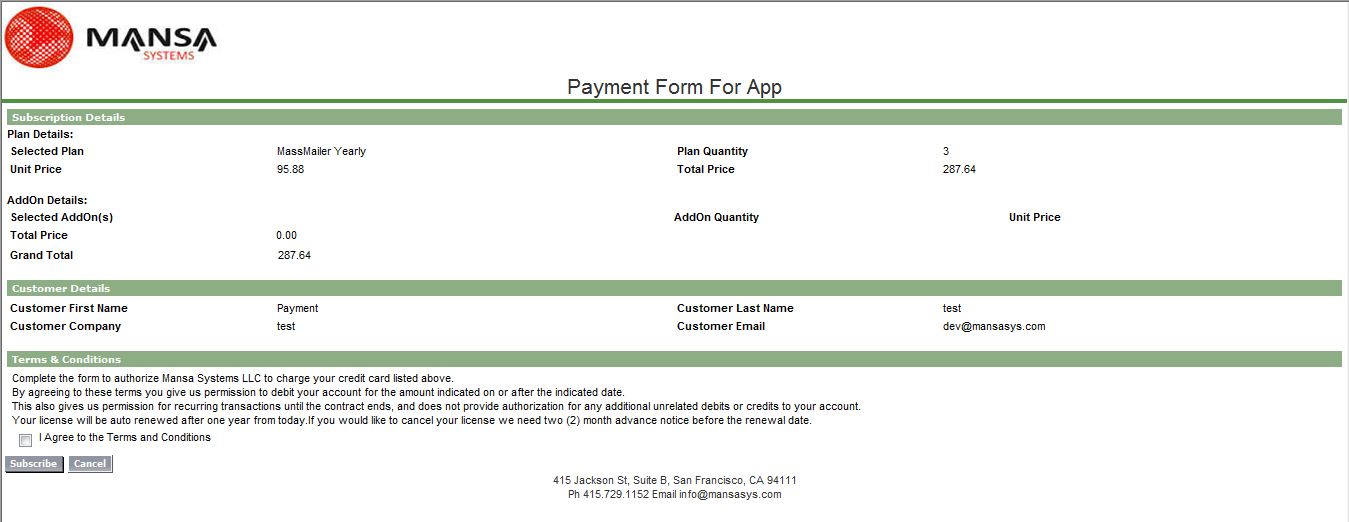
When the Contact clicks on the link, it redirects the contact to Payment Form Page.
-
All the information required on this page is filled out.
-
Click on Subscribe.
-
Now the Opportunity's stage is again changed to 'Closed Won'.
-
A new invoice and transaction record gets created in the related list of opportunity.
-
Click on the subscription name to see the detail page for updated subscription.
-
Email is sent to Opportunity owner to activate the license(s).
Downgrade Subscription using Payment Form Link.
To downgrade a subscription using Chargebee app:
a. Go to Opportunity which contains the subscription to be downgraded.
b. Change the product quantity.
c. Click on 'Send Payment Link' button.
d. An email is sent to Contact Role containing Payment Form Link.
e. A copy of this email is sent to Opportunity Owner.
f. An activity log is created in Activity History related list on Opportunity that the Payment Form Link has been sent
g. When the contact clicks on the link,it redirects to the payment form page.
h. Information is Filled in the Form and click on subscribe button.The subscription is now downgraded.
j. The status of opportunity changes to 'Closed Won', also an email is sent to Opportunity owner to activate the license(s).
k. You can check the subscription details from the subscription link through the related list on opportunity or through the subscription tab.
InLine VisualForce page for Account, Contact, Opportunity and Product
You can add Inline Vf page of related Subscriptions on Account, Contact, Opportunity and product. So that you can get to know all the details of related Subscriptions for a particular object record.
Plans and Addons
-
Plans and Addons from Chargebee are sync with Products in Salesforce. So you can view them by clicking on "Products" tab but do not edit them in Salesforce as they will not sync from Salesforce to Chargebee.
-
These products have product type as Plan or Addon.
-
You can edit the layout of Product and can add the Chargebee fields but do not modify the value of fields.
Coupons, Transactions and Invoices
-
You can click on the "Coupons", "Transactions" and "Invoices" tab to list all the records.
-
You can only view the detail by clicking on a specific record name but cannot edit the values in Salesforce they can not be sync from Salesforce to Chargebee now.
Related Articles
Show more
Was this article helpful?