Backdating Beyond Current Term
This feature is in Private Beta. Please contact support to enable this feature.
Backdating beyond the current term allows you to apply subscription changes retroactively across multiple billing terms, including past billing periods.
This feature enables you to:
- Update existing subscriptions from a date earlier than the current billing term
- Recalculate charges across multiple past billing cycles
When a backdated change is applied beyond the current term:
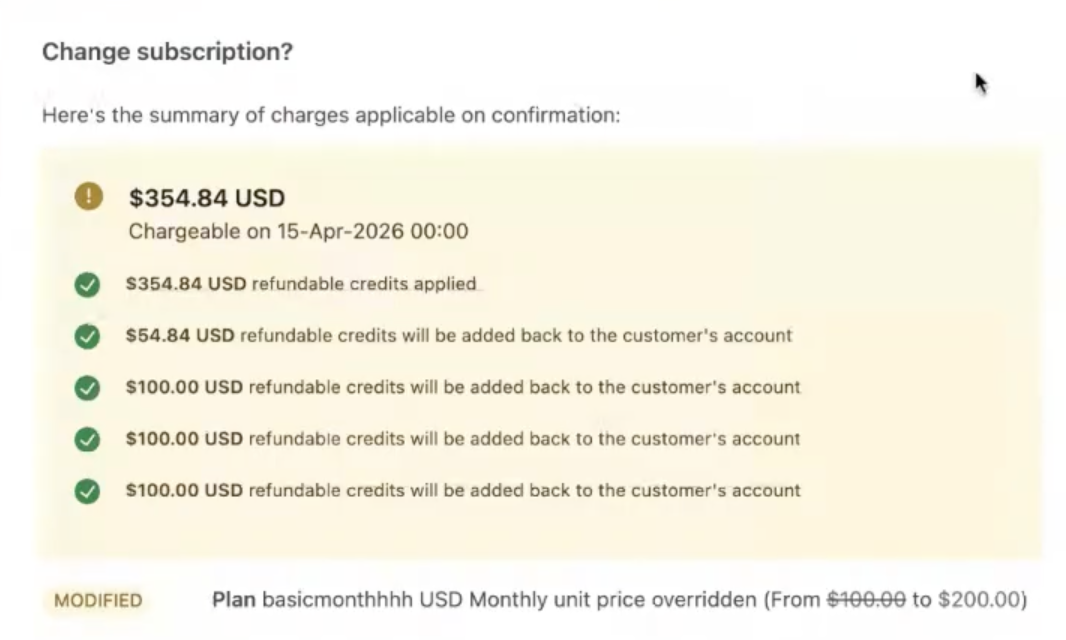
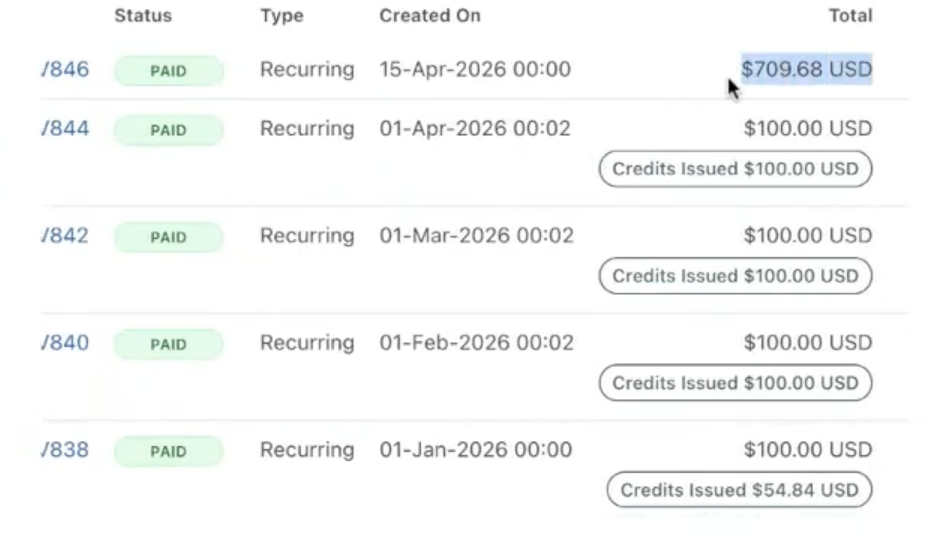
- Previously generated invoices for the affected period are adjusted (credited or adjusted)
- A new consolidated invoice is generated based on the updated subscription state
- Charges are recalculated from the backdated date through the current date (or the current term boundary).
- The new invoice will be raised as per the new tax rate during the backdating of a subscription.
- Use a custom field to capture the reason for backdating.
Benefits
Backdating beyond the current term helps you:
-
Handle long sales and approval cycles
Support enterprise workflows where agreements are finalized after several billing terms.
-
Reduce manual corrections
Avoid issuing multiple credits, refunds, or manual adjustments.
-
Maintain accurate and auditable billing history
Generate clear invoices that reflect updated subscription state across time.
-
Missed changes during subscription creation
You can also use this feature to apply missing details during subscription creation process.
Use Cases
Backdated subscription updates
You can update a subscription and apply the change from a past date, including dates before the current term.
Behavior
- Existing invoices for impacted periods are credited back, adjusted, or refunded.
- A new consolidated invoice is generated
- Charges are recalculated from the backdated date to the current date
- Each billing cycle is represented as a separate line item
Example: Backdating a Price Change
Scenario
- Subscription created on Jan 1 with a plan priced at $100/month
On April 15:
- Price is updated to $200/month
- Change is backdated to Jan 15
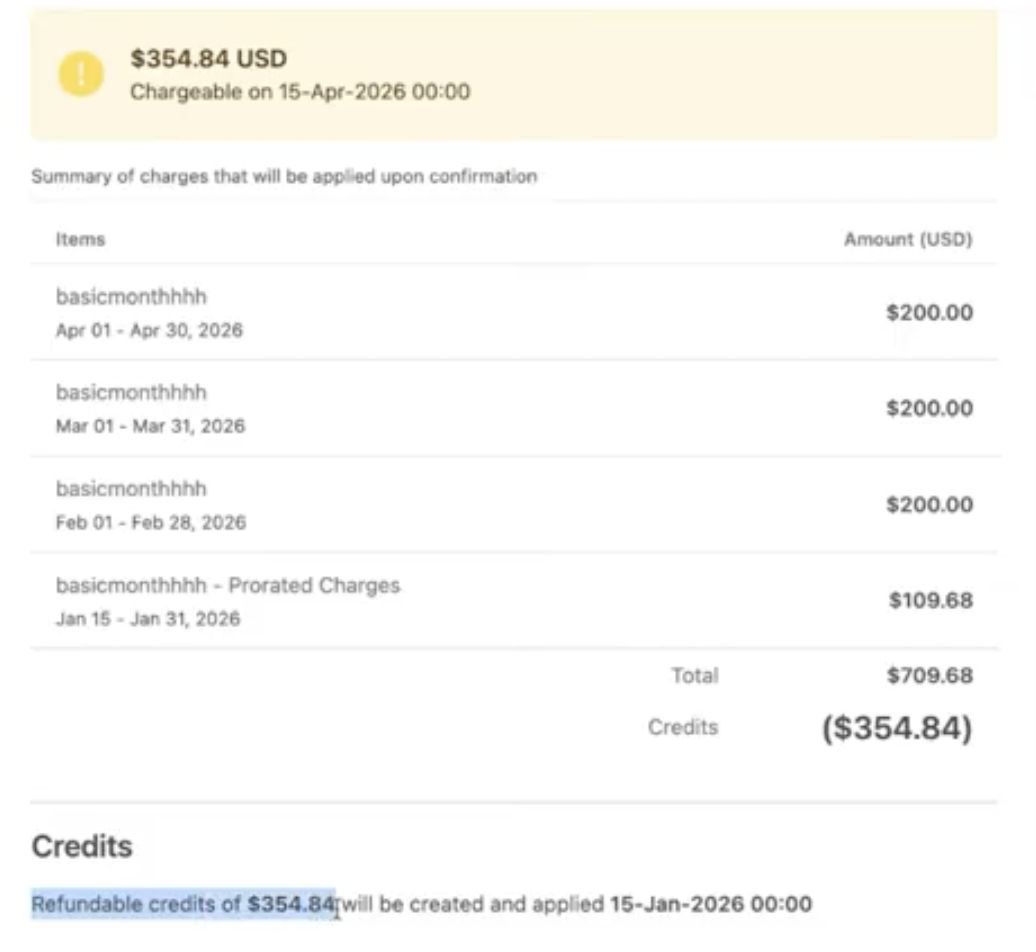
A new consolidated invoice is generated:
| Item | From | To | Amount |
|---|---|---|---|
| Plan A | Jan 15 | Jan 31 | $100 (prorated) |
| Plan A | Feb 01 | Feb 28 | $200 |
| Plan A | Mar 01 | Mar 31 | $200 |
| Plan A | Apr 01 | Apr 30 | $200 |
Backdating with quantity change
Scenario
- Subscription start: June 15, 2024
- Update date: Aug 25, 2024
- Backdated change effective: June 20, 2024
- Change: Addon quantity reduced from 10 → 8
Previously generated invoices are voided, and a new consolidated invoice is generated:
| Item | From | To | Quantity |
|---|---|---|---|
| Addon A | Jun 15 | Jun 20 | 10 (prorated) |
| Addon A | Jun 20 | Jul 15 | 8 |
| Addon A | Jul 15 | Aug 15 | 8 |
| Addon A | Aug 15 | Aug 25 | 8 (prorated) |
Note
- Charges are recalculated from June 20 onward
- Each billing cycle is represented as a separate line item
- Quantity change is applied starting from the backdated date
Change frequency while backdating
If a plan is changed to a new plan within the same billing period, billing will continue until the end of the current term. If the new plan has a different billing period, the new current term end will be changed to a future date that aligns with the frequency change.
Example 1: Yearly → Monthly Plan
Scenario
- Subscription created on Jan 1 with a yearly plan ($1200/year)
On April 15:
- Plan is changed to a monthly plan ($100/month)
- Change is backdated to Feb 1
A new consolidated invoice is generated:
| Item | From | To | Amount |
|---|---|---|---|
| Plan A | Feb 01 | Feb 28 | $200 |
| Plan A | Mar 01 | Mar 31 | $200 |
| Plan A | Apr 01 | Apr 30 | $200 |
Note
- Billing switches to monthly frequency from Feb 1 onward
- Each month is invoiced as a separate line item
Example 2: Monthly → Yearly Plan with Addon
Scenario
- Subscription created on Jan 1, 2024
- Plan: $100/month
- Addon: $30/month
On April 15:
- Plan is changed to a yearly plan ($1200/year)
- Change is backdated to Feb 1, 2024
A new consolidated invoice is generated:
| Item | From | To | Amount |
|---|---|---|---|
| Plan A | Feb 01 2024 | Jan 31 2025 | $1200 |
| Addon A | Feb 01 2024 | Jan 31 2025 | $360 |
Note
- Billing switches to yearly frequency from Feb 1, 2024
- Addon charges are aggregated for the full yearly term
Example 3: Multi-Term Backdating with Frequency Change
Scenario
- Subscription created on Jan 1, 2024 with a $100/month plan
On April 15, 2025:
- Plan is changed to a yearly plan ($1200/year)
- Change is backdated to Feb 1, 2024
A new consolidated invoice is generated:
| Item | From | To | Amount |
|---|---|---|---|
| Plan A | Feb 01 2024 | Jan 31 2025 | $1200 |
| Plan A | Feb 01 2025 | Jan 31 2026 | $1200 |
Note
- Billing is recalculated across multiple terms
- Each yearly cycle is represented as a separate line item
Unbilled charges
Refundable credits will be issued for the previous invoices, and unbilled charges will be created, which will be invoiced on renewal.
Advance invoice behaviour
Advance invoices can be created after the backdating operation is performed successfully. Any unbilled charges created while backdating can also be added to the advance invoice.
Limitations
Backdating range
- Subscription updates:
- For yearly subscriptions, backdating is allowed up to one billing cycle prior to the current term start date. For all other subscriptions, backdating is allowed up to one year from today.
If the limit is exceeded, an error is returned indicating that the start date is outside the supported range.
Subscription boundaries
- Backdating is only allowed for dates after the subscription start date (started_at)
- Dates before the subscription start date are not supported
Supported actions
- Currently supports subscription updates only. Subscription cancellation and creation are not supported today.
Behavior within the current term
- When backdating within the current term:
- Backdating remains restricted to the date on which the last scheduled change occurred, given prior updates exist.
For details, see backdating document
Coupons and discounts
- One-time and limited-period coupons are applied across all terms from the backdated date
- Fixed amount coupons are not prorated when applied mid-term
Invoicing behavior
- Advance invoices are not automatically created
- Promotional credits are applied to the new invoice
Unsupported features
- Multi-frequency billing is not supported.
- Multiple plans on a subscription is not supported.
- Contract terms are not supported.
- RevRec is not supported.
Subscription state
- Subscription must be active to perform backdated updates.
Was this article helpful?