New in Chargebee: Explore Reveal and understand your payment performance end-to-end.Try Now
Docschargebee docs
HomeBillingPaymentsRevRecGrowthReveal
Support

Product Updates


  • Release Notes

Getting Started


  • Overview
  • Chargebee Billing Data Centers
  • Object Relationship Model
  • Understanding Sites
  • Chargebee Tech Glossary
  • Articles and FAQ

Implementing Chargebee


  • Implementation Guide
  • Go-live Checklist
  • Articles and FAQ

AI in Chargebee


  • Chargebee Copilot
  • Chargebee Model Context Protocol (MCP) Server

Developer Resources


  • Developer Resources Overview
  • Articles and FAQ

Product Catalog


  • Product Catalog Overview
  • Coupons
  • Articles and FAQ

Subscriptions


  • Working with Subscriptions
  • Billing
  • Orders
  • Articles and FAQ

Customers


  • Managing Customers
  • Account Hierarchy
  • Email Notifications
  • Branding
  • Configure Multiple Languages
  • Articles and FAQ

Entitlements


  • Entitlements Overview
  • Features Overview
  • Feature Management
  • Managing Product Entitlements
  • Subscription Entitlements
  • Customer Entitlements
  • Grandfathering Entitlements
  • Articles and FAQ

Usage Based Billing


  • Understanding Usages
  • Setting up Usage Based Billing
  • Usage Alerts
  • Metered Billing
  • Articles and FAQ

Chargebee CPQ


  • Chargebee CPQ
  • Chargebee CPQ for Salesforce
  • Chargebee CPQ for HubSpot

Invoices, Credit Notes, and Quotes


  • Invoices
  • Credit Notes
  • Quotes [Legacy]
  • Transactions
  • Articles and FAQ

Taxes


  • Overview
  • Configuring Taxes
  • Country-specific Taxes
  • Articles and FAQ

Hosted Capabilities


  • Overview
  • Hosted Checkout
  • Hosted Self-Serve Portal
  • Hosted Pages Features
  • Additional Hosted Pages
  • Payment Components
  • Pricing Table
  • Managing Payments with Chargebee.js
  • Mobile-Optimized Hosted Pages
  • Articles and FAQ

Site Configuration


  • Users & Roles
  • Custom Fields & Metadata
  • Approvals
  • Mandatory Fields
  • File Attachments & Comments
  • Advanced Filter Options
  • Multicurrency Pricing
  • Multi-decimal Support
  • Configuring Reason Codes
  • Events and Webhooks
  • API Keys
  • Time Zone
  • Time Machine
  • Transfer Configurations
  • Articles and FAQ

Multi Business Entity


  • Multi Business Entity Overview
  • Customer Transfer Overview
  • Articles and FAQ

Mobile Subscriptions


  • Overview
  • Omnichannel Subscriptions
  • Omnichannel One-Time Orders
  • Mobile Subscriptions (Legacy)

Reports and Analytics


  • RevenueStory
  • Home Dashboard
  • Frequently Asked Questions
  • FAQs for Classic Reports Sunset
  • Articles and FAQ

Integrations


  • Sales
  • Customer Support and Success
  • Finance
  • Tax
  • eInvoicing
  • Marketing
  • Stitch
  • Collaboration
  • Contract Management
  • Ecommerce Management
  • Articles and FAQ

Data Privacy & Security


  • Two Factor Authentication
  • SAML Single Sign-On
  • System for Cross-Domain Identity Management (SCIM)
  • EU-GDPR
  • Consent Management
  • Personal Data Management
  • Compliance Certificates
  • HIPAA Guidelines
  • PCI Recommendations and Integration Types
  • Articles and FAQ

Data Operations


  • Bulk Operations
  • Migration
  • Articles and FAQ
  1. Billing
  2. Subscriptions
  3. Articles and FAQ
  4. Working with Subscriptions
  1. Billing
  2. Subscriptions
  3. Articles and FAQ
  4. Working with Subscriptions

How to change next billing for multiple subscriptions?

Problem Statement

You want to know how to change next billing for multiple subscriptions.### Scope

How can I perform bulk operations to change the next billing date?

I would like to do a bulk operation to change the subscriptions.next_billing_at of my subscription.

Summary

In Chargebee, you can update the 'Next Billing Date' for multiple subscriptions from the Subscriptions Index Page & using Bulk Operation. Please note that changing the next billing date would change all future renewal dates as well.

Solution

Based on the number of subscriptions that you would like to change the next billing for, you could choose one of the below two options:

1) Subscription Index Page:

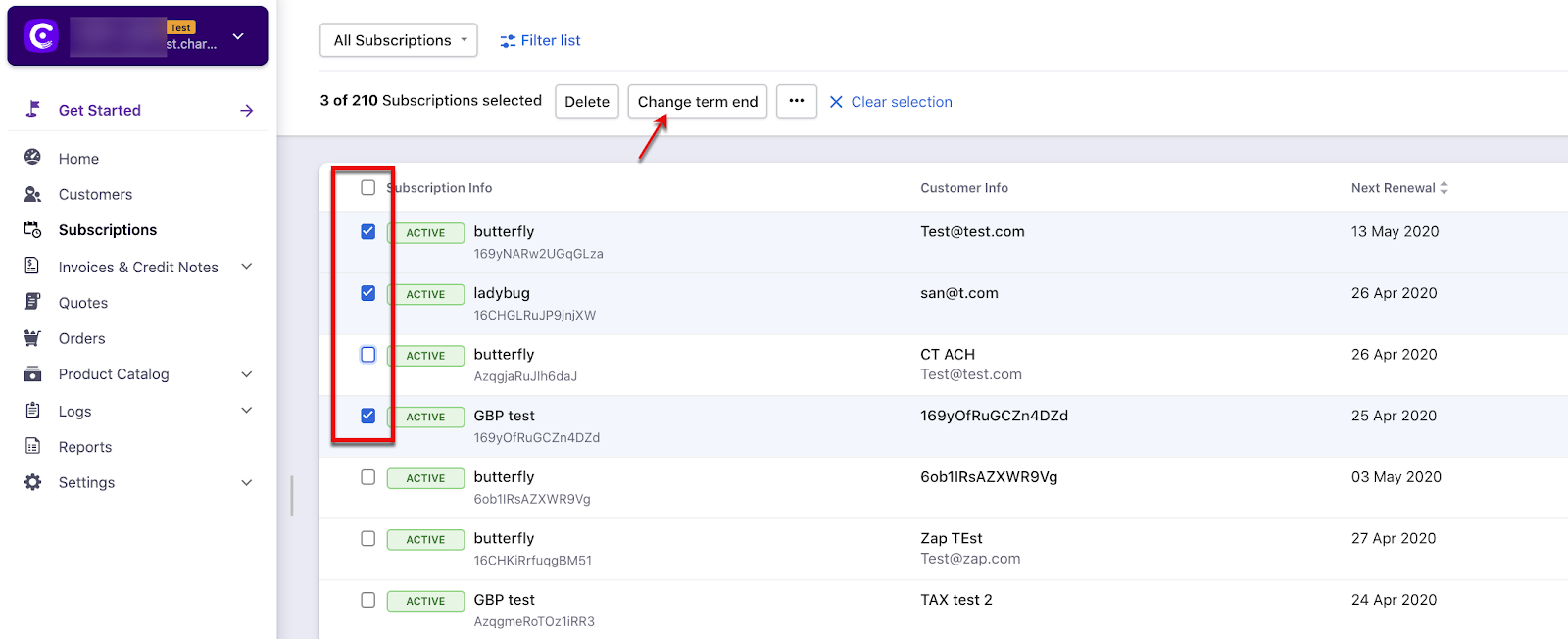
For multiple subscriptions that need a specific change term end, Go to > Subscriptions Index Page > Filter List (available as a checkbox on the right corner of each subscription) > Select Change term end (This navigation applies to the settings in the Leap UI only)
image

Note

On the recent UI enhancement you On the recent UI enhancement you can now scroll the index pages - Customers, Subscriptions, Invoices, and Credit Notes vertically. Earlier, the pages will be paginated which may prolong your search however with the new enhancement as you scroll down the list it will load all other data in a single page as highlighted below on the screenshot. Refer to this link for more information.

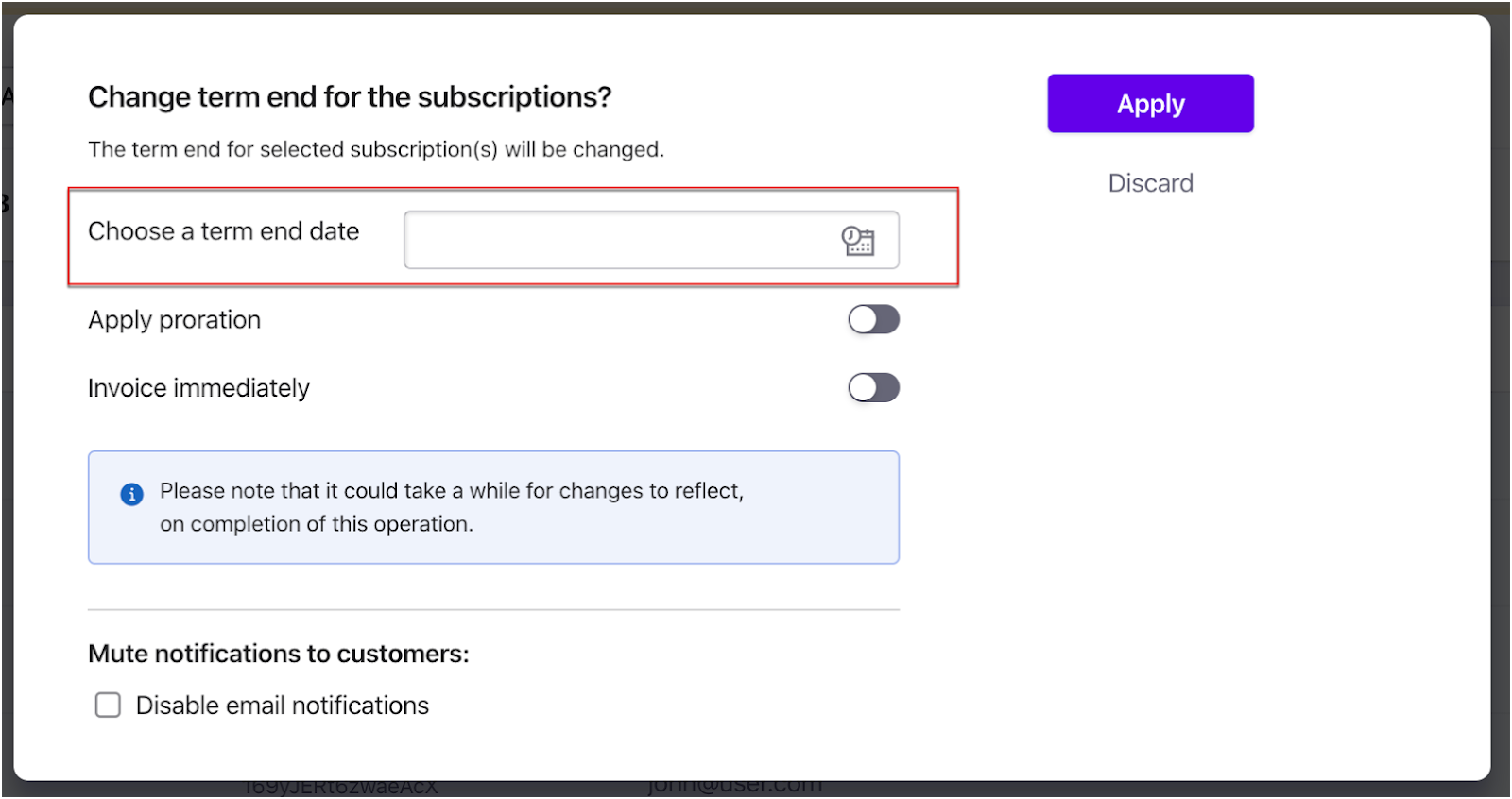
Now, you can set the Term end date, Appy Proration (If required), and Invoicing Options. You will also have the option to disable email notifications once this action is performed.
image

2) Change term end - Bulk operation.

If there are a large number of subscriptions, you could use the Change term end - Bulk operation. For this, you would first need to export the list of subscription IDs beforehand from the Subscriptions page.

Then, please go to Settings >> Import & Export Data >> Choose a bulk operation >> Subscriptions >> Change term-end. Download the sample CSV file, use the same format and populate the subscription IDs and the next billing accordingly and upload the file to Chargebee.

image

Refer to this link to learn how to perform bulk operations.

Related Articles

What is the Jump to Section under Customer/Subscription details page?
Is it possible to add multiple customers to a single subscription
Unable to create a subscription: "Cannot create the subscription as there is no valid card on file". How do I proceed?
How to move a subscription from one customer to another?
Collect first payment at a later date for a new subscription
Can I change the plan of an existing subscription on behalf of the customer ?
What happens when the number of billing cycle is 0?
How do I create/manage a subscription with users or licences ?
What's the difference between the subscription created, subscription activated and subscription started events?
How to get a list of all subscriptions in the customer details page for Reseller type business- (above 20 subscriptions)?
How do I add or remove coupons in Subscriptions?
How can I delete a subscription in Chargebee?
How do I apply Coupons to subscriptions?
How to check the billing amount before an invoice is generated?
How to retrieve the next billing date of a subscription?
Multiple subscriptions per customer
How do I change my subscription status from Non-Renewing to Active?
How to enable Proration Settings in Chargebee
Apply a coupon when creating a subscription
Charge /Invoice one-time fee in Chargebee
Subscription Status as Active when payment failed on renewal
Changing the billing date to a different date
How to change the term end date for a specific subscription?
How to give my customers the credits for the unused period when there is a subscription change?
How to let my customer select a different plan during reactivation from the portal?
'Chargebee::InvalidRequestError "customer[company] : wrong value"'
How to configure backdate subscription and invoices?
Prerequisites for backdating subscription actions
Generate a report that shows add-ons by customer/subscription
How do I set a Free Billing Period (manual free trial) for an existing Active subscription?
How can I apply multiple Manual discounts via API to an existing subscription?
How do coupons and taxes work on Chargebee’s checkout page?
Timezone for Subscription filters in Chargebee
Can we apply the setup cost while changing a subscription in Legacy Product Catalog sites?
How to set termination fee for Contract terms?
Will a manual discount be shown in the response of the List Subscriptions API?
Is it possible to receive Apple App Store notifications on my server first and then pass them to Chargebee?
Is there any customer information shared while using App Stores?
'What does this statement mean: "This customer has signed up but has not set up their Self-Serve Portal account."?‌'
Error “Subscription is in contract so you cannot pause” while pausing the subscription
Unable to backdate subscription cancellation when a contract term is applied

Show more

Was this article helpful?